



98views

More than two months after the initial 8.1 release based on Ubuntu 24.04.4 LTS, elementary OS 8.1.1 has arrived as its first maintenance update, bringing usability refinements, visual polish, and hardware improvements.
The Dock receives several quality-of-life upgrades. Tooltips are now more informative, displaying keyboard shortcuts for the first nine pinned apps along with clearer indicators for background processes. Workspaces in multitasking view now feature an animated pressed state and can expand dynamically when you drag windows onto them. From the Dock’s context menu, you can also remove apps or open them directly in AppCenter.
AppCenter itself is more consistent and responsive. Update badges now remain accurate even if applications are upgraded through the terminal or another store. The release also improves responsiveness when cancelling actions and introduces notifications when apps are removed while AppCenter isn’t open.
Visual consistency and reliability improvements extend to the window manager. System dialogs such as authentication prompts now combine blur effects with background dimming for a cleaner appearance, and hot corners are temporarily disabled while these dialogs are active. Fixes also address issues with the window switcher, missed shortcut inputs, fullscreen behavior in multitasking view, workspace animation glitches, and missing icons.
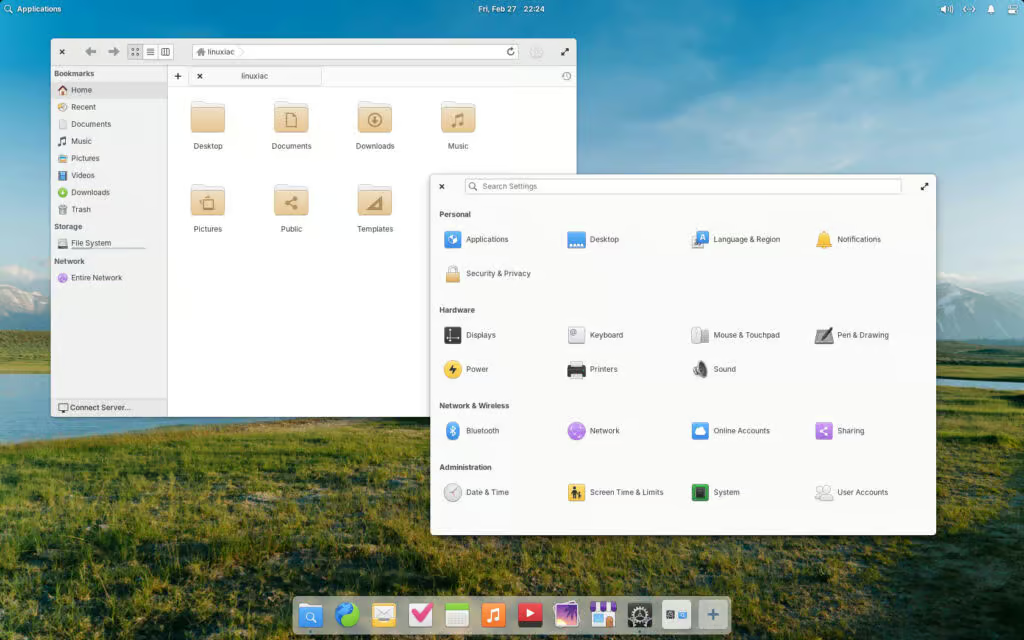
System Settings introduce new defaults and usability changes. Automatic updates are now enabled out of the box, and intrusive Wi-Fi notifications have been removed. Launchers for Multitasking View and System Settings are no longer pinned to the Dock, though both remain accessible via Quick Settings and workspace controls.
Additional customization options include selecting a default PDF viewer in the Applications settings panel. Input device support has expanded as well, with Mouse & Touchpad settings now accommodating pointing-stick devices such as TrackPoint hardware, alongside a new drag-lock option for touchpads.
Accessibility and system reliability have also been refined. Screen reader support has been improved, redundant driver notifications removed, Bluetooth status now persists more reliably across sessions, and the former Wacom settings panel has been renamed “Pen & Drawing” to better reflect broader digitizer support.
Under the hood, the update ships with the latest Hardware Enablement stack from Ubuntu, powered by Linux kernel 6.17. This brings updated Intel graphics support, improved power handling for hybrid AMD GPUs, enhanced gaming performance, and wider compatibility with ARM-based hardware.
The update is available now as a pay-what-you-can download from the project’s website, with localized images and torrent distribution options provided for convenience.
For more information, see the announcement.
add a comment

Trisquel 12.0 Releases as Ubuntu-Based Fully Free Linux Distro
Trisquel 12.0 “Ecne” has officially been released, but before diving into what’s new, it’s worth understanding what makes this distribution...

Popular macOS Network Monitor Little Snitch Arrives on Linux
Objective Development has announced that Little Snitch is being brought to Linux, introducing the popular network monitoring tool from the...

Deepin 25.1 Arrives With Linux Kernel 6.18 and New AI Features
Deepin 25.1 marks the first major update in the Deepin 25 series and is available as a fresh ISO for...

KDE Frameworks 6.25 Brings New Fixes and Developer Improvements
KDE has announced the release of Frameworks 6.25, the latest monthly update to its collection of add-on libraries for Qt...
