



80views
Microsoft’s March 2026 Microsoft Entra update brings passkey authentication to general availability, introduces a built-in tenant backup feature in public preview, and announces a breaking security change for hybrid environments scheduled for June 1, 2026. It also enforces TLS 1.2 for Entra Connect Health agents and adds new multi-tenant governance capabilities in preview. This overview highlights the key updates for administrators managing Microsoft 365 tenants and hybrid Active Directory environments.
Passkeys reach general availability
Passkeys are a modern alternative to passwords. Instead of typing a secret, you authenticate using a biometric factor (like a fingerprint or face scan) or a device PIN, while your device or password manager handles the cryptographic process in the background. Because no shared secret is entered or transmitted, passkeys are inherently resistant to phishing attacks. Microsoft Entra ID now offers two passkey variants as generally available:
- Synced passkeys are stored in a password manager (such as Apple Keychain, Google Password Manager, or 1Password) and synchronized across multiple devices belonging to the same account.
- Device-bound passkeys are locked to a specific hardware security key (such as a YubiKey) or a device’s TPM (Trusted Platform Module) chip and cannot be copied.
Both passkey types are built on the FIDO2 standard—an open specification that defines how passwordless authentication works. Because each credential is tied to the exact service domain where it was created, it cannot be reused on a phishing site pretending to be that service. In simple terms, a service domain defines the scope where a passkey is valid and allowed to authenticate.
Passkey profiles are now also generally available in Microsoft Entra ID. These profiles are admin-defined policies that control which passkey types users can use, what attestation requirements apply, and which authenticators are permitted. For example, administrators can enforce hardware-bound passkeys for privileged accounts while allowing synced passkeys for standard users. If passkeys were already configured in your tenant, those settings are automatically migrated into a default profile.
In addition, a public preview expands passkey support to Windows Hello. This feature stores credentials securely in the device’s TPM and uses biometrics or a PIN for authentication. Users can now register their Windows Hello credentials directly as an Entra passkey, eliminating the need for a separate hardware security key. During the preview phase, administrators must explicitly enable Windows Hello as a passkey provider within the passkey profile settings.
Entra Backup and Recovery (preview)
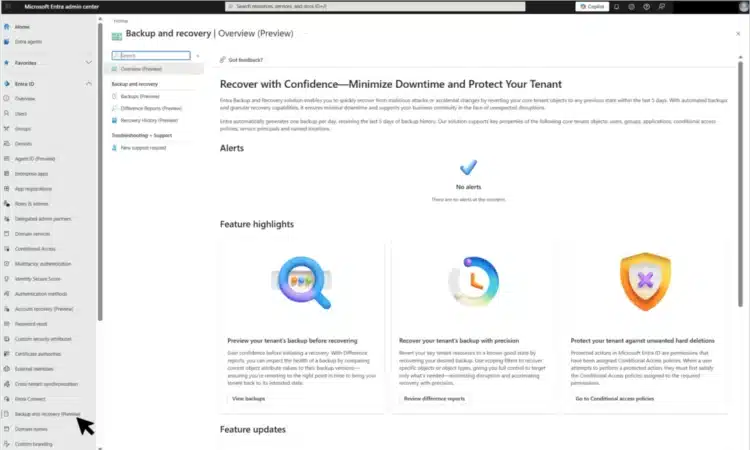
Entra Backup and Recovery is a new built-in service now available as a public preview. It automatically takes daily backups of critical directory objects without any configuration. Backed-up objects include users, groups, applications, service principals, Conditional Access policies, named locations, authentication method policy, and authorization policy.

With an Microsoft Entra ID P1 or P2 license, one backup is created daily and retained for up to five days. From the Entra admin center, administrators can browse available snapshots, generate detailed difference reports to see what changed between points in time, and initiate restore jobs to revert specific objects to a previous state.
In practice, this enables recovery of accidentally deleted users, restoration of misconfigured Conditional Access policies, and rollback of settings after a security incident. Microsoft has not yet released detailed pricing information for storage beyond the P1 or P2 licensing requirements.
Hybrid Join without waiting for sync (preview)
A new public preview in Microsoft Entra ID enables Windows devices to complete Hybrid Entra Join during provisioning, eliminating the need to wait for the next Entra Connect sync cycle. Hybrid Entra Join refers to a setup where a device is joined to both on-premises Active Directory and Entra ID at the same time. Previously, this process depended on syncing the device object from Active Directory to the cloud, which could delay Windows Autopilot deployments by up to 30 minutes.
The updated approach leverages Entra Kerberos, allowing devices to achieve Hybrid Entra Join immediately during provisioning—without requiring Entra Connect synchronization or Active Directory Federation Services. However, the device must still have network access to an on-premises domain controller running Windows Server 2025 during the join process.
Entra Connect Health requires TLS 1.2
Entra Connect Health has completed its migration to TLS 1.2 and removed support for TLS 1.1. TLS (Transport Layer Security) is the encryption protocol that secures traffic between your servers and Microsoft’s cloud services. TLS 1.1 has known cryptographic weaknesses and is considered deprecated.
Update your Entra Connect Health agents to the current version and verify that TLS 1.2 is enabled for outbound connections on the host servers. If your environment has TLS 1.2 disabled via registry settings or Group Policy, re-enable it before agent communication fails. Microsoft provides a step-by-step guide in the article.
Hard match blocked for role-holding accounts from June 2026
Starting June 1, 2026, Microsoft Entra ID will introduce a breaking security change: both Entra Connect Sync and Cloud Sync will block hard-matching a new on-premises Active Directory user to a cloud-managed account that already holds an Entra role. This is a significant update for hybrid environments.
What hard matching means:
When Microsoft Entra Connect processes a new AD user, it checks for an existing cloud account with a matching onPremisesImmutableId (also known as sourceAnchor). If a match is found, the cloud account is linked and brought under on-premises management—this is called a hard match. Typically, this attribute is automatically populated using values like objectGUID or ms-DS-ConsistencyGuid, though it can also be manually set via tools like Microsoft Graph in certain scenarios.
The security risk:
If an attacker gains write access to on-premises Active Directory, they could manipulate the sourceAnchor to match a privileged cloud account (such as a Global Administrator). This would allow them to take over that account through the sync process.
What’s changing:
From June 1, any attempt to hard match into a cloud account that already has an onPremisesImmutableId set and holds an Entra role will be blocked. Existing synchronized accounts are not impacted—only new hard match attempts are restricted.
What you should do:
Before the deadline, audit any existing hard-matched accounts used for administrative purposes. If you encounter a hard match error after enforcement, remove the Entra role from the cloud-only account, permanently delete the quarantined object, and trigger a new sync cycle to complete the process safely.
Shadow AI detection and prompt injection protection
For organizations using Microsoft Entra Internet Access (part of the Global Secure Access product), Shadow AI detection reached general availability. Shadow AI detection identifies AI applications used in your organization that have not been officially approved. Working alongside Microsoft Defender for Cloud Apps, it tracks which AI tools employees use and lets you apply Conditional Access policies to block or restrict specific applications.
add a comment


PowerShell SysAdmin Crash Course
PowerShell SysAdmin Crash Course: Unlock the Full Potential of PowerShell with Advanced Techniques, Automation, and Configuration by Steeve Lee is...
Windows App is replacing Remote Desktop: LAN support, keylogging protection, RDP Multipath, Mobile Application Management (MAM)
Microsoft is making a clear transition as Windows App replaces Remote Desktop, offering a unified experience for accessing cloud PCs,...
Introducing the new Windows 365 monitoring and reporting platform now in Public Preview
We’re excited to introduce the new Windows 365 monitoring and reporting platform, now available in public preview. This platform delivers...

Azure Devops 22.2 ISO
Azure DevOps 22.2 (that is, Azure DevOps Server 2022.2) is the latest point release in the 2022 server line, delivering new features from...




