



Windows App is replacing Remote Desktop: LAN support, keylogging protection, RDP Multipath, Mobile Application Management (MAM)
Windows App
81views
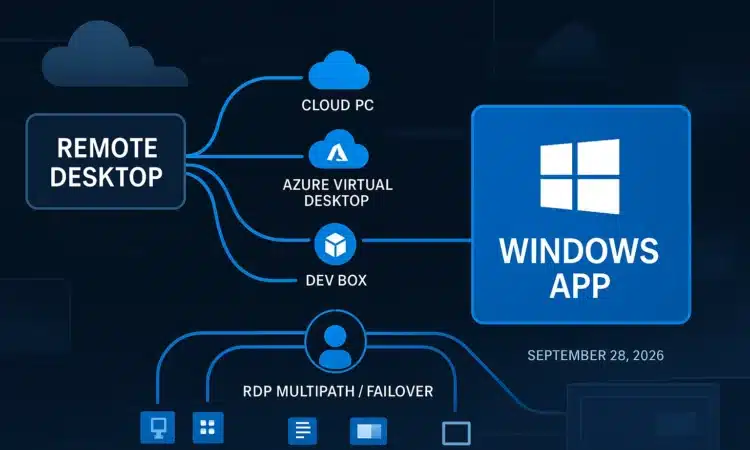
Microsoft is making a clear transition as Windows App replaces Remote Desktop, offering a unified experience for accessing cloud PCs, virtual desktops, and local machines. This shift also brings several enhancements, including LAN connectivity support, integrated keylogging protection, improved connection reliability with RDP Multipath, and more flexible Mobile Application Management (MAM) capabilities.
What is Windows App?
Microsoft released Windows App in September 2024 as the single access point for Windows 365 (Microsoft’s cloud PC subscription service), Azure Virtual Desktop (cloud-hosted virtual desktops), Microsoft Dev Box (cloud developer workstations), and Remote Desktop Services. The app was designed to replace the Remote Desktop app, which was available in the Microsoft Store. Microsoft formally announced the retirement of the Store-based app on March 10, 2025. It was removed from the Store on May 27, 2025, and connections to cloud services such as Windows 365 and Azure Virtual Desktop via the old app were blocked starting September 30, 2025.
The transition also extends to the standalone MSI-based Remote Desktop client, commonly used by IT teams to deploy remote access outside the Microsoft Store. Support for this client in commercial cloud environments ended on March 27, 2026, while organizations using Azure Government or Azure 21Vianet have support until September 28, 2026.
With Windows App, five previously separate connection methods are now unified into a single experience: Windows 365 Cloud PCs, Azure Virtual Desktop sessions, Microsoft Dev Box environments, Remote Desktop Services (on-premises or hosted Windows Server sessions), and direct connections to individual remote PCs. IT administrators can deploy Windows App via the Microsoft Store or distribute it to managed devices using Intune, Microsoft’s cloud-based device management platform.
Reliability: RDP Multipath
RDP (Remote Desktop Protocol) is the technology that transmits screen visuals, keyboard input, and audio between your device and a remote system. In environments with unstable Wi-Fi or when switching between networks, RDP sessions can disconnect, requiring users to reconnect from scratch.
RDP Multipath addresses this by establishing multiple parallel network connections using UDP, a lightweight and low-overhead transport protocol. If one connection drops, the session seamlessly switches to another without interruption. To use RDP Multipath, RDP Shortpath must be configured first, enabling a direct UDP connection to the session host and bypassing intermediate TCP relay servers.
This feature requires Windows App version 2.0.559.0 or later. The necessary ports are UDP 3390 for private networks, UDP 3478 for public networks, and TCP 443 as a fallback option. Note that the browser-based web client does not currently support Multipath.
LAN support
When the Store-based Remote Desktop app was retired in May 2025, Windows App still could not connect to PCs on the same local network, even though Windows App itself had become generally available in September 2024.
This caused organizations to keep mstsc.exe as a workaround. That gap is now closed. Remote PC connections are available in preview on Windows, including for personal accounts not linked to a work or school account.
Keylogging protection
Keyboard input protection is a client-side feature designed to reduce exposure to keylogging (malicious software recording every keystroke on the local device) and keystroke injection attacks during remote sessions. You enable it via Group Policy:
Computer Configuration > Administrative Templates > Windows Components > Remote Desktop Services > Remote Desktop Session Host > Azure Virtual Desktop > Enable Keyboard Input Protection
Or configure it through Remote Desktop Properties for both Windows 365 and Azure Virtual Desktop.
This feature is currently in public preview for Windows 365 Cloud PCs and Azure Virtual Desktop and is not yet generally available.
Mobile Application Management (MAM)
Mobile Application Management (MAM) allows organizations to apply security policies to individual apps on a user’s personal device without requiring full device enrollment. This differs from Mobile Device Management (MDM), which gives IT control over the entire device.
Using Intune App Protection Policies, administrators can limit clipboard sharing between the remote session and personal apps, enforce antivirus compliance, and block data from being copied to unauthorized locations. This makes MAM especially useful for BYOD (bring-your-own-device) scenarios, where users may not want—or be able—to enroll their personal devices in full management.
Productivity improvements
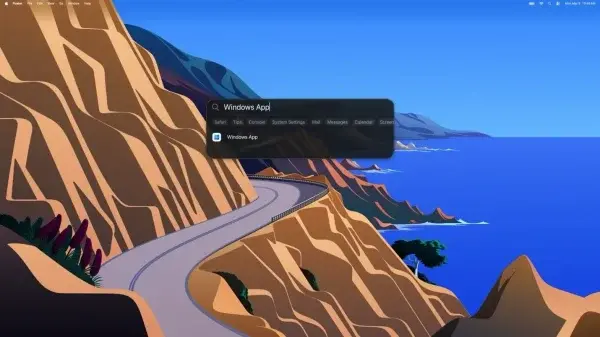
You can now launch remote sessions directly from the Windows Start menu. On macOS and iOS, sessions appear in Spotlight search results. On macOS, the Option+Tab application switcher has been updated so remote apps appear alongside local apps in a consistent order, and sessions are also accessible from the macOS Dock and Window menu.
The browser-based version of Windows App now supports a split-screen layout, where two virtual monitors appear side by side in a single browser tab—useful for a dual-monitor experience without a second physical screen.
Clipboard-based file transfer is also available in the browser version: you can copy a file on your local device and paste it inside the remote session without mapping a drive or using a separate file-transfer tool.
add a comment


PowerShell SysAdmin Crash Course
PowerShell SysAdmin Crash Course: Unlock the Full Potential of PowerShell with Advanced Techniques, Automation, and Configuration by Steeve Lee is...
Microsoft Entra March 2026: Passkeys GA, backup preview
Microsoft’s March 2026 Microsoft Entra update brings passkey authentication to general availability, introduces a built-in tenant backup feature in public...
Introducing the new Windows 365 monitoring and reporting platform now in Public Preview
We’re excited to introduce the new Windows 365 monitoring and reporting platform, now available in public preview. This platform delivers...
Azure Devops 22.2 ISO
Azure DevOps 22.2 (that is, Azure DevOps Server 2022.2) is the latest point release in the 2022 server line, delivering new features from...




