Physical Address
304 North Cardinal St.
Dorchester Center, MA 02124
Physical Address
304 North Cardinal St.
Dorchester Center, MA 02124

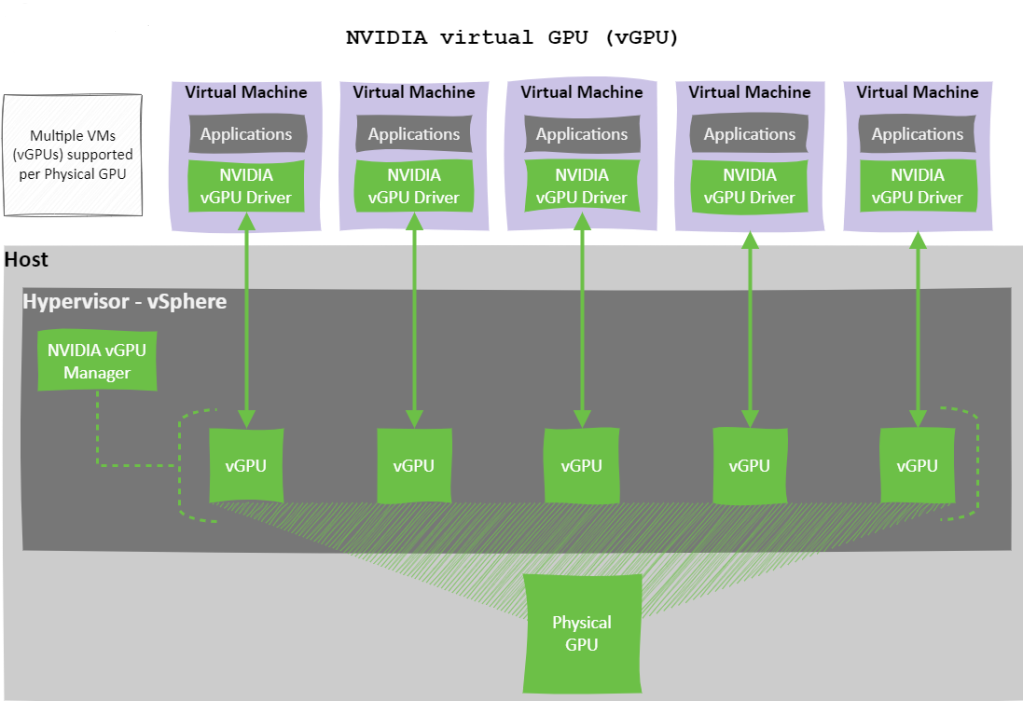
GPUs are often the priciest components in today’s server infrastructure especially when powering AI, machine learning, or demanding graphics workloads. Because of this, it’s essential to maximise their usage to get the best return on your investment.
Often, a single workload doesn’t fully utilise the capacity of a physical GPU (pGPU). Instead of letting that valuable compute power go to waste, NVIDIA vGPU technology allows you to split one pGPU across multiple virtual machines (VMs), improving consolidation, boosting efficiency, and reducing costs.
However, when sharing a GPU, how you partition and schedule access between virtual GPUs (vGPUs) directly impacts performance, user experience, and workload fairness.
In this blog post, we’ll explore NVIDIA’s Time-Slicing approach—one of two native GPU partitioning methods —with a deep dive into the three supported Scheduling Policies and how time-slice duration can be tuned to align with specific workload characteristics.
NVIDIA offers two native methods for partitioning a GPU:
This post will focus on Time-Slicing, how it works, and the different scheduling policies available.
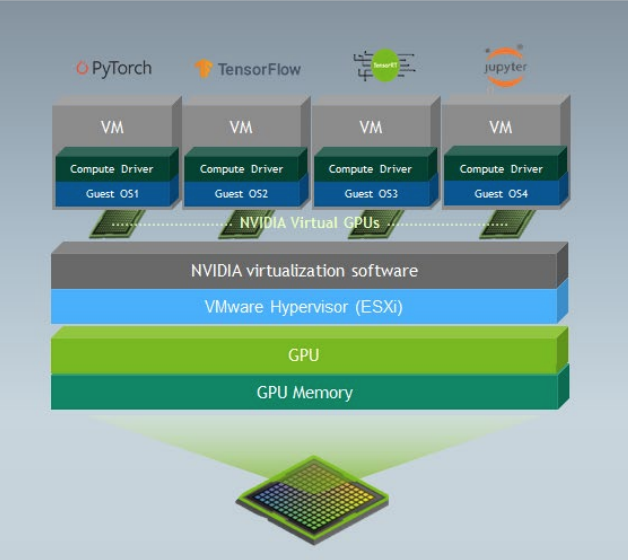
Time-slicing is a software-based technique that allows GPU compute resources to be shared across multiple virtual GPUs (vGPUs). With time-slicing, a physical GPU can only execute one vGPU task at a time. The GPU scheduler assigns each vGPU a slice of time in which it can execute, with other vGPUs waiting in a queue for their turn.
This sequential processing means that performance can vary depending on how time slices are allocated and how busy each vGPU is.
NVIDIA vGPU offers three Time-Slicing Scheduling Policies that determine how GPU compute resources are shared among virtual GPUs (vGPUs) on a physical GPU (pGPU). Understanding these policies is crucial for ensuring performance, fairness, and efficient utilisation in virtualised GPU environments.
The three scheduling policies are:
Each policy is detailed below.
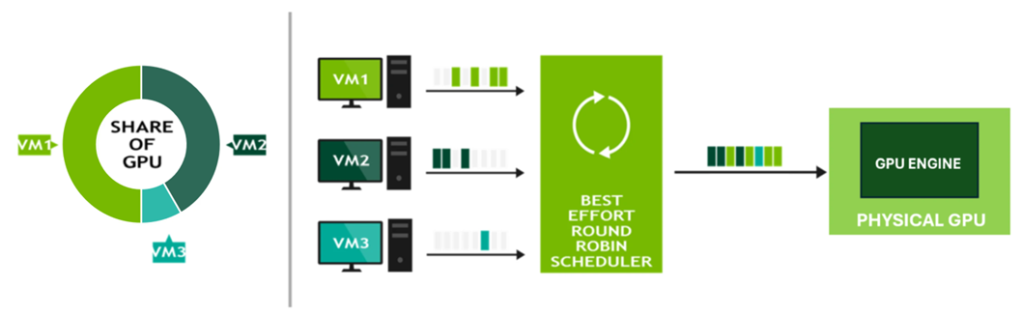
Best Effort is the default scheduling policy and uses a round-robin approach to distribute pGPU resources based on real-time demand. It aims to maximise GPU utilisation by allowing vGPUs to consume any available compute cycles when others are idle.
However, this policy can suffer from the “noisy neighbour” problem, where a single vGPU may dominate GPU resources, leading to performance degradation for other workloads.
Key Characteristics:
Illustration:
The diagram below illustrates that none of the virtual machines vGPUs have fixed GPU allocations, allowing each vGPU to consume anywhere from 0% to 100% of the pGPU’s compute capacity, depending on real-time demand.
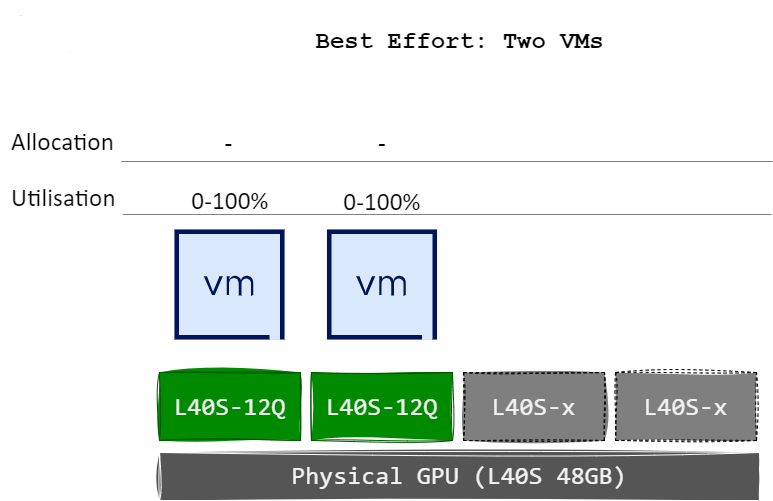
This behaviour remains unchanged even when an additional VMs or vGPUs are assigned to the pGPU.
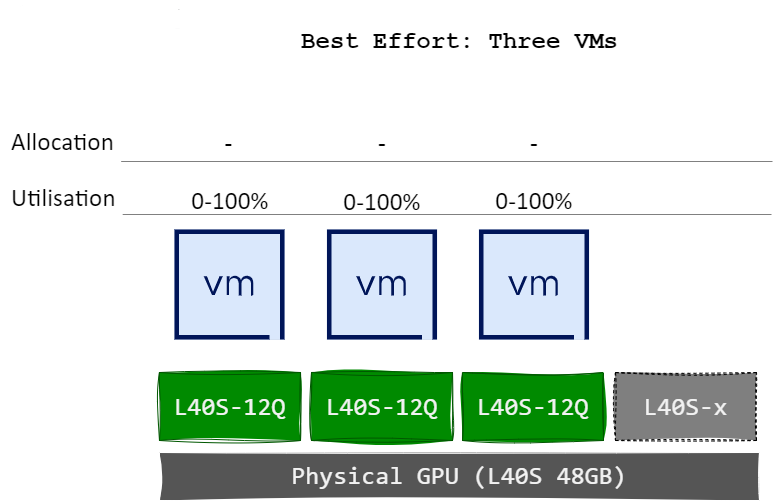
The diagram below illustrates a scenario in which the physical GPU is fully utilised; however, the distribution of compute resources between vGPUs and their respective virtual machines is unbalanced.
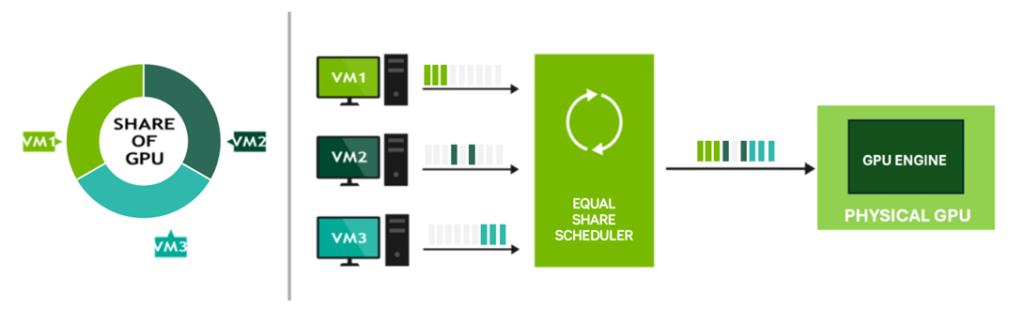
Equal Share ensures fairness by dividing GPU compute resources equally among all active vGPUs on a pGPU. As new vGPUs are added or removed, the system recalculates allocations to maintain equal distribution.
While this method avoids resource starvation and the “noisy neighbour” issue, performance can vary depending on the number of active vGPUs, as each receives a smaller share with increased utilisation.
Key Characteristics:
Illustration:
The diagram below illustrates how each virtual machines vGPUs receives an equal allocation of the pGPU’s compute capacity. When two VM/vGPUs are active, each is assigned 50% of the pGPU’s resources.
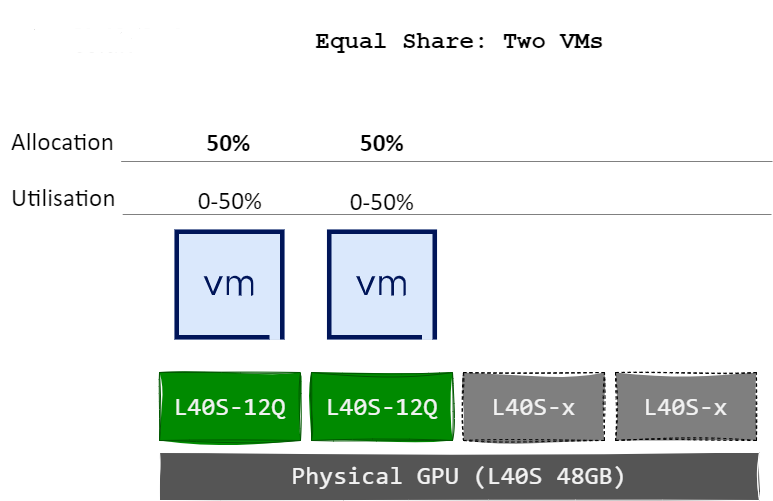
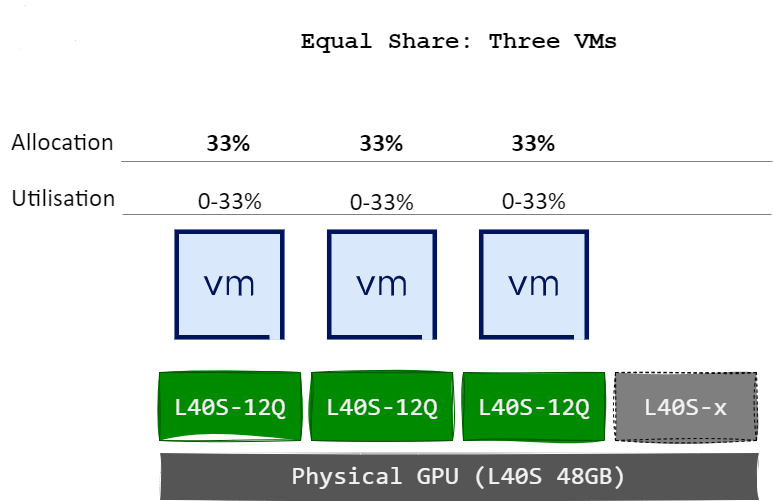
Upon the assignment of a third VM/vGPU to the same pGPU, the allocation is automatically recalculated, resulting in 33% of compute capacity being allocated to each vGPU.
The diagram below illustrates a scenario in which compute resources are allocated equally among the active vGPUs assigned to the pGPU. If a virtual machine does not fully utilise its vGPU allocation, due to inactivity or low demand, idle time is introduced on the pGPU, resulting in underutilisation. However, this scheduling policy avoids the “noisy neighbour” effect, as all vGPUs are guaranteed an equal share of pGPU compute resources regardless of workload intensity.
Fixed Share allocates GPU resources based on the vRAM size of the first vGPU profile assigned to a pGPU. The compute resources are divided into fixed slices, based on the max number of those profiles that will fit on the pGPU, each corresponding to the proportion of total vRAM allocated by the vGPU profile.
This approach provides deterministic and consistent performance, making it well-suited for performance-sensitive workloads that require predictable behaviour.
Key Characteristics:
Illustration:
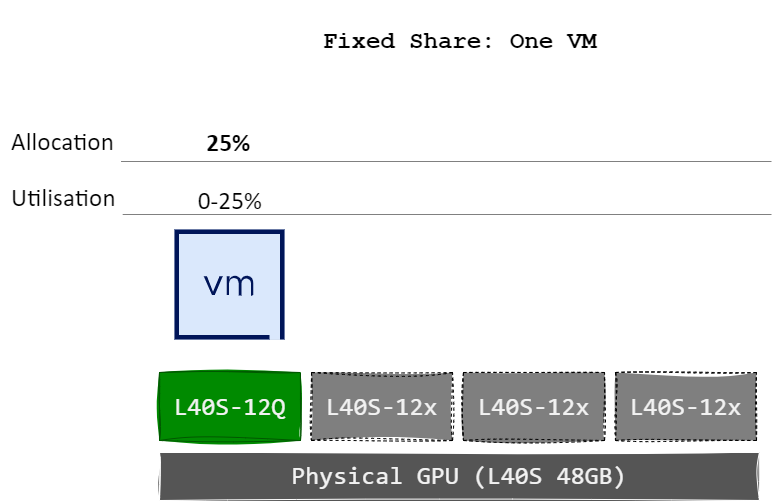
The diagram below illustrates how each virtual machines vGPUs receives a fixed allocation of the pGPU’s compute capacity based on the defined slice size. For example, when a single vGPU/VM is assigned a 12 GB profile on an NVIDIA L40S GPU (which has 48 GB of total vRAM), it is allocated 25% of the pGPU’s compute capability. This is because the 48 GB GPU can accommodate a maximum of four 12 GB vGPU profiles – dividing the GPU into four equal slices of 25% each.
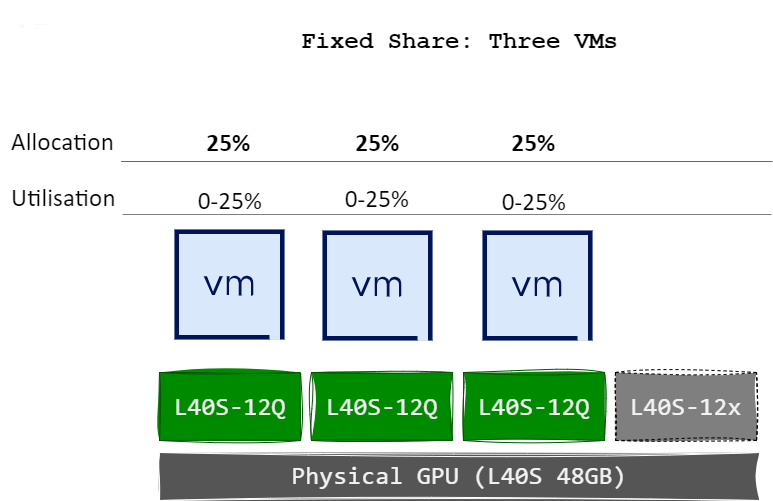
When two more vGPUs/VMs are assigned (has to use the same profile), it is also allocated 25% of the GPU’s compute resources, maintaining consistent performance allocation.
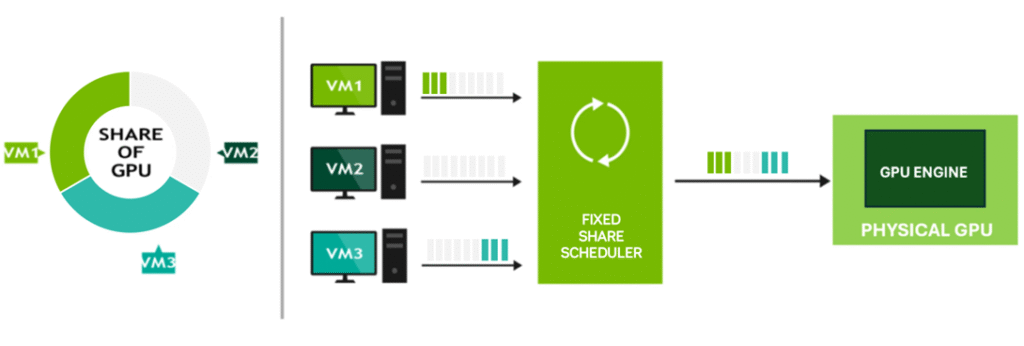
The diagram below illustrates a scenario where compute resources are allocated equally between vGPUs. If a virtual machine does not fully consume its vGPU allocation, either because it is powered off or not actively utilising GPU compute, idle time occurs on the pGPU, resulting in underutilisation. However, this scheduling policy avoids the “noisy neighbour” effect, as each vGPU is guaranteed a fixed share of the pGPU’s resources, regardless of other workloads.
Both the Equal Share and Fixed Share policies support configuration of the time-slice duration—the length of time a vGPU is scheduled to run before the next vGPU takes over.
There are two time-slicing approaches:
In this mode, two parameters control scheduling:
When disabled, scheduling is controlled via the Time Slice Length, defined in milliseconds. This specifies how long each vGPU can execute before the next is scheduled.
| Workload Type | Suggested Time Slice |
|---|---|
| Latency-sensitive (e.g. graphics) | Shorter time slice for improved responsiveness |
| Throughput-optimised (e.g. AI, ML) | Longer time slice to reduce context switching overhead |
Effective GPU resource management is essential in virtualised environments, especially when aiming to maximise performance and return on investment. NVIDIA’s Time-Slicing Scheduling Policies—Best Effort, Equal Share, and Fixed Share—each offer distinct advantages depending on your workload requirements and infrastructure goals.
Understanding how these policies operate—and how to fine-tune time-slice durations—empowers you to optimise GPU usage, minimise contention, and deliver consistent performance across all virtualised workloads.
As GPU demand continues to grow, selecting the right scheduling policy is key to maintaining both efficiency and user experience in your environment.