





112views
Users of KDE Plasma who prefer a more visually oriented method of launching applications now have a new tool to explore. A recently introduced project called AppGrid provides a fullscreen, grid-based application launcher designed specifically for KDE Plasma 6. It offers a modern alternative to the traditional Plasma application menus such as Kickoff and Kicker.
Unlike the typical category-based menu layout, AppGrid organizes installed applications in a large grid that spans the entire screen. This design emphasizes a more visual browsing experience and is influenced by launchers used in other desktop environments, including macOS Launchpad, COSMIC Desktop, and Pantheon Desktop from elementary OS.
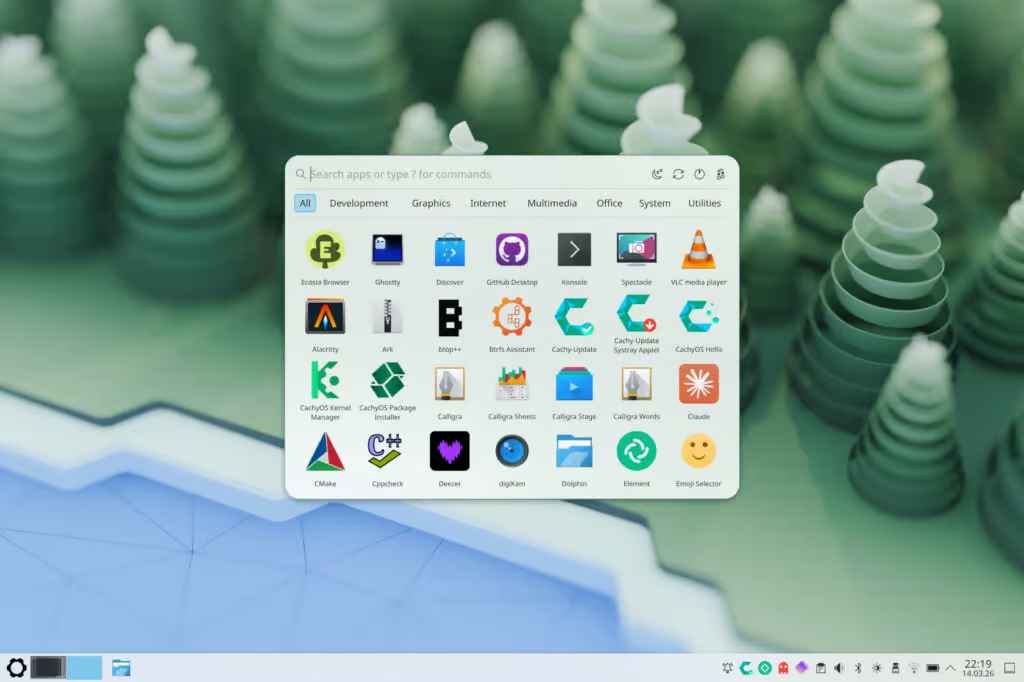
AppGrid integrates smoothly with Plasma’s existing panel system and can replace the default application launcher if desired. Users can activate it by selecting the “Show Alternatives” option from the panel menu, allowing AppGrid to take the place normally occupied by the standard launcher.
To improve usability, the launcher includes multiple ways to organize and find applications. Programs can be arranged alphabetically or sorted based on usage frequency, and category filters help users browse large collections of installed software. A built-in search function also allows quick access to applications by typing their names.
The launcher provides additional shortcuts for common tasks. Users can quickly open the terminal, run shell commands, or launch the file manager directly from the interface. System session controls—such as shutdown, restart, suspend, logout, and screen locking—are also available within the launcher.
Customization is another key aspect of AppGrid. Users can adjust settings such as grid dimensions, icon size, transparency levels, blur effects, and corner rounding to better match their desktop appearance.
Keyboard interaction is also supported. The launcher can be opened using the Super key, search results can be triggered using numbered shortcuts, and arrow keys allow navigation through the grid.
Although the project is still relatively new, installation packages are already available for several Linux distributions. Arch Linux users can install it through the Arch User Repository, while prebuilt packages are available for Fedora Linux, Debian, and recent Ubuntu releases.
More details about the project, along with installation instructions and source code, can be found on its repository hosted on GitHub. AppGrid is specifically built for KDE Plasma 6 and relies on Qt 6 and KDE Frameworks 6 components.
add a comment


How to Set Up Automated Incremental Backups with rsync and Cron on Linux
Data loss is one of the most disruptive events a system administrator or Linux user can experience. Hard drives fail....

How to Automate Daily Linux Health Checks with a Bash Script + Cron
Introduction Every Linux server runs silently in the background, accumulating usage, filling disks, crashing services, and building up memory pressure...

Pangolin 1.17 Tunneled Reverse Proxy Adds Multiple Roles per User
Pangolin an open-source, self-hosted identity-based remote access platform that blends a tunneled reverse proxy with zero-trust VPN-style access has released...

Pidgin 3.0 Messaging Client Moves from Experimental Build to Alpha
Pidgin—the classic messaging client many users still remember—is very much alive. More than a year after its first experimental 3.0...




