




125views
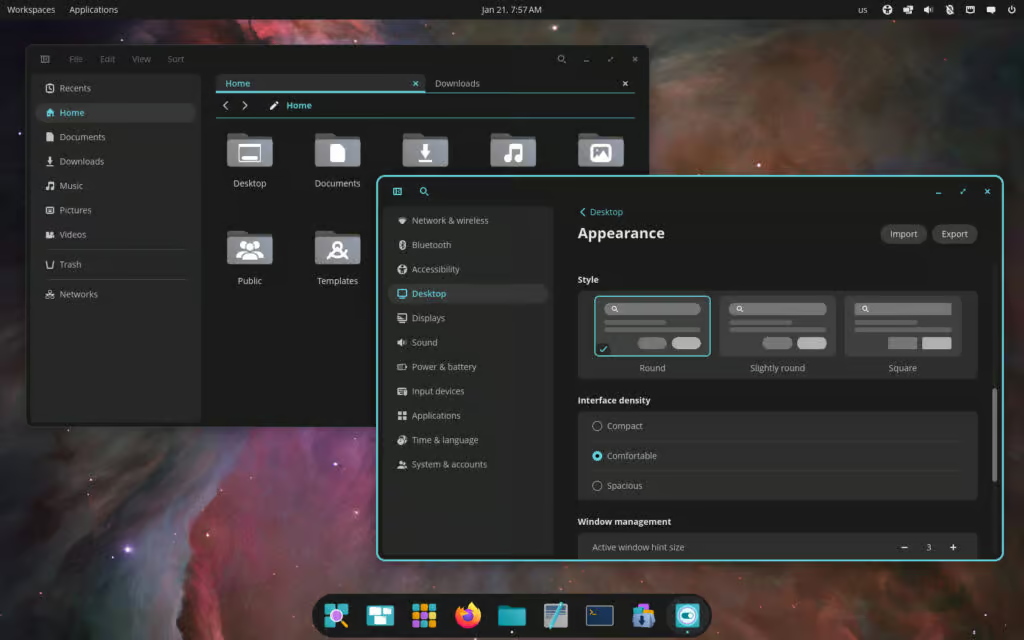
It’s been just over a month since System76 dropped the first stable COSMIC desktop (Epoch 1.0) with Pop!_OS 24.04 LTS on December 11, 2025. The Rust-based environment has been receiving rapid point releases, and hot on the heels of the recent addition of system-wide rounded corners and window shadows (now configurable under Settings > Appearance > Experimental Settings > Window shadow and corners, applying consistently across GTK, Qt, Iced, and native apps), version 1.0.3 landed on January 20, 2026.
This update focuses on usability tweaks, bug fixes, better multi-tasking in core apps, and improved reliability especially welcome for early adopters on Pop!_OS and users pulling it from rolling distros.
Standout Changes in COSMIC 1.0.3
COSMIC Files (File Manager) Gets Real Workflow Love
- Easier multi-directory workflows: Open multiple folders as separate tabs more smoothly.
- New “Open” button in the multi-preview pane for quicker access when previewing several items.
- Refined Shift-click selection now properly includes hidden files (fixing a previous annoyance when selecting ranges).
- Handy new feature: Copy file timestamps — super useful for backups, rsync, or any sync setup where preserving modification/access times matters.
Other App & Component Polish
- COSMIC Notifications: Cleaned up logging for better debugging.
- COSMIC Player: Auto-mutes audio during thumbnail generation—no more surprise sounds while browsing your media library.
- COSMIC Settings: Added fallback to save network passwords at the system level if the secret agent (e.g., gnome-keyring) channel fails.
- New CLI option to apply RON theme files directly (great for scripting or quick theme switches).
- COSMIC Terminal: More secure handling of passwords in memory (careful loading/clearing when toggling the passwords page).
System-Level & Integration Fixes
- xdg-desktop-portal-cosmic: No longer crashes/aborts without dma-buf support—better compatibility on varied hardware (including older GPUs).
- Sets proper PipeWire data flags for memfd, which should fix or improve screen casting/recording in apps like OBS Studio.
- Rectangle selection in portal configs now saves only after drag completes (prevents partial/invalid saves).
- Compatibility enhancements for Nix flake setups and other declarative environments.
- Updated translations across the entire COSMIC suite.
These changes build on COSMIC’s strengths: lightweight performance, beautiful tiling window management, and a modern look without the bloat of older DEs. With rapid iteration like this, it’s clear System76 is committed to making COSMIC a serious contender against GNOME and KDE.
How to Get COSMIC 1.0.3
- Pop!_OS 24.04 LTS users: The update is already rolling out—just run your regular system update (e.g., via Pop!_Shop or sudo apt update && sudo apt upgrade).
- Rolling-release distros (Arch Linux, openSUSE Tumbleweed, Fedora, NixOS, CachyOS, Serpent OS, etc.): Packages are being prepared and should hit repos in the coming days.
- For bleeding-edge or manual builds: Check the main repo at https://github.com/pop-os/cosmic-epoch (full changelog in the epoch-1.0.3 release tag).
If you’re on Pop!_OS or curious about a fresh Rust-written desktop that’s fast, consistent, and actively developed, now’s a great time to jump in. COSMIC feels more refined with every point release.
add a comment


8 Ubuntu Terminal Tools You Must Master in 2026
Introduction1. micro — The Terminal Editor With Zero Learning Curve2. Neovim — IDE-Level Terminal Editing When You Are Ready3. tmux...
Canonical Plans Controversial GRUB Changes for Ubuntu 26.10 Secure Boot
Canonical is considering a significant overhaul to how Secure Boot works in Ubuntu 26.10, with a proposal aimed at reducing...
Tails 7.6 Introduces Automatic Tor Bridges to Bypass Censorship
Tails 7.6 has been released, bringing a new update to the privacy-focused Linux distribution that routes all internet traffic through...
LibreOffice 26.2.2 Released With Over 100 Bug Fixes Across Writer, Calc, and Impress
The Document Foundation has rolled out LibreOffice 26.2.2, marking the second maintenance release in the 26.2 series that debuted earlier...




