




88views
vmorecloud.com · azure fundamentals
Creating & Adding an Azure Subscription to Azure AD
Learn how subscriptions connect to Azure Active Directory, why the trust relationship matters, and how to spin up a new subscription in minutes.
N:1
Subscriptions
per Directory
per Directory
1:1
Directory
per Subscription
per Subscription
∞
Resources
per Subscription
per Subscription
Foundation
What Is an Azure Subscription?
An Azure subscription is the logical entity that gives you entitlement to deploy, consume, and be billed for Azure resources. Think of it as the contract between you and Microsoft Azure.
Logical Boundary
A subscription acts as a logical container for all the Azure resources you deploy — VMs, databases, storage accounts, and more. Every resource lives inside exactly one subscription.
Trust Relationship with Azure AD
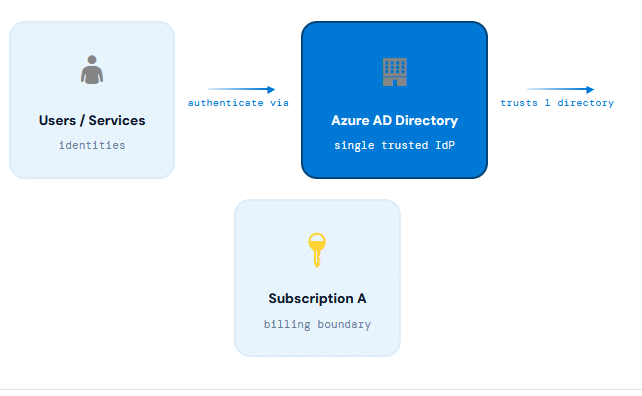
Every subscription trusts exactly one Azure AD directory to authenticate its users, services, and devices. This is a one-to-one relationship: one subscription, one trusted directory.
Pricing & Billing
Each subscription has a pricing model (Pay-As-You-Go, EA, CSP, etc.). You must attach a payment method to create or use Azure services under that subscription.
Many-to-One Directory
Multiple subscriptions can all trust the same Azure AD directory — giving one organization a single identity plane across many billing boundaries.
Expiry Behavior
If your subscription expires, you lose access to all associated resources. However, your Azure AD directory itself persists and can be managed by a different subscription.
Architecture
The Trust Relationship Visualized
Understanding the relationship between subscriptions, directories, and resources is the foundation of Azure governance.
Azure Subscription ↔ Azure AD Directory Trust Model
Users / Services
identities
authenticate via
Azure AD Directory
single trusted IdP
trusts 1 directory
Subscription A
billing boundary
MULTIPLE SUBSCRIPTIONS → ONE DIRECTORY (ALLOWED)
Sub A
Sub B
Sub C
→
Single Azure AD
contoso.onmicrosoft.com
contoso.onmicrosoft.com
ONE SUBSCRIPTION → MULTIPLE DIRECTORIES (NOT ALLOWED ✗)
Sub A
→
Directory X
Directory Y
🚫 Not
Possible
Possible
Key Takeaway
A subscription can only trust one directory, but a directory can be trusted by many subscriptions. This asymmetry is fundamental to Azure governance design — organize your subscriptions per billing or environment boundary, all pointing at a single corporate directory.
Subscription Offerings
Choose the Right Subscription Type
Azure offers multiple subscription types to match different organizational needs, budgets, and use cases. Each comes with its own pricing model and service availability.
Free
Free Trial
$200 credit for 30 days plus 12 months of popular free services. Ideal for learning, experimentation, and proof-of-concept builds without any upfront commitment.
Flexible
Pay-As-You-Go
Pay only for what you use, billed monthly. No upfront costs, no termination fees. The most flexible option for startups and development workloads.
Enterprise
Enterprise Agreement
Volume licensing for large organizations committing to a minimum spend over 3 years. Significant discounts and centralized billing management.
Partner
CSP (Cloud Solution Provider)
Purchased through a Microsoft partner who manages billing and support. Great for SMBs that want managed Azure services with expert guidance.
Education
Azure for Students
$100 credit for 12 months, no credit card required. Free for verified students. Access to popular Azure services for academic projects and coursework.
Step-by-Step Guide
How to Create a New Subscription
Creating a new Azure subscription and associating it with your Azure AD directory takes only a few minutes in the Azure Portal.
1
🔐 Log In with the Right Permissions
Sign in to the Azure Portal (portal.azure.com) using an account with Global Administrator or Owner permission on the target tenant. Without these roles, the subscription creation option will not be available.
portal.azure.com
2
🏢 Select Your Target Tenant
Use the tenant/directory switcher in the top-right corner of the Azure Portal to ensure you’re operating under the correct Azure AD tenant. The new subscription will be associated with this directory.
Directory Switcher → Switch Directory
3
🔍 Search for “Subscriptions”
In the Azure Portal search bar at the top, type Subscriptions and select the Subscriptions service from the results. This opens the subscription management blade showing all your existing subscriptions.
Search Bar → “Subscriptions”
4
➕ Click “+ Add”
Click the + Add button in the Subscriptions blade. This action opens a new browser tab or window, redirecting you to the Azure subscription creation portal where you can browse available offers.
Subscriptions Blade → + Add
5
🛒 Select a Subscription Offering Type
The subscription creation page displays all available offers — Free Trial, Pay-As-You-Go, Enterprise Agreement, CSP, and more. Select the type that matches your requirements and budget. Each offering has different pricing models and service availability.
Choose: Free / PAYG / EA / CSP / Student
6
💳 Enter Payment Details & Agreements
Fill in your payment method details (credit card, invoice, or partner billing). Read and accept the subscription agreements and terms of service. Different subscription types may show different agreement screens based on your offer selection.
Payment → Agreements → Fill Details
✓
🚀 Activate Your Subscription
Click Activate to activate the subscription and service plan. Within a few moments, your new subscription will appear in the Azure Portal under your Azure AD directory, ready for resource deployment.
✅ Subscription Active
Activation Flow
The Subscription Activation Pipeline
Select Offer
Free / PAYG / EA
Payment Mode
Card / Invoice
Accept Terms
SLA & Agreements
Activate
Click Activate
Live!
Resources ready
Things to Know
Critical Rules & Behaviors
Before you move or reassign subscriptions, understand these behaviors that catch many Azure administrators off guard.
AD Directory Outlives the Subscription
If your Azure subscription expires, all resource access is lost — but the Azure AD directory itself remains intact. You can associate that same directory with a new or different subscription to regain management access.
Moving Subscriptions Removes RBAC
When you transfer a subscription to a different Azure AD directory, all users who had RBAC role assignments immediately lose their access. Roles must be manually reassigned after the directory transfer.
Policies Are Removed on Directory Transfer
Any Azure Policy assignments applied to the subscription are also removed when it is moved to a different directory. Policies must be re-applied and re-evaluated in the new directory context.
One Directory Per Subscription
Each subscription can only trust a single Azure AD directory at any given time. However, multiple subscriptions can all point to the same directory — enabling centralized identity management across billing boundaries.
Before Moving a Subscription to Another Directory
Always document and export all RBAC role assignments and Azure Policy definitions before transferring a subscription to a new directory. These are not automatically migrated and must be manually recreated post-transfer.
Expired Subscription Warning
Microsoft will attempt to contact you before disabling an expired subscription, but resources enter a “disabled” state quickly. Ensure billing information is always current to avoid unexpected access loss to production workloads.
Summary
Key Takeaways
Azure subscriptions are the billing and entitlement backbone of your Azure environment. Understanding how they relate to Azure AD directories — and what happens when you move or expire them — is foundational knowledge every Azure administrator and architect must have.
🔑
Trust is 1:1
One subscription trusts exactly one Azure AD directory. Cannot be changed without full reassignment.
💳
Payment Required
All subscriptions except Free Trial require a valid payment method before resources can be created.
🛡️
AD Persists
Expired subscriptions don’t delete Azure AD. The directory always outlives the subscription.



Microsoft AZ-801 Study Guide: Complete Preparation for Windows Server Hybrid Advanced Services
If you're planning to take the Microsoft AZ-801 exam, you’re entering the advanced stage of Windows Server hybrid administration. This...
Microsoft 365 Backup: Delegate Administration & Configure Billing Policies
Introduction Data protection at enterprise scale is no longer a monolithic IT responsibility. As organizations grow — spanning multiple departments, regions, subsidiaries, and business units — the need to decentralize backup management while maintaining centralized governance has become one of the most pressing demands in Microsoft 365 administration. On March 2, 2026, Microsoft announced the general availability of departmental billing for Microsoft 365 Backup, a major enhancement that directly addresses this challenge. The new capability introduces three fundamental improvements to the backup management experience: granular billing scoping across Azure subscriptions,...

KDE Introduces KIO S3 for Native Amazon S3 Storage Access
The KDE Project has announced KIO S3, a new component that introduces built-in access to Amazon’s S3 storage service and...




