Physical Address
304 North Cardinal St.
Dorchester Center, MA 02124
Physical Address
304 North Cardinal St.
Dorchester Center, MA 02124

You’re sitting in your favorite coffee shop, laptop open, ready to deploy your application to the cloud. But wait – where exactly in the world should your application live? Should it be in the bustling data centers of North Virginia, the tech hubs of Tokyo, or perhaps the growing cloud infrastructure of Mumbai?
Welcome to one of the most crucial decisions in your Azure journey – understanding and leveraging Azure Regions and Availability Zones. Today, we’re going to demystify this fundamental concept that can make or break your cloud strategy.
Let me start with a story that perfectly illustrates why regions matter. Imagine you’re running an e-commerce platform. Your customers in Sydney are experiencing 3-second load times because your application is hosted in a data center in Virginia – that’s over 15,000 kilometers away! Meanwhile, your European customers are having a completely different experience with sub-second load times from your London-based deployment.
Azure Regions are geographically distributed locations around the world where Microsoft has established clusters of data centers. Think of them as Microsoft’s global neighborhoods, each designed to serve specific geographic areas with optimal performance and compliance.
Microsoft Azure currently operates in 60+ regions across 140+ countries – more than any other cloud provider. But here’s what makes this impressive: it’s not just about quantity; it’s about strategic placement.
Each Azure region consists of:
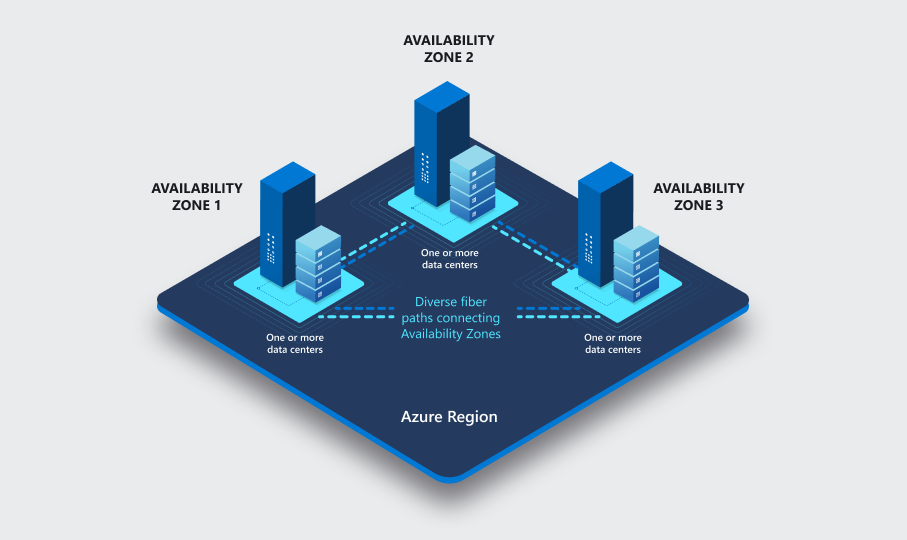
Within a single region, Microsoft provides Availability Zones (AZs). An AZ is a physically separate data center with its own power, cooling, and networking.
✅ Tip: Use zone-redundant services (like Azure SQL Database, Azure Storage, or Virtual Machines) to automatically replicate across multiple AZs.
| Feature | Azure Region | Availability Zone |
|---|---|---|
| Definition | Geographic area containing multiple data centers | Physically separate data centers within a region |
| Purpose | Location choice, compliance, and latency | High availability and fault tolerance |
| Example | East US, West Europe | Zone 1, Zone 2, Zone 3 within East US |
| Resilience | Region pairs for disaster recovery | Redundancy within the same region |
Here’s how Microsoft designed AZs to be your ultimate reliability partner:
Let me share a real-world architecture pattern that I recommend to my mentees:
The Three-Tier Resilient Web Application:
This setup ensures that even if an entire availability zone goes offline (power outage, natural disaster, maintenance), your application continues running seamlessly.
Selecting the right Azure Region is more than just picking the closest data center — it’s a strategic decision that directly impacts performance, compliance, cost, and resilience. Below are the key factors to consider when making your choice:
Choose a region geographically close to your customers or employees. This minimizes network latency, ensuring faster application response times.
Certain industries and countries have strict data residency and regulatory requirements. Azure provides region-specific compliance certifications to help organizations meet legal obligations.
Not all regions have the same pricing. Resource costs can vary slightly depending on the location, so balancing cost with performance is essential.
If high availability is critical, ensure the chosen region supports Availability Zones. Not every region offers this capability.
Leverage paired regions for business continuity. Each Azure region is paired with another to provide geo-redundant storage and cross-region replication options.
Let me share some advanced architectural patterns that showcase the true power of Azure’s global infrastructure:
Traffic Manager (Global DNS)
├── Primary Region (East US 2)
│   ├── App Service (Zone-redundant)
│   ├── Azure SQL (Zone-redundant)
│   └── Redis Cache (Zone-redundant)
└── Secondary Region (West Europe)
    ├── App Service (Zone-redundant)
    ├── Azure SQL (Geo-replicated)
    └── Redis Cache (Geo-replicated)
Understanding Azure regions and availability zones isn’t just about technical knowledge – it’s about building resilient, performant, and compliant applications that can serve users anywhere in the world.
Remember, the cloud isn’t just about moving your applications from on-premises to online; it’s about reimagining how you deliver value to your users globally. Every region selection, every availability zone configuration, every architectural decision brings you closer to that goal.