



17views

The Budgie Desktop project has unveiled Budgie 10.10.2, the second maintenance release in the 10.10 series, introducing several noteworthy updates.
A standout feature is the integration of the Labwc bridge, which connects Budgie Desktop with the Labwc Wayland compositor. This allows users to configure window decoration themes directly from the Budgie Desktop Settings, offering independent customization of window decorations.
The update also revamps keyboard and locale management. The bridge now relies on the freedesktop locale1 interface from systemd-localed as the main source for keyboard layout configuration. If this is unavailable, the system defaults to /etc/default/keyboard or switches to a US layout if needed. Another significant change is that the environment configuration file is no longer overwritten with every login, ensuring that user adjustments remain intact between sessions.
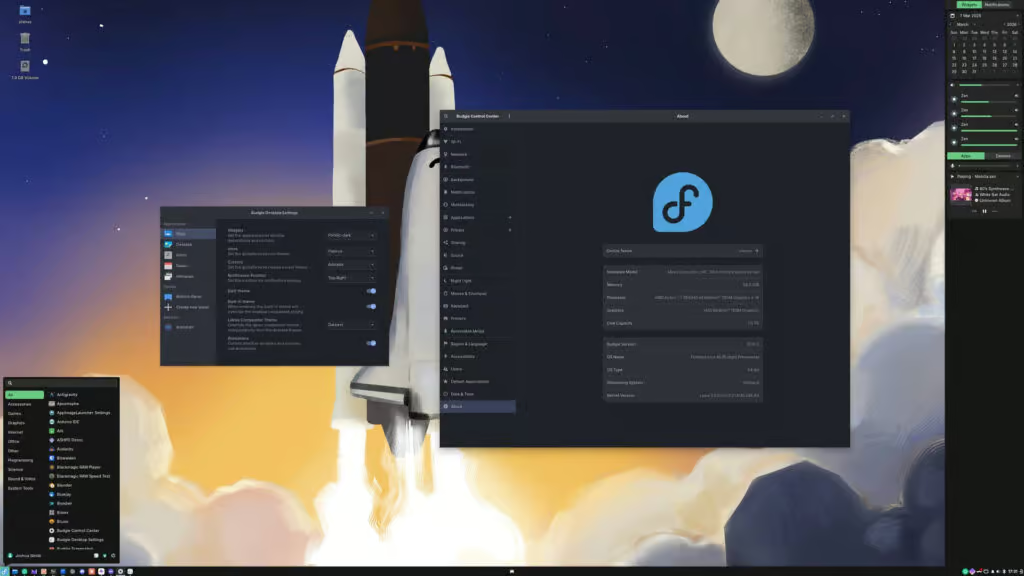
In terms of touchpad configuration, the bridge now syncs touchpad scroll settings from the GNOME configuration into Labwc settings. Additionally, users can configure the left-handed setting for touchpads separately from the mouse configuration, resolving a longstanding issue for left-handed trackpad users.
The Icon Tasklist component has received a major update with the addition of the ApplicationMatcher class. This class improves how application windows are matched with their corresponding desktop entries using multiple strategies. Several other fixes improve tasklist behavior, such as using exact window references instead of class IDs to track windows in the popover, and fixing grouped application behavior when using the “show all windows on click” feature.
The Budgie Menu also benefits from improvements, particularly in how it adapts across different screen resolutions. Unnecessary scaling logic has been removed, with the compositor now handling scaling directly. This change prevents the “stubby” menu effect that could occur when the menu was scaled down. Additionally, the menu’s height is now set to around 35% of the available screen area, with limits between 480 and 600 pixels, and application categories are now sorted based on locale for international users.
The Show Desktop feature now uses the proper D-Bus interface, and the default Super+D shortcut behaves as expected. Budgie now accurately tracks minimized windows when the desktop is shown, ensuring that only those windows are restored when toggling back.
The screenshot tool has also been improved to retain the user’s custom save path, making it more convenient by eliminating the need to reconfigure the save directory each time.
A usability enhancement has been made to dialog behavior, specifically for the Run and Power dialogs. These dialogs now remain visible when focus is shifted (in sloppy-focus and mouse-focus modes) and only disappear when the cursor moves out of the dialog.
Finally, Budgie 10.10.2 includes several bug fixes, including the resolution of Icon Tasklist scaling issues and the introduction of native DPI scaling support for Wayland. On-screen display notifications are now correctly placed above fullscreen applications, and the Raven notification panel’s fade-in animation has been fixed.
For further details, check out the official announcement.
add a comment

FRANK OS 1.0 Launches With a Retro Windows 95-Like Desktop
Blending retro inspiration with embedded development, a new open-source project named FRANK OS has introduced an interesting idea: running a...

CachyOS March 2026 Release Brings Animated Installer Previews
About six weeks after its previous January refresh, the performance-focused CachyOS distribution—built on Arch Linux—has rolled out its second update...

OpenWrt 25.12 Released with APK Package Manager Replacing opkg
The OpenWrt project has introduced OpenWrt 25.12, marking the first stable release in the new 25.12 series of its open-source...


Postfix 3.11 MTA Released With REQUIRETLS Support
A year after the 3.10 release, the Postfix team has announced version 3.11. With this release, the 3.7 branch has...
