



42views

A new open-source tool named APTUI has been introduced to simplify package management on Linux systems that use the APT ecosystem. The project provides a terminal-based text user interface (TUI) that allows users to interactively browse, install, and manage software packages directly from the command line. It works with popular distributions such as Debian, Ubuntu, and Linux Mint.
Rather than replacing the existing APT package manager, APTUI acts as a frontend layer that sits on top of it. This means the core APT system remains unchanged, while APTUI provides a structured interface for tasks that are normally performed through commands like apt install, apt remove, or apt upgrade.
The software is developed using the Go programming language and built with the Bubble Tea TUI Framework, which is designed for creating terminal user interfaces. The result is a keyboard-focused interface that feels like a lightweight dashboard inside the terminal. Users can navigate repositories, search for packages, and perform management tasks without leaving the command-line environment.
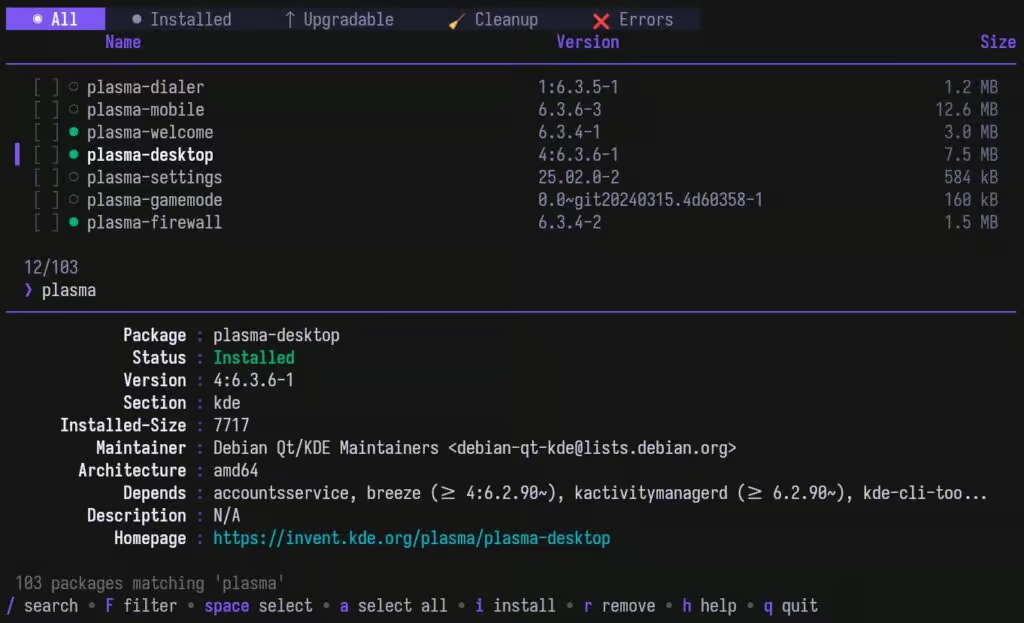
APTUI offers a modern terminal interface for managing packages across Debian-based distributions. While many Linux desktops already include graphical package managers, server environments often run without a graphical interface. In those situations—such as on Ubuntu Server or Debian servers—administrators usually rely entirely on terminal commands. Additionally, many Linux users simply prefer the speed and flexibility of the command line.
The interface includes several features designed to make package management easier. Users can browse the full list of repositories, search for software using fuzzy search, and apply filters based on package attributes. Results are organized into different sections such as all packages, installed packages, and packages with available upgrades, making it easier to understand the system’s current state.
APTUI also supports common package operations. From within the interface, users can install, remove, purge, or upgrade packages. Multiple packages can be selected for batch operations, and a detailed information panel displays metadata like version numbers, package descriptions, architecture, and repository source.
Another notable capability is the transaction history feature. APTUI records previous package operations and provides undo and redo shortcuts, allowing users to review and reverse recent actions directly within the interface.
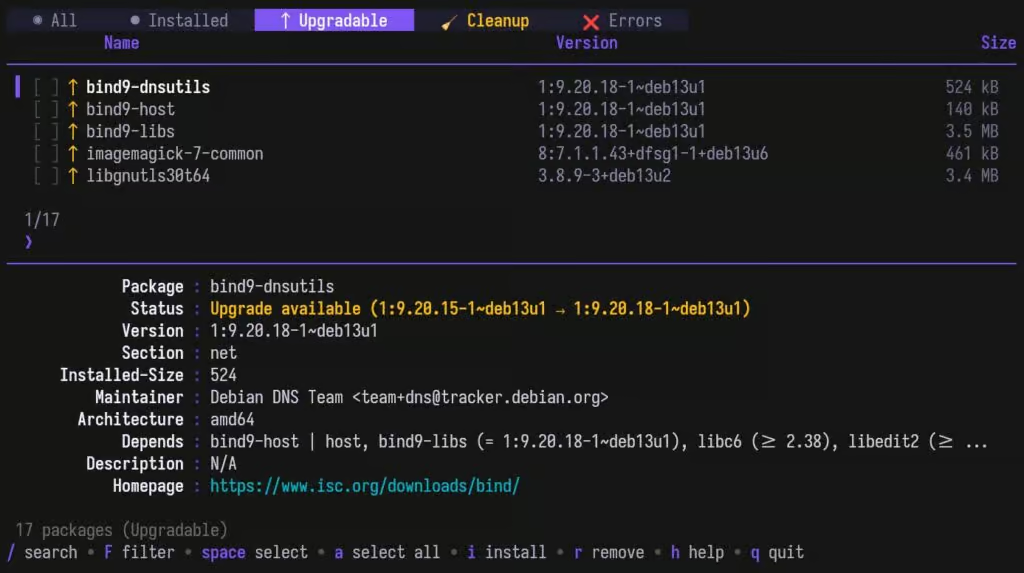
Repository management is also included. The tool enables users to manage additional repositories or PPAs from the terminal interface. This includes listing repositories, enabling or disabling them, and adding or removing sources. Both traditional .list repository files and the newer DEB822 .sources format are supported.
APTUI also provides tools for mirror testing and selection. The application can evaluate available mirrors and help users switch to a faster or more reliable source when necessary, which can improve download speeds during package updates.
Because it performs system-level modifications, administrative privileges are required for tasks like installing software or managing repositories. Running the application with sudo allows these actions to be executed.
Although the project is still in its early development stages, it is already functional on systems that rely on the APT package manager. Early testing shows that core package operations work reliably.
The project’s source code is available publicly on GitHub under the MIT license, along with installation instructions and precompiled binaries for users interested in trying APTUI on their systems.
add a comment


Calibre 9.5 E-Book Manager Released With Reading Progress Column
The open-source e-book management application Calibre has released version 9.5, marking the fifth maintenance update in the 9.x series. One...

Fwupd 2.1.1 Released With AMD Platform Secure Boot Support
The widely used Linux firmware management utility fwupd has been updated to version 2.1.1, introducing several security improvements and expanded...

Igalia Introduces Moonforge Linux, a Yocto-Based OS for Embedded Devices
Igalia has announced Moonforge Linux, a new open-source framework designed to make it easier for developers to build Linux-based operating...


EndeavourOS Titan Launches With Linux 6.19, New GPU Driver Tool
The team behind EndeavourOS has introduced a new installation image called Titan, arriving about three months after the Ganymede Neo...
