


14views

The KDE Project has shared a new development update highlighting several features planned for KDE Plasma 6.7, including a convenient way to type characters that are not present on standard physical keyboards.
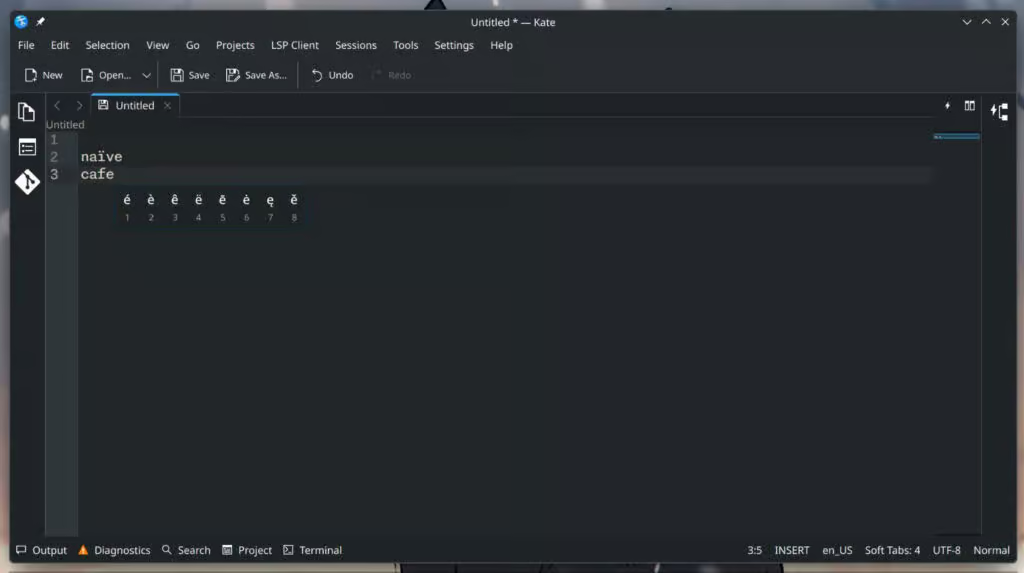
One of the most notable additions is a press-and-hold typing feature. With this capability, users will be able to hold down certain keys to reveal additional character options, similar to the behavior seen on many smartphone keyboards. The functionality is part of the plasma-keyboard module and can be enabled through System Settings → Keyboard → Virtual Keyboard. Once activated, holding a supported key will display alternative characters associated with that key.
Another improvement arriving in Plasma 6.7 is the ability to install custom sound themes directly from downloaded files, making it easier for users to personalize the desktop environment.
The Global Menu widget is also receiving an update. It will now show the menu of the currently active window even if that window is located on another monitor. This behavior can be adjusted in settings for users who prefer the previous functionality.
Several interface enhancements are also included. Navigation within the System Tray’s Clipboard and Networks widgets has been refined so the standard back button now returns users to the previous screen, removing the need for duplicate navigation controls. Additionally, notifications for newly connected USB printers have been streamlined, with the system now presenting a single alert instead of multiple messages.
Changes to window management are also on the way. When two windows are tiled side by side, they will be centered within the usable screen space while ignoring desktop panels, rather than shrinking the window positioned closest to the panel.
The development update also addresses a problem related to Electron applications. Previously, tray icons from different Electron apps could end up sharing configuration settings due to an upstream bug. Although this issue has been resolved in Electron itself, many applications have yet to adopt the fix. Plasma introduces its own workaround to prevent this behavior.
Under the hood, technical improvements are being made as well. The xdg-desktop-portal-kde component now handles screencasting and remote desktop requests from sandboxed applications more efficiently. Systems equipped with multiple GPUs should also experience improved reliability, particularly when one of the GPUs lacks OpenGL 3D acceleration support. In such cases, the capable GPU will still provide hardware acceleration.
More details about these changes can be found in the latest “This Week in Plasma” update published on the KDE community blog.
add a comment

Debian 13.4 Released with Security Fixes and Stability Updates
More than two months after the previous 13.3 update, the Debian Project has released Debian 13.4, the fourth update in...

Google Chrome is Finally Coming to ARM64 Linux
Google has revealed plans to bring its Google Chrome browser to ARM64-based Linux systems, closing a long-standing gap in its...


KDE Frameworks 6.24 Released with Core Library Enhancements
About a month after the release of version 6.23, the KDE Project has introduced KDE Frameworks 6.24, continuing development of...

How to install Apache on Rocky Linux 10
The Apache HTTP server is one of the most popular Web servers in the world. It is an open-source application that runs on any Linux server and is completely free to install. It is, used to handle requests and deliver static/dynamic content. Due to its reliability, flexibility, and security, millions of Website Owners, Developers, and Web Hosting providers trust it. Let me walk you through the steps involved in installing the Apache (httpd) server on Rocky Linux 9. Here are some of the main features of Apache HTTP Server: *...