


21views
Introduction
Most Linux sysadmins and power users will immediately reach for htop, top, or a full-featured GUI tool like GNOME System Monitor when they need to understand what is happening on their machine. But not everyone managing a Linux desktop is a power user — and not every situation calls for a terminal full of scrolling numbers and cryptic process trees.
GNOME Usage is a different kind of system monitoring tool. It was designed from the ground up with one goal in mind: give everyday GNOME desktop users a clean, simple, and completely approachable way to understand what their system is doing — without requiring any technical background to interpret the results. No configuration files, no command-line arguments, no wall of numbers to decode.
In this post, we take a deep dive into what GNOME Usage actually does, how it fits into the broader ecosystem of Linux system monitoring tools, when it is the right choice to reach for, and where its limitations are compared to more advanced alternatives. Whether you are setting up a Linux workstation for a less technical colleague or just want a cleaner at-a-glance view of your own system, GNOME Usage is worth knowing about.
What is GNOME Usage?
GNOME Usage is a free and open source system resource monitoring application built specifically for the GNOME desktop environment. It sits in the category of lightweight GUI monitoring tools — the kind of utility you keep open in a corner of your screen to get a quick read on system health without context-switching into a terminal or wading through a complex dashboard.
The application is developed by Petr Stětka and lives on the GNOME GitLab infrastructure at gitlab.gnome.org/GNOME/gnome-usage. It is written in Vala — a modern, statically-typed programming language that compiles to C and is specifically designed for GLib/GNOME development. This makes GNOME Usage a native, well-integrated citizen of the GNOME stack with tight compliance to the GNOME Human Interface Guidelines.
The project is released under the GNU General Public License v3.0, meaning the source code is fully open, freely redistributable, and community-auditable. It is available through most major Linux distribution package repositories that ship the GNOME desktop, including Ubuntu, Fedora, and Debian.
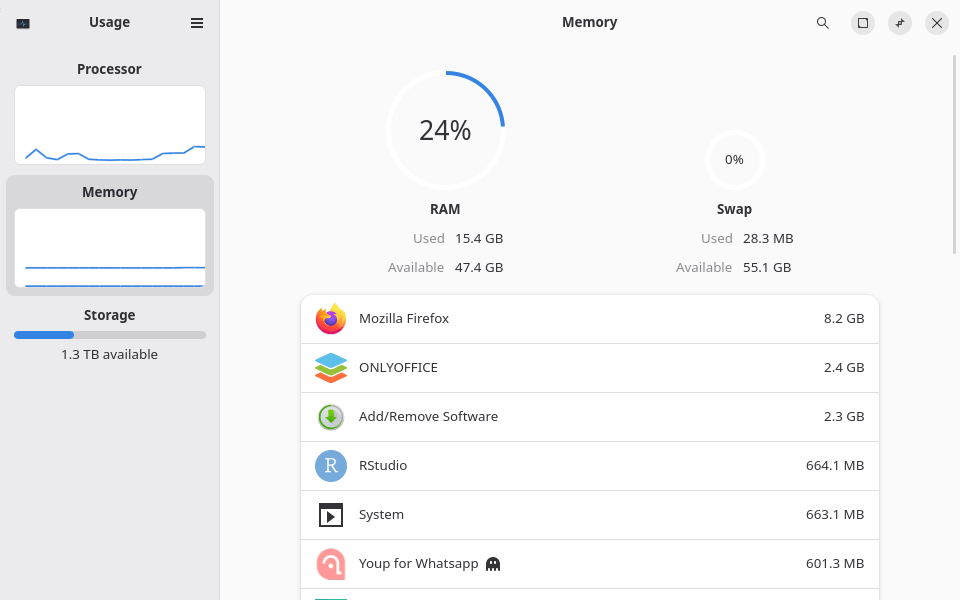
What Does GNOME Usage Actually Monitor?
Despite its lightweight footprint and simplified interface, GNOME Usage covers the four pillars of system resource awareness that matter most to everyday desktop users:
CPU Usage
GNOME Usage displays a real-time view of processor utilization, giving users a clear visual signal when a runaway process or a particularly demanding task is putting the CPU under pressure. Rather than showing raw per-core breakdowns (which are more relevant for servers and developers), it presents a consolidated view that answers the most practical question: is my CPU being hit hard right now, and if so, by what?
Memory (RAM) Usage
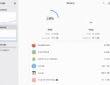
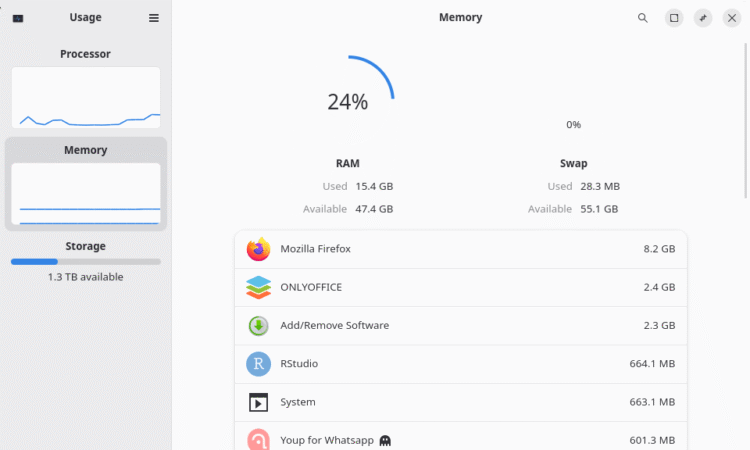
Memory pressure is one of the most common sources of desktop slowdowns, particularly on machines with 8 GB or less of RAM. GNOME Usage shows current RAM consumption in a human-readable format, broken down by application so users can spot memory-hungry processes without needing to interpret the bewildering output of commands like free -h or parse a /proc/meminfo file.
Storage and Disk Space
One of the more distinctive features of GNOME Usage compared to simple process monitors is its built-in storage analysis capability. The application provides a visual overview of disk space utilization, helping users understand how their storage is being distributed across directories, file types, and applications.
Network Activity
Network usage monitoring in GNOME Usage covers basic send and receive activity, giving users a signal when something on their system is generating significant network traffic. This is particularly useful for spotting unexpected background network activity — a system update running silently, a cloud sync service hammering the connection, or an application phoning home more aggressively than expected.
Process Management
Beyond passive monitoring, GNOME Usage includes basic process management capabilities. Users can view running applications and processes and terminate unresponsive or resource-excessive applications directly from the interface
How to Install GNOME Usage
GNOME Usage is available through the standard package repositories of most major GNOME-based Linux distributions. Installation is straightforward:
Ubuntu / Debian (APT)
sudo apt update && sudo apt install gnome-usage
Fedora (DNF)
sudo dnf install gnome-usage
Arch Linux (Pacman)
sudo pacman -S gnome-usage
Conclusion
GNOME Usage is a well-executed tool that knows exactly what it is trying to be. In a Linux ecosystem full of powerful, complex, and sometimes overwhelming monitoring utilities, it carves out a meaningful niche: a clean, zero-learning-curve window into system resource consumption that any desktop user can open, understand, and act on within seconds.
add a comment

apt vs apt-get: What’s the Real Difference and Which Should You Use on Linux?
Introduction If you have spent any meaningful time on a Debian-based Linux system — whether that is Ubuntu, Linux Mint,...
openSUSE Releases Agama 19 Installer with Many New Features and Improvements
The openSUSE project released the Agama 19 web-based installer for openSUSE Tumbleweed, Slowroll, and MicroOS operating systems, a major release...
Fedora Introduces Fedora Forge, Plans Full Pagure Migration by 2026
After nearly a year of planning and development, the Community Linux Engineering (CLE) team has officially introduced Fedora Forge, a new platform powered by Forgejo. This marks an important step forward for Fedora’s infrastructure. While Pagure has served the community reliably for many years, the project is now moving away from its in-house solution toward a more modern and scalable alternative. The complete transition is scheduled to take place during Flock to Fedora 2026, and project maintainers are strongly advised to migrate their repositories well in advance of the event....

Krita 5.3 and Krita 6.0 Released With New Text Engine and Wayland HDR Support
Following its beta release earlier this year, Krita has officially launched two parallel versions, 5.3 and 6.0, both derived from...




