
ZSvirt Download: ISO, OVA and QCOW2 Virtualization Platform
Looking for an alternative virtualization platform for your lab or infrastructure? ZSvirt is an open-source virtualization platform designed to centrally manage virtual machines, compute hosts, storage, and networks. This guide explains where to find ZSvirt downloads, how common image formats differ, and what to consider before deploying the platform.
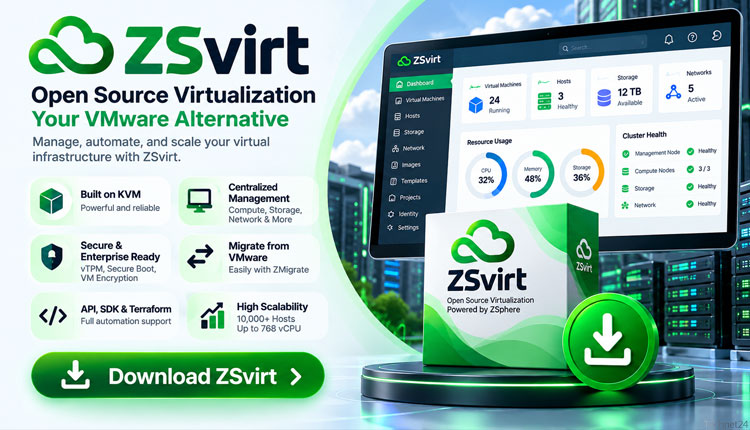
- ZSvirt is an open-source virtualization platform associated with ZStack’s ZSphere technology.
- Its management capabilities cover virtual machines, compute hosts, storage, and networking.
- ISO, OVA, and QCOW2 formats serve different installation and evaluation scenarios.
- Official documentation should be used to confirm prerequisites, compatibility, and deployment procedures.
- Test migration, backup, and recovery workflows before using the platform for production workloads.
What Is ZSvirt?
ZSvirt is an open-source virtualization platform designed to provide centralized management of virtualized infrastructure. It is associated with ZStack’s ZSphere virtualization engine and targets environments that need to coordinate virtual machines, compute resources, storage, and networking.
Instead of managing each hypervisor host independently, administrators can use a central management layer to organize infrastructure resources and virtual-machine operations. The platform also documents APIs and automation-related capabilities for integrating infrastructure tasks into wider workflows.
ZSvirt announced an open-source release under GPL-3.0. Before redistributing software or adopting it for a business-critical environment, review the current license, project terms, and licensing of bundled components.
ZSvirt Download: Official Download Center
The safest starting point is the official ZSvirt download center. Use it to locate the current installation media or virtual-machine images, then consult the official documentation for the matching release.
Visit Official ZSvirt Download Center →
Additional project resources: official documentation and source repository.
Download options and version numbers can change. Before installing, check the release notes, file details, supported deployment method, and any checksum published by the project.
Which ZSvirt Image Format Should You Choose?
| Format | Typical purpose | When to consider it |
|---|---|---|
| ISO | Bootable installation media. | Installing the platform on compatible physical hardware or a supported virtual machine. |
| OVA | Packaged virtual-machine appliance. | Importing a preconfigured appliance into a compatible virtualization environment. |
| QCOW2 | Virtual disk image format. | Compatible KVM/QEMU-based environments and supported image-based deployment workflows. |
These formats are not interchangeable. An ISO generally provides installation media, whereas OVA and QCOW2 are used in supported virtual-machine or disk-image workflows. Confirm the intended use of each file in the download center before choosing an image.
Key Features of ZSvirt
Centralized virtual-machine management
ZSvirt provides a management layer for organizing and operating virtual machines. Centralized management can simplify routine tasks when an environment contains multiple hosts and workloads.
Compute hosts and clusters
The platform is designed to manage compute resources and hosts as part of a wider virtualized environment. Review the current documentation for supported cluster configurations, capacity limits, and failure-handling behavior before designing production infrastructure.
Storage and networking
Storage and networking are fundamental to virtual-machine availability and performance. Check which storage backends, network configurations, and hardware devices are supported by the specific ZSvirt release you intend to deploy.
APIs and automation
API access and automation integrations can help administrators incorporate infrastructure provisioning into existing operational workflows. Verify the current API documentation and supported integration versions before building automation around them.
Virtual-machine import and migration
ZSvirt project materials describe VM import and migration-related workflows, including OVF and VMDK scenarios. Actual migration success depends on guest operating systems, virtual hardware, drivers, storage, network configuration, and application dependencies.
ZSvirt System Requirements and Planning
Hardware requirements depend on the deployment model, workload size, number of hosts, storage architecture, and enabled services. Consult the official installation guide for exact minimums and supported configurations.
- Processor: Confirm CPU compatibility and required virtualization extensions.
- Memory: Allocate enough RAM for management services and expected workloads.
- Storage: Plan capacity for platform components, VM disks, templates, and backups.
- Networking: Prepare management IP addresses, DNS, gateways, and required host connectivity.
- Hardware: Verify server, network adapter, and storage compatibility.
- Security: Restrict management access and use appropriately segmented networks.
How to Install and Get Started with ZSvirt
- Read the official documentation. Confirm the supported hardware, installation method, and prerequisites for your chosen release.
- Choose the correct image. Select ISO for an installation workflow or an OVA/QCOW2 image when explicitly supported for your target environment.
- Verify the downloaded file. Compare its checksum with the value published by the official project when one is provided.
- Prepare infrastructure. Plan IP addressing, DNS, management access, storage, and network connectivity before initializing the platform.
- Follow the release-specific installation steps. Use the matching official guide rather than assuming that steps from another version are interchangeable.
- Test the environment. Create a non-critical test VM and validate networking, storage, backups, and recovery procedures before production deployment.
Read the Official Installation Documentation →
ZSvirt vs VMware vSphere
Organizations evaluating virtualization platforms should compare operational requirements, support arrangements, licensing, compatibility, and migration costs instead of relying on feature lists alone.
| Evaluation area | What to verify |
|---|---|
| Workload compatibility | Guest OS support, virtual hardware, applications, and device requirements. |
| Availability | Clustering, recovery behavior, maintenance, and failover capabilities. |
| Storage and networking | Supported backends, network features, and integration with existing infrastructure. |
| Operations | Monitoring, backup integration, automation, support, and administrator training. |
| Migration | Downtime, application validation, data consistency, and rollback planning. |
VMware vSphere remains an established enterprise virtualization platform. ZSvirt may be worth evaluating for organizations exploring open-source alternatives, but suitability depends on the workload and required operational capabilities.
Is ZSvirt Free and Open Source?
ZSvirt announced an open-source release under GPL-3.0. Review the official license and current project terms to understand the rights and obligations that apply to the software and any included components.
Open-source licensing does not eliminate infrastructure costs. Organizations should account for servers, storage, networking, backup systems, maintenance, monitoring, and technical support when estimating total cost of ownership.
Security Recommendations Before Deployment
- Download installation media from the official project source.
- Verify published checksums and review release notes.
- Keep management interfaces on trusted administrative networks.
- Use strong credentials and least-privilege access.
- Maintain tested backups of management configuration and VM data.
- Test updates, migration, and recovery procedures outside production first.
Official Sources and Further Reading
- ZSvirt official download center
- ZSvirt official documentation
- ZSvirt source repository
- ZSvirt open-source announcement
- TechNet24 ZSvirt download coverage
Final Thoughts
ZSvirt is an option for administrators exploring centralized virtualization management and open-source infrastructure. Different image formats support different installation and evaluation workflows, so choosing the correct download is an important first step.
Start with the official download center and documentation. Confirm compatibility, test backup and recovery, and evaluate migration requirements before deploying the platform for important workloads.
Explore more virtualization resources in the VMoreCloud Virtualization section .

