
Omarchy 4.5 RC1 Expands Linux Support to Snapdragon X and NVIDIA N1X
Omarchy 4.5 RC1 introduces initial support for ARM64-based laptops powered by Qualcomm Snapdragon X and NVIDIA N1X processors. The release candidate marks a significant step for Omarchy, an Arch Linux-based desktop operating system that has primarily focused on x86-64 computers.
Released on October 20, 2026, Omarchy 4.5 RC1 also brings desktop refinements, enhanced notifications, support for 50 languages, per-monitor workspaces, floating workspaces with a dock, a redesigned Appearance menu, and performance improvements throughout the system.
- Initial AArch64 support targeting Snapdragon X and NVIDIA N1X laptops.
- Testing on selected Dell, ASUS, Lenovo Yoga, and ThinkPad systems.
- Per-monitor workspaces and floating workspaces with a dock.
- Enhanced notifications and support for 50 languages.
- A new Appearance menu and theme introductions.
- Speed improvements covering startup, menus, panels, media keys, and theme switching.
- Separate installation images for x86-64 and AArch64 testing.
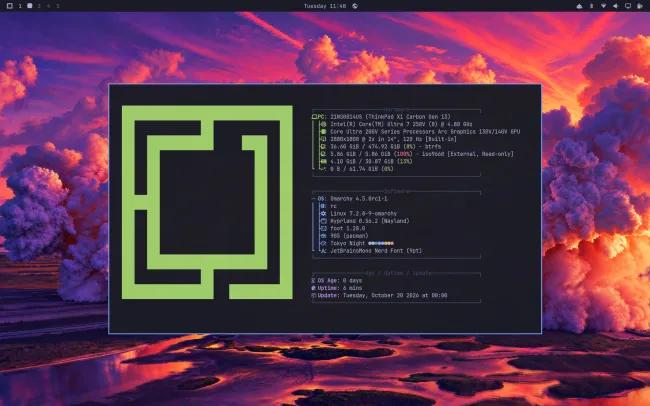
Omarchy Takes a Major Step Toward ARM64 Laptops
Omarchy is an Arch Linux-based operating system built around a customized desktop experience, including the Hyprland Wayland compositor, keyboard-driven workflows, carefully selected applications, and integrated configuration tools.
Until this release, Omarchy had primarily concentrated on x86-64 systems. Omarchy 4.5 RC1 begins expanding that focus to AArch64, also commonly referred to as ARM64, with initial work targeting newer Snapdragon X and NVIDIA N1X laptop platforms.
This matters because ARM-based laptops are becoming an increasingly important part of the Linux hardware landscape. Bringing a distribution to these systems involves more than compiling packages for a different processor architecture. Firmware, boot support, graphics, wireless connectivity, audio, suspend and resume, and power management all influence whether a laptop is practical for everyday use.
Omarchy 4.5 RC1 represents an early step in that process rather than a guarantee of complete hardware compatibility.
Snapdragon X Support Targets Lenovo Laptops
The initial Snapdragon X testing reported for Omarchy 4.5 RC1 includes the Lenovo Yoga Slim 7x and Lenovo ThinkPad T14s. These systems provide a starting point for bringing the Omarchy desktop experience to Qualcomm-powered laptops.
However, Snapdragon X support can involve additional firmware requirements. Phoronix notes that, on many laptop models, the necessary firmware must be obtained from the existing Windows installation.
This means prospective users should not assume that every Snapdragon X laptop will install and operate identically. Hardware revisions, firmware availability, device-specific drivers, and the maturity of upstream Linux support can all affect the experience.
What users should check before installing
- Confirm that the exact laptop model is supported by the current Omarchy ARM64 image.
- Review the official installation instructions and any device-specific guidance.
- Check firmware requirements before removing or overwriting an existing operating system.
- Verify that networking, graphics, audio, suspend, and other essential hardware work as expected.
- Keep a recovery method and a complete backup available.
NVIDIA N1X Support Expands the Hardware Target
Omarchy 4.5 RC1 also brings initial AArch64 support aimed at NVIDIA N1X laptop systems. According to Phoronix, testing has been carried out on the Dell XPS 16 and ASUS ProArt P14.
The inclusion of NVIDIA N1X is notable because it extends the release candidate’s ARM64 work beyond Qualcomm-powered laptops. It also highlights the need to validate Linux support on individual hardware platforms rather than assuming that a working ARM64 installation on one device will automatically work on another.
As this is an early release candidate, users should treat hardware compatibility as an evolving area. The available image and the progress of the Linux kernel, firmware, graphics stack, and device-specific support will influence the results.
Omarchy 4.5 Brings Desktop and Workflow Improvements
ARM64 support is the headline change, but Omarchy 4.5 RC1 also introduces a broader set of desktop refinements. These improvements are intended to make the operating system more convenient and responsive for everyday use.
Per-monitor workspaces
Per-monitor workspaces improve how users organize applications across multiple displays. Instead of treating a multi-monitor setup as a single undifferentiated workspace environment, this approach provides more control over the workspace experience on each screen.
This can be especially useful for developers, system administrators, and other users who separate terminals, documentation, browser windows, and monitoring tools across several displays.
Floating workspaces with a dock
The release adds floating workspaces with a dock, expanding the desktop’s window-management and navigation options. This gives users another way to organize open applications while keeping access to important desktop controls convenient.
The practical benefit will depend on individual workflows and display configurations, but the feature contributes to Omarchy’s focus on a distinctive, keyboard-oriented desktop environment.
Enhanced notifications
Omarchy 4.5 RC1 includes improved notifications as part of its desktop refinement work. Notifications are an important part of a desktop operating system because they communicate background activity, application events, and system information without forcing users to interrupt their current task.
A new Appearance menu and theme introductions
The update adds a new Appearance menu and theme introductions. These changes help users discover and manage the visual options available in the desktop environment.
Theme switching has also received performance work, making it one of several areas where the release aims to reduce friction during common desktop operations.
Support for 50 languages
Omarchy 4.5 expands language support to 50 languages. Broader language availability can make the operating system more accessible to users who prefer localized desktop experiences.
Language support can vary across individual applications and components, so users should still check the behavior of their preferred language and input methods on their own installations.
Performance Improvements Across the Desktop
The Omarchy 4.5 release candidate includes a collection of performance improvements covering both visible interactions and background behavior.
- Faster theme switching: reduces the time spent changing the desktop’s appearance.
- Quicker menus and panels: improves responsiveness in common desktop controls.
- Media-key refinements: improves the handling of frequently used media controls.
- More event-driven behavior: changes some desktop components to react to changes instead of repeatedly polling.
- Faster Omarchy menu: reduces waiting when opening the distribution’s main management interface.
- Startup refinements: includes work intended to make parts of the startup and shell experience faster.
These changes are incremental rather than a single advertised performance benchmark. Actual responsiveness will depend on hardware, configuration, running applications, and the final implementation of each change.
Omarchy 4.5 RC1 Release Details
| Item | Details |
|---|---|
| Release | Omarchy 4.5.0 RC1 |
| Release date | October 20, 2026 |
| Release type | Pre-release / release candidate |
| Base distribution | Arch Linux |
| Desktop environment | Omarchy desktop built around Hyprland |
| Architectures | x86-64 and initial AArch64 support |
| ARM64 hardware focus | Qualcomm Snapdragon X and NVIDIA N1X laptops |
| Additional changes | Notifications, workspaces, appearance, language support, and performance |
| Recommended use | Testing and evaluation on supported hardware |
How to Download Omarchy 4.5 RC1
The official Omarchy project provides separate installation images for x86-64 and AArch64 testing. Use the official release page to review the current instructions and available downloads before installing.
For compatible conventional Intel and AMD 64-bit systems.
For supported ARM64 hardware, including the initial target platforms.
View the official Omarchy 4.5.0 RC1 release notes and installation guidance →
Updating an existing Omarchy installation
The official release notes describe the following update path for an existing Omarchy system:
- Back up important files and make sure you have a recovery option.
- Open the Omarchy update interface.
- Select Update > Channel > RC.
- Then select Update > Omarchy.
- Review the result and report reproducible problems through the official project issue tracker.
Menu labels or update behavior can change as development progresses. Follow the current official instructions if they differ from the steps above.
Verify the Download Before Installation
The official release page lists a SHA-256 checksum for the x86-64 ISO. Compare the downloaded file’s checksum with the value published by the project before using the image.
Published x86-64 ISO SHA-256:
fd8e39f6eca395315328dd12208cc0c324aaf067dc391aa2b476c166ed0f8718
On Linux, you can calculate the checksum of the downloaded image using:
sha256sum omarchy-4.5.0rc1.isoCompare the resulting value with the official release page. For the AArch64 image, use a checksum explicitly published for that image by the project, if available. Do not compare its checksum against the x86-64 value.
Should You Install Omarchy 4.5 RC1?
Omarchy 4.5 RC1 is most suitable for users who want to test the next Omarchy feature release, evaluate early ARM64 support, or help the project identify bugs before the stable release.
Who should consider testing it?
- Linux enthusiasts with compatible Snapdragon X or NVIDIA N1X hardware.
- Existing Omarchy users who can safely test a release candidate.
- Developers and experienced Linux users interested in ARM laptop compatibility.
- Contributors willing to report reproducible problems and provide useful diagnostic information.
Who should wait for the stable release?
Users who rely on their laptops for daily work, have no recovery option, or need predictable hardware compatibility should consider waiting for a stable release and distribution-specific guidance. Early ARM support can require additional firmware preparation and may not provide complete functionality on every device.
What About Apple Silicon Support?
The Omarchy project is also working toward bringing its separate Omarchy Mac effort into the main project. However, Linux support for newer Apple M-series hardware remains a separate and evolving compatibility challenge.
Users should not interpret the initial Snapdragon X and NVIDIA N1X support as confirmation that all Apple Silicon systems are ready for Omarchy. Check the project’s current hardware-specific documentation before attempting an installation.
Final Thoughts
Omarchy 4.5 RC1 is an important development milestone because it begins extending the distribution beyond its traditional x86-64 focus. Initial AArch64 support for Snapdragon X and NVIDIA N1X laptops opens a path toward a broader range of Linux-capable hardware.
The release also brings useful improvements to workspaces, notifications, theme management, localization, and desktop responsiveness. Those changes make the release candidate relevant to existing Omarchy users as well as people following Linux on ARM laptops.
For now, the key qualification is its pre-release status. Hardware support and everyday reliability should be evaluated on a device-by-device basis, and users who need a dependable production system should follow the stable release channel when it becomes available.
Official Sources
- Phoronix: Omarchy 4.5 Expanding to AArch64 With Snapdragon X and NVIDIA N1X Laptops
- Official Omarchy 4.5.0 RC1 release notes and downloads
- Omarchy source repository on GitHub
- Omarchy Dragon: the project’s Snapdragon Linux effort

