
Pangolin 1.25 Adds HTTP Redirects, mTLS, and Load Balancing
Pangolin 1.25 expands its self-hosted secure-access platform with HTTP redirects, mutual TLS authentication, machine-client roles, and configurable load-balancing strategies. The release also adds YAML blueprint exports, authenticated identity headers for private HTTP resources, and credential regeneration for Community Edition users.
Built around WireGuard-based connectivity, Pangolin combines tunneled access to services with reverse-proxy and access-control capabilities. Version 1.25 makes it easier for administrators to manage public endpoints, control which clients can reach protected applications, and reuse infrastructure configurations.
- Configure permanent and temporary HTTP redirects without deploying a separate proxy just for redirection.
- Protect public resources with mutual TLS (mTLS) client-certificate authentication.
- Assign roles to machine clients for reusable access permissions.
- Choose from four load-balancing strategies for eligible HTTP and HTTPS resources.
- Export public and private resources as reusable YAML blueprints.
- Forward authenticated client identity to private HTTP applications.
- Regenerate site, machine-client, and remote-node credentials in Community Edition.
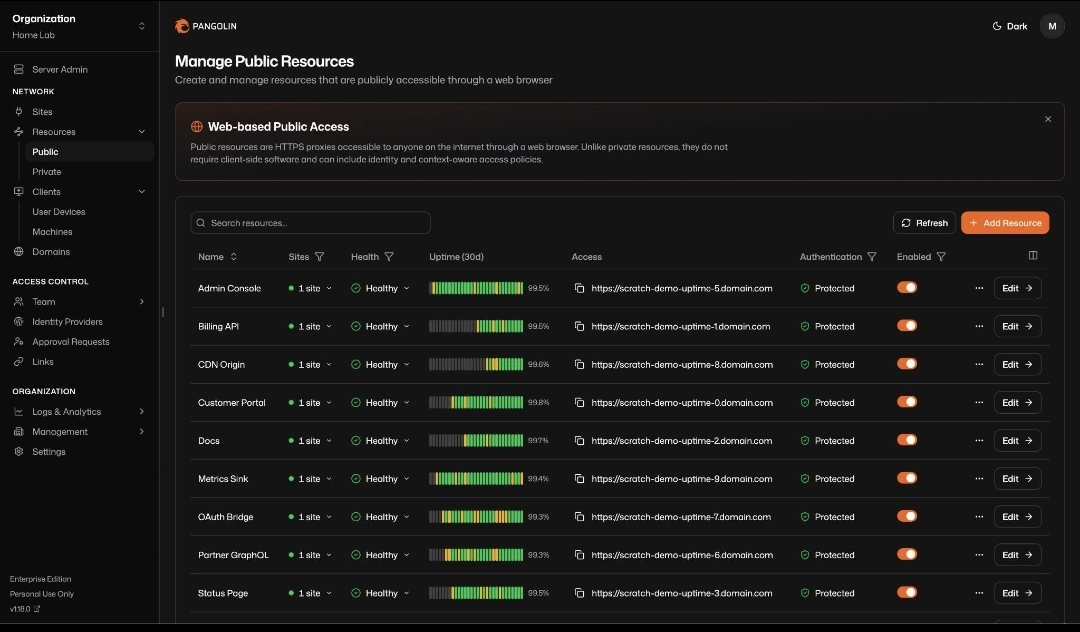
What Is Pangolin?
Pangolin is an open-source, self-hostable secure-access platform that combines tunneled networking with reverse-proxy and access-management features. It uses WireGuard-based connectivity to help users expose or access services without relying exclusively on direct inbound connections to every application.
Depending on the deployment, administrators can use Pangolin to publish selected web applications, provide access to private services, manage machine clients, and apply authentication policies to resources.
This approach can be useful for homelabs, self-hosted applications, remote infrastructure, development environments, and organizations that need controlled access to internal services.
Learn more from the official Pangolin website and the Pangolin GitHub repository.
HTTP Redirects Are Now Built In
One of the main additions in Pangolin 1.25 is native HTTP redirect management. Administrators can send requests from an old hostname or URL path to a new destination without maintaining a separate reverse-proxy configuration solely for that redirect.
Redirects can be configured through Settings → Redirects in the dashboard. The feature supports hostname and path matching, optional path rewriting, and permanent or temporary redirects.
Where can redirects be attached?
Pangolin supports two redirect attachment models:
- Domain-level redirects: associated with a hostname independently of a particular resource.
- Public-resource redirects: associated with a specific public resource and its lifecycle.
Administrators can define rules that match a hostname and path, then direct matching requests to the intended destination. Redirect priority also matters: among redirects for the same host, the higher-priority matching rule takes precedence. A matching redirect is evaluated before the corresponding resource, including before that resource’s authentication step.
Permanent versus temporary redirects
Permanent redirects are useful when a hostname or URL has moved for the long term. Temporary redirects are better suited to short-lived changes, testing, or situations where the original address may be restored.
Choosing the correct redirect type is important for browsers, caching behavior, and search engines. Administrators should test the destination and path behavior before deploying redirects on production domains.
Mutual TLS Adds Client-Certificate Authentication
Pangolin 1.25 adds mutual TLS authentication for public resources. With mTLS, a connecting client must present a valid TLS certificate that chains to a certificate authority trusted by the service.
Ordinary TLS generally authenticates the server to the client. Mutual TLS adds authentication in the other direction, allowing the service to verify the client’s certificate before granting access.
How mTLS works in Pangolin
- Open the authentication settings for the public resource.
- Enable mutual TLS as an additional authentication method.
- Upload one or more trusted certificate authority certificates.
- Issue client certificates signed by one of the trusted authorities.
- Configure approved clients to present their certificates when connecting.
- Test both authorized and unauthorized clients before enabling the policy in production.
Clients without a valid certificate fail the TLS handshake and receive a connection error rather than reaching the normal Pangolin login page. After a successful certificate handshake, any other configured authentication methods, such as PIN or single sign-on, still apply.
Pangolin can also forward verified certificate information upstream using the X-Forwarded-Tls-Client-Cert-Info header.
Where mTLS is useful
- Private APIs that should only accept requests from provisioned clients.
- Administrative applications accessed from managed devices.
- Internal tools where an additional device or workload identity check is desirable.
- Service endpoints where certificate-based authentication complements existing identity controls.
Machine Clients Gain Role-Based Access
Machine clients are used by automated workloads, services, scripts, and other non-interactive systems that need access to Pangolin resources.
Previously, administrators might need to grant permissions to individual private resources separately for each machine client. Pangolin 1.25 adds role assignments for machine clients, allowing them to inherit permissions from reusable roles.
The effective access permissions combine grants inherited from assigned roles with permissions granted directly to the machine client. This helps administrators manage groups of workloads without maintaining an entirely separate list of resource permissions for every machine.
Why this matters for infrastructure teams
- Automation: grant CI runners or deployment tools access to the resources needed for their jobs.
- Consistency: reuse established permission roles instead of recreating equivalent access lists.
- Administration: update role permissions centrally when access requirements change.
- Least privilege: separate permissions for monitoring, deployment, and administration workloads.
Role assignments are particularly useful in larger deployments, but administrators should review the combined effect of role-based permissions and direct grants to avoid unintentionally expanding access.
Four Configurable Load-Balancing Strategies
Pangolin 1.25 introduces four load-balancing strategies for eligible HTTP and HTTPS public resources that have multiple targets in the same routing group.
| Strategy | How it works | Potential use case |
|---|---|---|
| Round Robin | Rotates requests across available targets. | General-purpose distribution across similar backends. |
| Power of Two Choices | Selects two random targets and favors the one with fewer active connections. | Reducing concentration on busy targets. |
| Client IP Hash | Uses the client’s IP address to direct it consistently toward the same target. | Applications that benefit from predictable client-to-target routing. |
| Least Response Time | Favors targets with faster response times and fewer active connections. | Workloads where backend responsiveness varies. |
The best strategy depends on application behavior, backend capacity, and whether the application requires consistent routing. IP hashing, for example, does not replace a properly designed shared session store or guarantee session persistence in every failure scenario.
Export Resources as YAML Blueprints
Pangolin 1.25 allows administrators to export public and private resources as YAML blueprints directly from the dashboard.
To export a resource, open the resources table, select the three-dot menu for the relevant entry, and choose Export as Blueprint. The resulting configuration can be copied or downloaded and reused through supported Pangolin interfaces, including the dashboard, API, CLI, or site blueprints.
Benefits for configuration management
- Version control: retain resource definitions in a repository.
- Repeatability: reuse configurations when building similar environments.
- Documentation: review important resource settings alongside infrastructure documentation.
- Migration: use exported definitions as a starting point when recreating resources.
Blueprint export can support GitOps-style workflows, but administrators should review exported files before committing them to a repository. Avoid publishing credentials, tokens, or other sensitive values, and verify which settings are included in the generated blueprint.
Authenticated Identity Headers for Private HTTP Resources
Another addition lets Pangolin forward the identity of an authenticated client to upstream applications through private HTTP resources.
The supported headers include:
Remote-UserRemote-EmailRemote-NameRemote-Role
This makes it possible for an internal web application to receive identity information associated with the connected Pangolin client, reducing the need to implement a separate login handoff for some architectures.
However, forwarded identity headers should be trusted only when the upstream service is reachable through a controlled path. Restrict direct access to the application and ensure that clients cannot inject or override identity headers outside the trusted proxy boundary.
Credential Regeneration Comes to Community Edition
Pangolin 1.25 adds credential regeneration for sites, machine clients, and remote nodes in Community Edition. This helps administrators rotate credentials without deleting and recreating the corresponding entities.
The dashboard offers two operations:
- Regenerate: issues new credentials and invalidates the old ones while leaving the existing connection running until it is restarted with the new credentials.
- Regenerate and Disconnect: replaces the credentials and immediately terminates the active session.
The first option can be useful when planning a controlled rotation. The second is more appropriate when immediate disconnection is required, such as after a suspected credential exposure.
Before rotating credentials, plan how dependent services will receive the new values. Store replacement secrets securely, update affected clients, and verify that connectivity has been restored.
Additional Improvements and Bug Fixes
Alongside the major features, Pangolin 1.25 includes interface improvements and fixes across the application. The release information also lists changes involving integration APIs, health-check hostnames, relay-port handling, client registration errors, organization cleanup, and exit-node address selection.
These changes can improve operational consistency, particularly for administrators managing multiple sites, remote nodes, machine clients, and application resources.
Pangolin 1.25 at a Glance
| Item | Details |
|---|---|
| Software | Pangolin |
| Release | 1.25 |
| Release announcement | October 20, 2026 |
| Project type | Open-source, self-hostable secure-access and tunneled reverse-proxy platform |
| Connectivity foundation | WireGuard-based tunneling |
| New security features | mTLS for public resources and machine-client roles |
| Traffic management | Four configurable load-balancing strategies |
| Configuration management | YAML resource blueprint export |
| Identity and credentials | Private HTTP identity headers and credential regeneration |
| Load-balancing dependency | Traefik 3.6 or newer for full support |
How to Get Pangolin 1.25
Visit the official Pangolin release announcement and project repository for installation instructions, release notes, and supported deployment methods.
Read the official Pangolin 1.25 announcement →
View Pangolin releases on GitHub →
Visit the official Pangolin website →
Who Benefits Most From Pangolin 1.25?
The new release is particularly relevant to administrators who operate self-hosted services and want to centralize access control and routing.
- Homelab administrators: manage access to dashboards, media services, and private applications.
- IT and infrastructure teams: organize access for staff, services, and automation clients.
- Developers: export resource configurations and reuse them across environments.
- Security-conscious operators: add client-certificate authentication to selected public endpoints.
- Operators of multi-target web services: select a routing strategy for eligible backends.
Not every environment needs every feature. Administrators should choose redirect, mTLS, access-role, and load-balancing configurations according to their actual requirements and test them before making production changes.
Final Thoughts
Pangolin 1.25 is a substantial update for self-hosted networking and secure application access. Native HTTP redirects simplify URL management, mTLS adds a client-certificate authentication option, and machine-client roles help scale permissions across automated workloads.
Configurable load balancing, YAML blueprint exports, private HTTP identity headers, and credential regeneration round out the release. Together, these features give administrators more options for managing services and access policies through one platform.
The main consideration is compatibility. Traefik version requirements affect load balancing, while permanent redirects have a Badger dependency with a documented plugin-integrity warning. Review the current release notes, back up your installation, and test changes before upgrading a production environment.
Official Sources
- Pangolin: Version 1.25 release announcement
- Pangolin GitHub releases and patch notes
- Pangolin source repository
- Linuxiac: Pangolin 1.25 adds HTTP redirects and mTLS