Physical Address
304 North Cardinal St.
Dorchester Center, MA 02124
Physical Address
304 North Cardinal St.
Dorchester Center, MA 02124

In the Next section we will learn What Read only DNS in Windows Server 2025
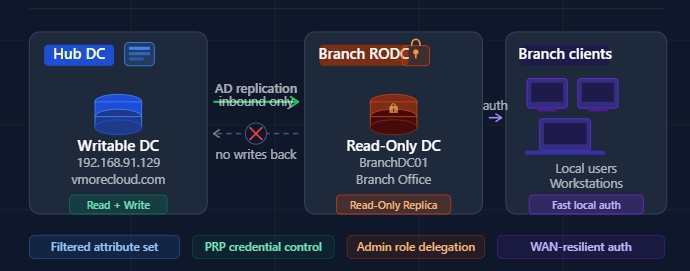
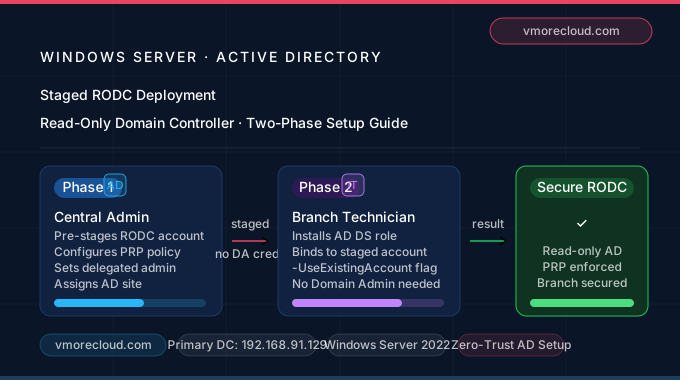
Active Directory Security What Is a Read-Only Domain Controller (RODC) and Why Your Branch Office Needs One A practical, no-fluff guide to understanding, deploying, and securing your infrastructure with RODC on Windows Server. Managing Active Directory across multiple locations is…
The Microsoft Exam AZ-800 Guide to Administering Windows Server Hybrid Core Infrastructure by Greg Tomsho is a comprehensive resource for IT professionals looking to build expertise in modern hybrid environments. This eBook provides a solid foundation in Windows Server administration…
As organizations rapidly adopt cloud technologies, mastering Windows Server 2025 on Azure has become essential for system administrators and cloud engineers. Windows Server 2025 on Azure is a practical, hands-on guide focused on deploying and managing Windows Server 2025 in…
Windows Admin Center has long been a favorite tool for IT pros, trusted to manage millions of Windows Servers around the world. Over the years, Windows Admin Center’s browser-based console has made every day server administration easier and more accessible. Now, responding directly to your feedback and evolving needs, we are introducing…

The adoption of Windows Server 2025 has been remarkable, and we are truly grateful for the overwhelming response. A big thank you to everyone on the Windows Server team for their hard work. Windows Server 2025 brings several major improvements,…
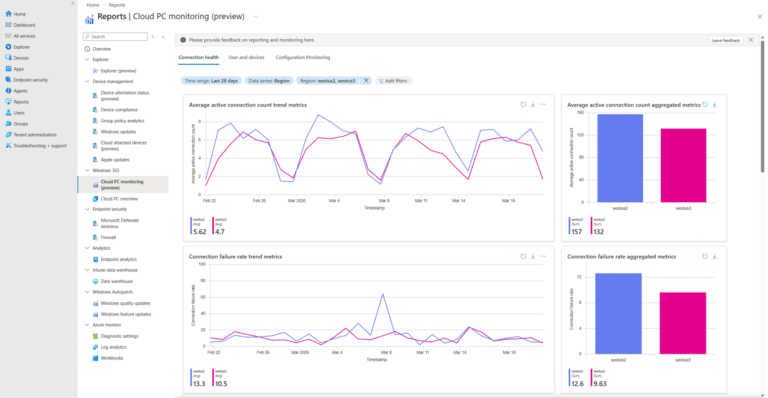
We’re excited to introduce the new Windows 365 monitoring and reporting platform, now available in public preview. This platform delivers a unified reporting experience within the Microsoft Intune admin center, bringing together Cloud PC health, performance, and configuration insights into…
Managing hundreds or thousands of Windows machines individually is not administration — it is chaos. Whether you need to enforce a password policy across every workstation in the domain, restrict access to Control Panel for standard users, deploy software settings,…

According to Microsoft’s latest Digital Defense Report, 97% of identity-based attacks are password spray attacks. This highlights a key reality: most attackers aren’t relying on advanced cracking methods. Instead, they use a simple but highly effective tactic—trying a small set…
In Windows Server environments, blocking program installations from USB drives is an important security measure. This helps prevent the installation of unauthorized software and the spread of malware through removable storage devices. With Group Policy, administrators can enforce specific rules…

We have detected that you are using extensions to block ads. Please support us by disabling these ads blocker.




