Physical Address
304 North Cardinal St.
Dorchester Center, MA 02124
Physical Address
304 North Cardinal St.
Dorchester Center, MA 02124

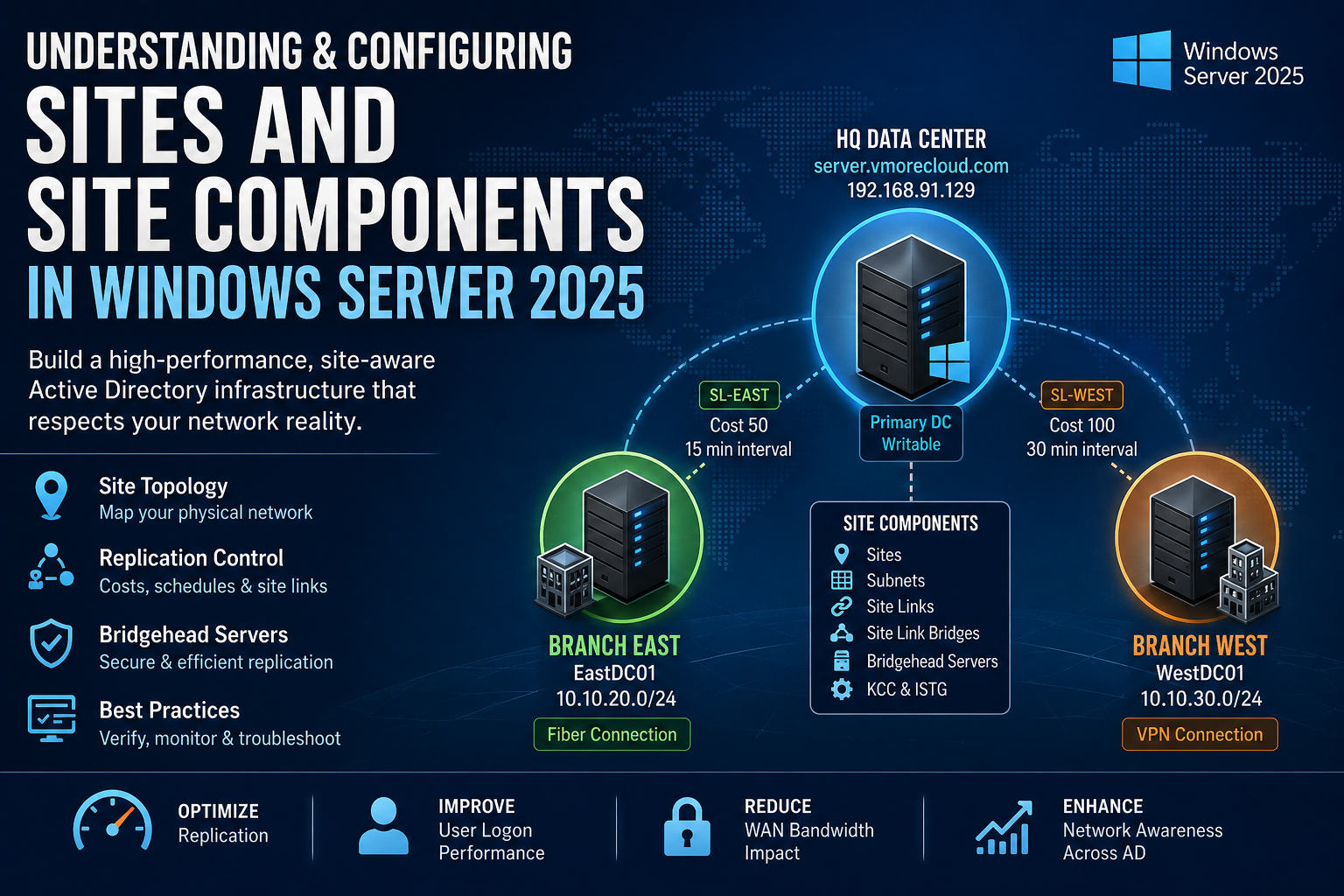
Every Active Directory deployment has a physical reality — servers in multiple buildings, cities, or data centers, linked together by connections of wildly different speeds and reliability. Without Active Directory Sites, Windows has absolutely no way to respect that reality. It treats a domain controller sitting two feet away in the same server rack the same as one sitting behind a 10 Mbps satellite link on the other side of the world. AD Sites give the directory a precise map of your network topology, and every decision AD makes — from who authenticates a user to which DC gets replicated first to where Group Policy downloads from — flows directly from that map. This guide builds that map from the ground up for the vmorecloud.com domain running on server.vmorecloud.com at 192.168.91.129.
An Active Directory Site is a logical container object — stored in AD’s Configuration naming context — that represents one or more IP subnets sharing fast, reliable, low-latency connectivity. The word “logical” is doing real work here: a site doesn’t inherently represent a building, city, or data center. But it is specifically designed to mirror physical network reality closely enough that Active Directory can make intelligent, network-aware decisions based on it.

“Without AD Sites, every domain controller looks equally close. With them, Active Directory knows your network as well as your routing table does.”
Three core functions flow directly from correct site configuration:
Every new Active Directory forest starts with a single site: Default-First-Site-Name. Every DC you promote lands in this site unless you’ve configured subnets and site assignments beforehand. In a single-building deployment, this is harmless. In any multi-location environment, leaving all DCs in the default site is one of the most common and consequential AD misconfigurations — because AD assumes all DCs in the same site are equally fast, and replicates them as such.
AD Sites and Services is built from six distinct object types. Each does a specific job, and the whole topology only works when all six are correctly configured and working together.
Named AD containers representing a physical network location. DCs and clients derive their site membership from subnet matching. The fundamental unit of all AD topology decisions.
IP address ranges mapped to specific sites. AD matches each machine’s IP against subnet objects at connection time to determine site membership. Missing subnets = silent misbehavior.
Objects that define replication connections between two or more sites. Each carries a cost (routing preference), interval (check frequency), and schedule (permitted replication hours).
Groups multiple site links into an explicit transitive replication path. Required when automatic site link transitivity is disabled and you need manual control over multi-hop replication routing.
The designated DC in each site that handles all inter-site replication traffic. Auto-selected by the ISTG or manually designated. Every inter-site AD change passes through the bridgehead.
The Knowledge Consistency Checker (intra-site) and Inter-Site Topology Generator (inter-site) automatically build and continuously maintain optimal replication connection objects. They run silently in the background.
Throughout this guide, we build and configure a three-site hub-and-spoke architecture. server.vmorecloud.com at 192.168.91.129 anchors the central HQ datacenter site. Two branch offices connect via site links of different quality — East over fiber, West over a VPN tunnel.
All inter-site replication flows through server.vmorecloud.com as the designated bridgehead for the HQ site. Branch-East gets a 15-minute replication interval on an unrestricted schedule; Branch-West is restricted to off-peak hours to protect shared VPN bandwidth during business hours.
Windows Server 2025 brings six meaningful upgrades to how AD Sites and replication work — each worth understanding before deployment:
The KCC and ISTG in WS2025 recalculate topology changes after a DC failure, site addition, or link reconfiguration significantly faster than in WS2022 — shrinking the window where stale replication paths persist.
All inter-site RPC replication traffic between bridgehead servers defaults to TLS 1.3 in WS2025. Previous versions maxed out at TLS 1.2. Significant for environments with compliance requirements around data-in-transit encryption.
The ISTG in WS2025 evaluates candidate DCs on available memory and current replication queue depth — not just uptime — when choosing bridgehead servers. Results in fewer overloaded bridgeheads in busy environments.
Azure Arc-managed hybrid workloads can now consume on-premises AD site membership as a proximity signal for cloud resource routing decisions — finally bridging on-prem network topology and hybrid cloud placement.
New event log entries and richer repadmin output in WS2025 expose ISTG decision logic, site link cost calculations, and replication queue detail at a level of granularity not available in previous server versions.
PowerShell 7 with the refreshed ActiveDirectory module adds bulk subnet assignment cmdlets, improved pipeline support for site object management, and new health reporting commands purpose-built for large topologies.
All commands in this section run on the primary DC — server.vmorecloud.com at 192.168.91.129 — as a Domain Administrator. Open PowerShell elevated and import the AD module first.
If a client or DC IP address doesn’t match any defined subnet object, AD logs Event ID 5807 and assigns the machine to a random site. This breaks DC Locator, causes incorrect Group Policy application, degrades DFS referrals, and produces erratic replication behavior — all silently. Always define subnet objects for every network range in your environment: LAN segments, Wi-Fi VLANs, VPN client pools, Azure hybrid connections, and management networks.
Site links define the replication pathways between sites. Each link has three parameters that together determine when and how replication happens: cost (route preference — lower wins), interval (how often AD checks for changes within the permitted window, minimum 15 minutes), and schedule (which hours replication is permitted at all).
Lowest cost — always the preferred replication route.
Reliable leased line — secondary preference after fiber.
Acceptable but variable — higher cost reflects overhead.
High-latency failover only — never a primary replication path.
The bridgehead server is the DC in each site that handles all inter-site replication traffic. It’s the replication gateway — every change that needs to cross a site link flows through it. By default, the ISTG selects the bridgehead automatically based on DC availability. You can override this with a manual preferred bridgehead designation.
In the vmorecloud.com topology, server.vmorecloud.com at 192.168.91.129 is the natural bridgehead for HQ-DataCenter — it’s the writable primary DC with the most resources and the lowest replication queue depth.
When you designate a preferred bridgehead, the ISTG will not automatically select a replacement if that server goes offline. Inter-site replication for that site halts entirely until the designated server comes back. If uptime matters, either designate two preferred bridgehead servers for the same site (AD will use both), or leave bridgehead selection fully automatic and let the ISTG manage failover without intervention.
By default, all AD site links are transitive — meaning replication can route through intermediate sites to reach a destination even without a direct site link between them. This is controlled by the Bridge all site links option on the IP transport object, which is enabled by default.
| Aspect | “Bridge all site links” ON (default) | “Bridge all site links” OFF |
|---|---|---|
| A → B → C replication | Automatic — ISTG routes through B | Requires explicit site link bridge object |
| Admin overhead | Low — ISTG manages routing | High — manual bridge objects required |
| Routing control | Automatic (ISTG decides) | Fully manual (you decide every hop) |
| Best use case | Most enterprise environments | Strict hub-spoke with controlled routing policy |
| Event ID | Source | Meaning & Action |
|---|---|---|
1311 | NTDS Replication | KCC cannot calculate a valid inter-site replication path. Check site links exist and connect the right sites. |
1566 | NTDS Replication | ISTG selected a new bridgehead server. Informational — review if unexpected. |
5807 | NetLogon | Client connected from a subnet not mapped to any site. Add the missing subnet object immediately. |
1388 | NTDS Replication | Inter-site replication failure — bridgehead server unreachable. Check network and firewall rules. |
2088 | NTDS Replication | Bridgehead cannot resolve partner DC FQDN. Check DNS resolution between sites. |
1126 | NTDS General | DC cannot contact AD. Often caused by a missing subnet → wrong site assignment. |
dcdiag /test:topology /v validates your entire site topology in a single pass — it checks for orphaned connection objects, DCs not assigned to sites, misconfigured site links, and replication path failures. Make it standard practice after any site, subnet, or site link change before marking the task complete.
Without defined sites, AD treats all domain controllers as equally close and routes replication, authentication, and service requests with zero awareness of real network topology. Sites translate physical reality into AD intelligence.
Subnet-to-site mappings are the mechanism that assigns machines to sites based on IP address. One uncovered subnet — a Wi-Fi VLAN, VPN pool, Azure hybrid range — silently breaks DC affinity for every machine in that range.
Lower cost = preferred replication path. The ISTG runs Dijkstra’s shortest-path algorithm across your cost assignments. Assign costs that genuinely reflect link bandwidth and reliability — not arbitrary numbers.
Every inter-site replication byte flows through one DC per site. Manual designation gives control but removes automatic failover. Know this trade-off before you override the ISTG’s automatic selection.
The automatic topology generators respond to DC failures, site additions, and link changes without any admin intervention. Only create manual connection objects when you have a specific requirement they genuinely cannot satisfy.
Faster KCC convergence, TLS 1.3 inter-site encryption, smarter ISTG bridgehead selection, and Azure Arc site awareness make WS2025 the strongest AD sites platform Microsoft has shipped. Use its diagnostics tools actively.
The DC Locator service runs at every single user login — and it uses subnet-to-site mapping to find the nearest domain controller. Incorrect or missing sites force branch users to authenticate over the WAN instead of against a local DC. The result is measurable: 2–5 additional seconds per login, multiplied by every user, every working day, at every branch location. Fix your site configuration once and every login at every branch gets permanently faster.
Without site-aware replication, AD replicates changes to every DC as fast as it can, treating a satellite link the same as a local Gigabit LAN. Correct site link costs and replication schedules can reduce inter-site AD replication bandwidth consumption by 60–80% in multi-site organizations. That’s a real and measurable reduction in monthly MPLS and VPN circuit costs, achievable through configuration alone.
Every AD-integrated service that has a “nearest server” concept uses site affinity for client routing — DFS namespace referrals, SYSVOL access, Group Policy downloads. Without correct site configuration, workstations at a branch may download their Group Policy from a DC on the other side of a constrained WAN link at every single login. Sites make local resources genuinely local for every one of these services, not just authentication.
Restricting AD replication on bandwidth-constrained links to off-peak hours ensures that VoIP calls, ERP queries, and video conferences get the bandwidth they need during working hours, without competing with AD directory sync. AD replication doesn’t need to be real-time to be reliable — it needs to be scheduled, predictable, and invisible to business users during peak hours.
Microsoft Entra Connect Sync, Azure Arc, and Microsoft Entra Domain Services all consume on-premises AD site topology as a signal for sync source selection, replication routing, and proximity-based resource placement. An AD environment without correct site configuration produces broken hybrid behavior — incorrect Entra Connect server placement, degraded Azure Arc routing, and suboptimal sync scheduling. Get on-premises sites right first, and hybrid services inherit that accuracy automatically at no additional cost.
Active Directory Sites and Site Components are not an advanced feature you get to eventually — they are the core infrastructure layer that every other AD-dependent service builds on top of. A domain with unconfigured or incorrectly configured sites is one where branch users experience unnecessary latency at every login, replication traffic crosses WAN links it shouldn’t, Group Policy downloads from the wrong server, and no one can pinpoint why AD-related performance degrades as the network grows.
For the vmorecloud.com domain running on server.vmorecloud.com at 192.168.91.129, the three-site hub-and-spoke topology built in this guide gives AD a precise, accurate map of the network — one that scales cleanly as new branches are added, costs traffic intelligently across different link qualities, and lets the KCC and ISTG automate the replication topology without constant admin intervention. Windows Server 2025 makes this stronger still: TLS 1.3 inter-site replication, faster KCC convergence, smarter bridgehead selection, and Azure Arc awareness make the platform genuinely better for modern hybrid environments.
One afternoon of deliberate configuration. Permanent improvements to authentication speed, replication efficiency, WAN costs, and service reliability at every location. There is no better return-on-effort investment in your Active Directory environment.





