



416views
Introduction
VMware Cloud on AWS is a hybrid cloud solution that seamlessly integrates VMware’s enterprise-class Software-Defined Data Center (SDDC) with Amazon Web Services (AWS). It enables businesses to extend their on-premises VMware environments to the cloud, offering scalability, reliability, and cost-efficiency. This guide walks you through deploying VMware Cloud on AWS.
VMware Cloud on AWS in a jointly engineered solution between VMware and Amazon Web Services, you need to complete certain tasks first in AWS Console and VMware Cloud Console in order to have a fully capable production SDDC environment.
Refer to this link for details, https://docs.vmware.com/tw/VMware-Cloud-on-AWS/index.html
Preparation tasks in VMware Cloud Services Platform (CSP)
- Verify you have a default payment method to use for VMware Cloud. A default payment method will be the primary fund to cover all organization’s costs.
- Add Organization Owners and Organization Users. You have total control on who can do what in your organization. Certain services or features in VMware Cloud on AWS require certain permissions.
Preparation tasks in Amazon Web Services Console (AWS Console)
- Create and AWS Account. This is necessary to configure AWS services that you would like to integrate with VMware Cloud on AWS. Linking both the VMware Cloud on AWS and your AWS account in a later step will let you take advantage of the full potential on this solution.
Create and configure an AWS Virtual Private Cloud (VPC) and subnets. There some requirements that must be met when you configure a VPC for VMware Cloud on AWS.
Deploy an SDDC from the VMware Cloud Console
- Log in to the VMware Cloud Console at https://vmc.vmware.com.
- Create the SDDC.
- Choose a seller.
- Select the software edition.
VMware Cloud on AWS: Advanced includes vSphere, vSAN, NSX, VMware Aria Automation, and VMware Aria Operations. - Configure SDDC properties.
- Choose a Cloud.
For a VMware Cloud on AWS deployment, select AWS. - Select an AWS Region in which to deploy the SDDC.
See Choosing a Region for a list of available regions and the features they support. - Select a Deployment type.
- Select the host type.
- If you selected the i4i host type, choose whether to use vSAN ESA or vSAN OSA.
- Make up an SDDC Name.
- If you are creating a multiple host SDDC, specify the initial Number of Hosts you want in the first cluster.
- Choose a Cloud.
- Click Show Advanced Configuration to select the size of the SDDC appliances.
- Click Next to connect to an AWS account.
- Select a VPC and Subnet from the drop-down menu and click Next.
- Click NEXT to configure the Management Subnet in the SDDC.
- Click DEPLOY SDDC to create the SDDC.
Refer to this link for details of SDDC deployment, https://docs.vmware.com/en/VMware-Cloud-on-AWS/services/com.vmware.vmc-aws.getting-started/GUID-EF198D55-03E3-44D1-AC48-6E2ABA31FF02.html

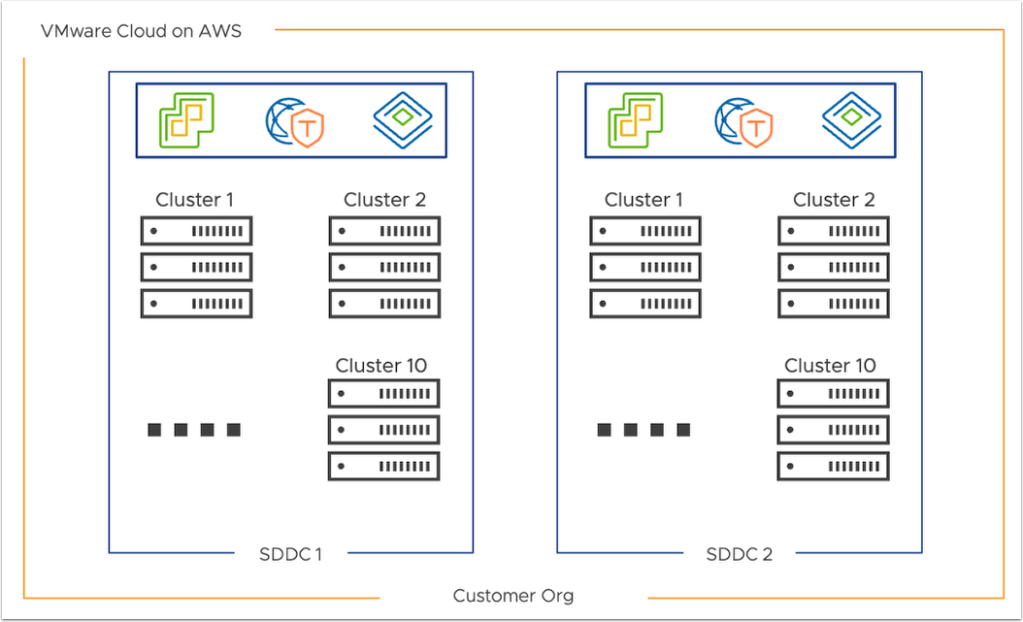
Software Defined Data Center (SDDC) on AWS
Benefits of VMware Cloud on AWS
- Scalability: Rapidly scale infrastructure up or down as needed.
- Disaster Recovery: Leverage VMware Site Recovery for robust DR capabilities.
- Operational Consistency: Maintain consistent operations across on-premises and cloud environments.
- Cost Efficiency: Reduce infrastructure costs by utilizing on-demand cloud resources.
By deploying VMware Cloud on AWS, businesses can achieve a seamless hybrid cloud experience, enabling agility and innovation while maintaining control over their IT environments.
add a comment

Proxmox Finally Has a Real RVTools-Style Report (This is What Was Missing)
Introduction If you spent any meaningful time in VMware environments, RVTools was likely one of the first utilities you installed...
Download Virtuozzo 9 ISO
Virtuozzo 9 is a powerful enterprise-grade virtualization and cloud platform designed for service providers, hosting companies, and enterprises. It combines...
Check Point R81.20 T634 for VMware
If you're running Check Point environments in production, staying updated with the latest Jumbo Hotfix is critical for security, performance,...




