





179views

The latest stable and long-term supported kernel series (LTS) is now the Linux 6.18 LTS series, and Ubuntu users can install it on their machines via the official Ubuntu Mainline Kernel PPA archive. Here are the instructions for installing Linux 6.18 LTS on an Ubuntu system.
Linux 6.18 LTS is a Linux kernel that was released on November 30, 2025, with new features such as support for the Rust Binder driver, a new dm\pcache device-mapper target to enable persistent memory as a cache for slower block devices, and a new command-line option ‘microcode=’ to control the behavior of the microcode loader on x86 platforms.
To install Linux 6.18 on Ubuntu 25.10 (Questing Quokka) or Ubuntu 25.04 (Plucky Pluckin) systems , we will use the official Linux kernel packages from the Ubuntu Mainline Kernel PPA archive built by the Ubuntu Kernel team, which can be installed manually or via the Mainline Kernels tool.
Installing the Linux kernel 6.18 LTS using the Mainline Kernels tool
The easiest way to install the Linux 6.18 LTS kernel on your Ubuntu computer is by using a graphical tool called Mainline Kernels, which you can install from this PPA by running the commands below in the Terminal app. Open the Terminal application and run the following commands to install the Mainline Kernels tool:
sudo add-apt-repository ppa:cappelikan/ppa

sudo apt update

sudo apt dist-upgrade

sudo apt install mainline
After the Mainline Kernels tool is installed, you can open it from your Ubuntu system’s applications menu. The tool quickly checks for the availability of all kernel versions from Canonical’s Mainline Kernel PPA archive and will list the Linux 6.18 kernel at the top.
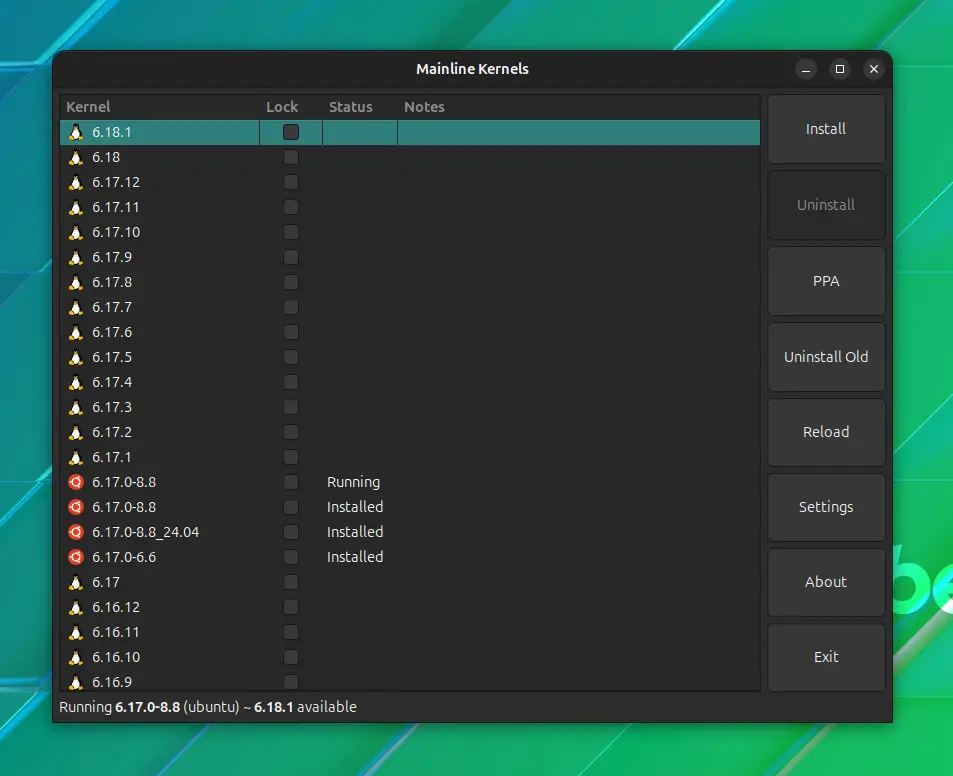
Click on the “6.18” entry to select it, and then click the large “Install” button on the right to install the new kernel on your Ubuntu machine. Wait for the installation to finish and then restart your computer.
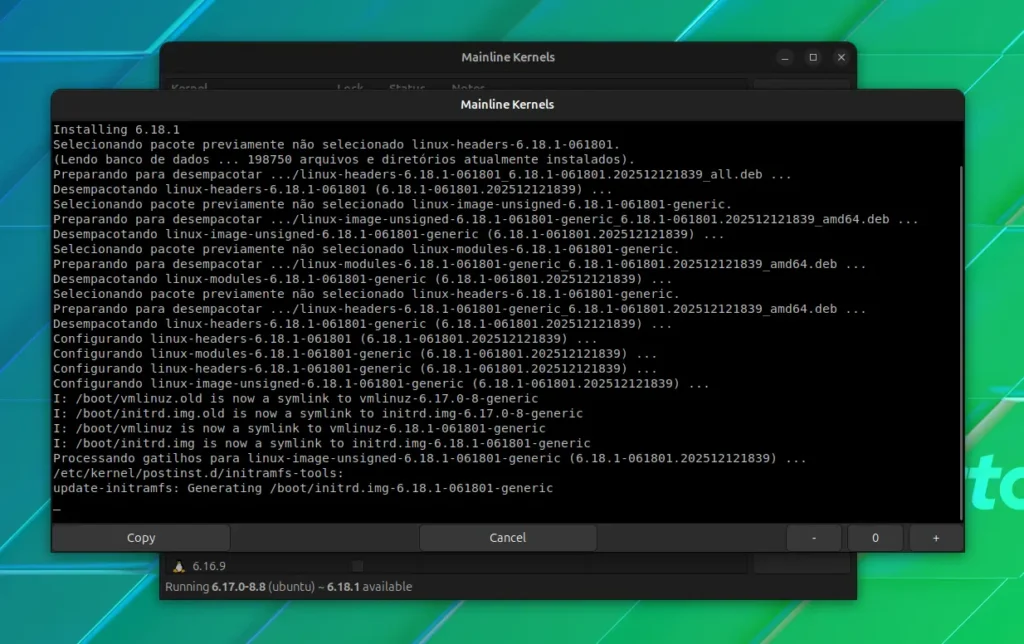
The advantage of using this method is that you will receive new kernel versions (e.g., Linux 6.18.1, 6.18.2, etc.) as they are released upstream. Even better, the Mainline Kernels tool can notify you about new Linux kernel versions if you enable the notification feature in the tool’s settings.
Installing the Linux 6.18 LTS kernel via the command line.
The second method is recommended for experienced users who know what they are doing and do not want to use the Mainline Kernels tool from the first method above. This method can be used as a backup option when the Mainline Kernels tool does not show the latest kernels from the Ubuntu Mainline Kernel PPA file.
This method implies that you must manually download and install the Linux 6.18 LTS kernel packages for your specific architecture (64-bit (amd64), AArch64 (ARM64), ARMhf, PowerPC 64-bit Little Endian (ppc64el), or IBM System z (s390x)) from the official Ubuntu mainline kernel PPA archive and install them on your system via the command line.
For example, to install the Linux 6.18 LTS kernel on a 64-bit Ubuntu system (amd64), download the packages listed below to a folder in your Home directory. After downloading all the kernel packages to their respective folders, you can install them all at once by running the command ‘sudo dpkg -i *.deb’.
linux-image-unsigned-6.18.0-061800-generic_6.18.0-061800.202511302339_amd64.deb linux-modules-6.18.0-061800-generic_6.18.0-061800.202511302339_amd64.deb linux-headers-6.18.0-061800-generic_6.18.0-061800.202511302339_amd64.deb linux-headers-6.18.0-061800_6.18.0-061800.202511302339_all.deb
To revert to the default Ubuntu kernel or another installed kernel, press the Esc key when the computer boots up, go to the “Advanced options” boot entry, and select a different kernel version from the list of available kernels.
2 Comments
Leave a Response

Incus 6.23 Container & Virtual Machine Manager Released
The Incus project has rolled out version 6.23, marking the final update in the 6.x series before the anticipated 7.0...


KaOS 2026.03 Released With Major Move Away From systemd Components
The KaOS project has rolled out its March 2026 ISO, introducing one of the most extensive internal transformations the distribution...

8 Ubuntu Terminal Tools You Must Master in 2026
Introduction1. micro — The Terminal Editor With Zero Learning Curve2. Neovim — IDE-Level Terminal Editing When You Are Ready3. tmux...

Canonical Plans Controversial GRUB Changes for Ubuntu 26.10 Secure Boot
Canonical is considering a significant overhaul to how Secure Boot works in Ubuntu 26.10, with a proposal aimed at reducing...

[…] Moreover, the platform will gain full support for LXC containers, providing a clear migration path for users coming from the legacy CORE edition and its custom Jails. Under the hood, TrueNAS 26 will offer Linux kernel 6.18 LTS. […]
[…] Linux kernel 6.18 with built-in microcode updates […]