




283views
Managing Apple devices in the modern enterprise has evolved rapidly. As organizations adopt hybrid work, BYOD strategies, and security-first frameworks, Microsoft Intune has become one of the most powerful platforms for managing macOS, iOS, iPadOS, and Apple TV devices at scale.
In 2025, Intune offers deeper integration with Apple Business Manager (ABM), enhanced security baselines, automated provisioning, and advanced compliance controls. This guide will help you master Apple device deployment with Intune in 2025—whether you’re an IT admin, systems engineer, consultant, or enterprise architect.
Why Use Intune for Apple Device Deployment?
Microsoft Intune provides a powerful, cloud-based management suite capable of:
- Zero-touch deployment using ABM + Automated Device Enrollment
- Full lifecycle management for Apple devices
- Compliance-driven security enforcement
- App deployment and patch automation
- Cross-platform visibility across macOS, iPadOS, iOS, Windows, Android, and Linux
- Integration with Microsoft Entra ID (Azure AD)
- Enterprise-grade Zero Trust security model
Prerequisites for Apple Deployment in Intune (2025)
Before enrolling devices, you must configure:
Apple Business Manager (ABM)
Required for:
- Automated Device Enrollment (ADE)
- VPP (Apps and Books)
- Managed Apple IDs
- Supervised iOS/iPadOS deployment
Intune + Microsoft Entra ID
Licensing needed:
- Microsoft Intune Suite or
- Microsoft 365 E3/E5 or
- Enterprise Mobility + Security (EMS) E3/E5
Certificates Required
- APNs Certificate (renew yearly)
- MDM Push Certificate
- Token synchronization with ABM
These are foundational and must be configured correctly before rollout.
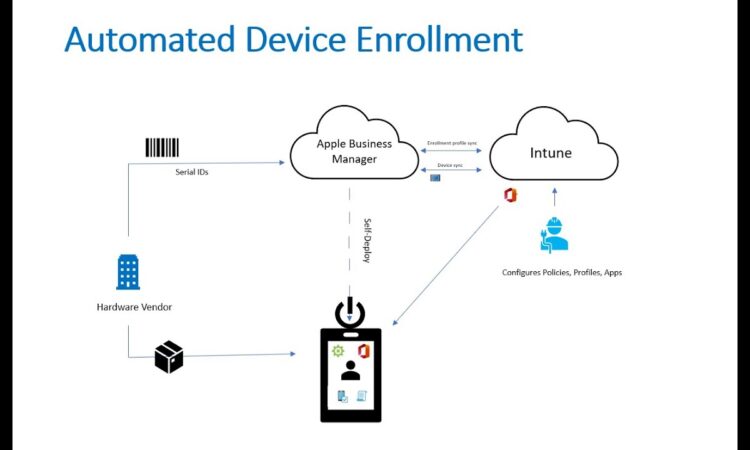
Zero-Touch Deployment with Automated Device Enrollment (ADE)
ADE allows brand-new Apple devices to configure themselves out-of-the-box.
How it works
- Device is purchased through an ABM-linked reseller
- It automatically appears in Apple Business Manager
- Device is assigned to an Intune MDM enrollment profile
- On first boot, the device auto-enrolls into Intune with:
- enforced supervision
- no user tampering
- pre-applied corporate settings
Apple Security Compliance with Intune (2025)
Microsoft has added stronger Apple-aligned security controls, including:
macOS Compliance Options:
- SecureToken enforcement
- FileVault encryption monitoring
- Firewall & Gatekeeper enforcement
- System extensions management
- Kernel extension whitelisting
iOS / iPadOS Compliance Options:
- Device passcode policy
- Jailbreak detection
- OS version minimums
- Managed apps only (App Protection Policies)
- Block unmanaged cloud backups
Together with Conditional Access, you achieve a Zero Trust Apple environment.
Monitoring & Reporting Enhancements
Intune’s 2025 reporting suite delivers:
- Real-time macOS/iOS compliance dashboards
- Device health monitoring
- App install success/failure analytics
- Security baseline compliance
- Automated alerts & notifications
Admins gain end-to-end visibility across every managed Apple endpoint.
Click below to start download torrent.

File Size~3.67GB
add a comment


Alt-N SecurityGateway 11.3.0
Alt-N SecurityGateway 11.3.0 is an advanced email security and filtering solution designed to protect email systems from spam, viruses, phishing...

ManageEngine EventLog Analyzer 13.0
ManageEngine EventLog Analyzer 13.0 is a comprehensive and robust log management and analysis solution designed for enterprises to monitor, analyze,...
Veeam Agent For Windows 13.0.1.120
Veeam Agent for Microsoft Windows 13.0.1.120 is a powerful and reliable backup solution designed to protect your Windows-based systems. Whether...
How to Create and Access Shared Folders in Windows 11 (Step‑By‑Step)
Windows file sharing allows any Windows PC to host a file share, making files available to other computers on the same network. Better still, files located within the shared folder are not solely accessible to Windows devices. Apple devices running MacOS can also access the shared folder, as can Linux devices, so long as those devices are operating on the same network. Some organizations use this type of file sharing as an alternative to deploying Network Attached Storage (NAS). The shared folder essentially functions as a NAS, allowing authorized users...




