


Microsoft 365 Backup: delegate administration, configure billing policies
21views
Microsoft has launched departmental billing for Microsoft 365 Backup, effective March 2, 2026, enabling organizations to configure billing policies, delegate administration, and implement chargeback models across different business units. This enhancement addresses enterprise demands for decentralized backup management while maintaining centralized IT governance and visibility.
The new capability introduces granular scoping through Role-Based Access Control (RBAC), pay-as-you-go billing across multiple Azure subscriptions, and department-specific backup policies. Role-Based Access Control (RBAC) is a security and management model in which you assign users specific roles (such as backup admin or reader), and those roles define exactly what actions they can perform and on which resources, rather than granting broad, user-specific permissions. Organizations can now align backup protection with business criticality without overprovisioning resources or creating unnecessary spending.
Departmental billing
With departmental billing, you can break down backup costs by Azure subscription, limit backup management to specific departmental administrators, and prevent unauthorized backup charges from other departments.
The feature implements RBAC to ensure that only administrators with the Owner or Contributor role on the subscription can create and edit backups that incur consumption charges.
This approach gives organizations three primary capabilities: aligning backup costs to the teams that generate them, delegating backup management without relinquishing central control, and supporting chargeback models across departments, regions, or business units. Different parts of your organization can now independently manage backup operations and costs, while IT leadership retains overall governance.
Aligning backup costs to the teams is about correctly mapping backup spending to the right departments. Chargeback is the formal process of internally billing or allocating those mapped costs back to those departments.
Prerequisites
Before implementing departmental billing, you need an active Microsoft 365 Backup configuration in your tenant. You must be a SharePoint Administrator or Global Administrator to access the Microsoft 365 admin center and set up Microsoft 365 Backup. The Azure subscription you use for billing must reside in the same Microsoft Entra ID as your Microsoft 365 organization.
Microsoft 365 Backup does not support the Azure Free Trial. You need a standard Azure subscription with Owner or Contributor permissions to configure departmental billing and manage backup policies effectively.
Configuring billing policies
To enable departmental billing for your tenant, first create billing policies and connect them to Microsoft 365 Backup by following the pay-as-you-go setup instructions. Navigate to the Services tab on the Pay-as-you-go page and select Microsoft 365 Backup.
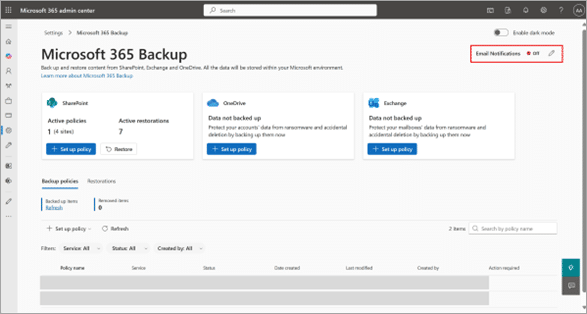
In the Settings tab on the Microsoft 365 Backup page, select the checkbox to limit backup management within departments. Once you enable this setting, only administrators assigned the Owner or Contributor Azure role on the billing policies connected to Backup can create and edit backup policies.
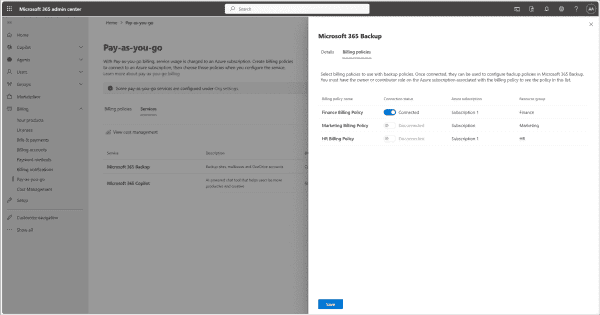
When creating backup policies for your department, you must associate a Billing Policy with each Backup Policy through the Create or Edit policy wizard. Administrators only see billing policies for which they have Owner or Contributor access. Billing policies appear as confidential for administrators who lack the necessary access rights.
Administrators can now define backup policies for specific scopes such as individual departments, geographic regions, subsidiaries, or teams. This ensures you protect the right data without forcing a one-size-fits-all approach across the entire tenant.
Using RBAC, organizations assign department-specific backup administrators to manage protection and recovery within their respective scopes. Central IT retains overall governance and visibility over all backup operations while departmental administrators handle their specific requirements independently.
The system allows you to map backup costs to the right cost centers through pay-as-you-go billing across multiple Azure subscriptions.
Modifying billing policies
After associating a Billing Policy with a Backup Policy, you can update it from the Backup Dashboard. Select the backup policy requiring modification, click the three-dot menu next to the backup policy name, and select Update Billing Policy.
If you wish to manage Backup without RBAC controls that restrict backup management to Owners or Contributors of subscriptions, uncheck the departmental billing box in the Settings tab of the Microsoft 365 Backup page. This action disables departmental billing and reverts to tenant-wide billing management.
Monitoring costs and consumption
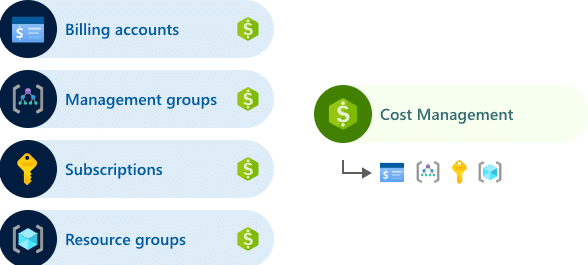
You can view actual and accumulated cost breakdowns by tenant and service type for OneDrive, SharePoint, and Exchange in Microsoft Cost Management in the Azure portal. You can also access this information through the Cost Management public APIs.
Sign in to the Azure portal and search for Cost Management + Billing. Select Cost Analysis to view the accumulated cost and forecast cost. Click +Add Filter to see cost breakdowns by meters and tags.
The system supports billing attribution through two primary tags: tenants and servicetype. The tenants tag displays a list of tenant IDs, while the service type tag shows OneDrive, SharePoint, or Exchange. An applications tag showing app IDs is planned for future releases.
For OneDrive accounts, the system uses the SiteId of the corresponding OneDrive site. To convert this back to a user ID, use the Microsoft Graph API endpoint https://graph.microsoft.com/v1.0/sites/<siteid>/drive?select=owner. Exchange mailbox attribution is not currently available.
Exporting billing data
You can export daily cost information using the billing export feature in the Azure portal. Navigate to the Billing section in the left navigation to view monthly invoices. Microsoft recommends using the cost-by-resources view to see the costs associated with Microsoft 365 Backup.
Set up budget alerts on costs by following the procedures in the Cost Management public APIs documentation. This allows you to receive notifications when backup costs exceed predefined thresholds, helping you maintain budget control across departments.
The MailboxDbGuid tag in the Azure consumption report is intended for Microsoft internal use only. You should not rely on this tag because its value might change, and it differs from the MailboxId.
Additional new features
Microsoft 365 Backup is now generally available for Government Cloud Customers (GCC). The service is also introducing file-level restore capabilities, currently in public preview with general availability expected in late April 2026. This feature lets you restore individual files or folders from a restore point rather than restoring an entire site.
File-level restore is particularly useful in situations where users delete files in sites without retention policies and discover the issue after SharePoint empties the deleted file from the site’s recycle bin. Microsoft 365 Backup can restore data to the most recent backup point, with a retention period of up to 1 year.
Conclusion
Departmental billing unlocks several practical scenarios for enterprise organizations. Large businesses with multiple business units can now maintain autonomous management of backup operations and associated costs. Global organizations benefit from regional teams managing their own protection policies without central IT intervention. Organizations already using Microsoft 365 Backup can begin configuring scoped backups and billing models immediately.
add a comment

What is Microsoft Agent 365?
What Is Microsoft Agent 365? Microsoft Agent 365 is a platform‑neutral control plane that treats AI agents as first‑class entities...
What is Microsoft Defender for Cloud Apps?
Microsoft Defender for Cloud Apps is a Cloud Access Security Broker (CASB) solution that delivers comprehensive security for Software as...

Why Active Directory Password Policy Fails Modern Attacks (and What Admins Need Instead)
According to Microsoft’s latest Digital Defense Report, 97% of identity-based attacks are password spray attacks. This highlights a key reality:...
Azure DevOps Server 2022.2 Downloads
Azure DevOps Server allows you to self host the same modern dev services available in Azure DevOps, including Boards (planning and...




