Physical Address
304 North Cardinal St.
Dorchester Center, MA 02124
Physical Address
304 North Cardinal St.
Dorchester Center, MA 02124

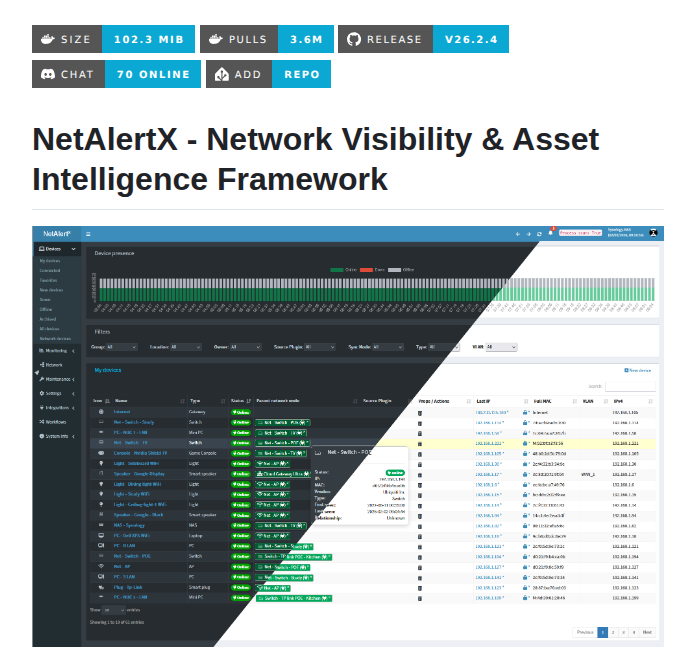
In today’s hyper-connected world, knowing exactly what’s happening on your network isn’t just convenient—it’s essential. Whether you’re a home user protecting your family’s devices, a small business safeguarding critical infrastructure, or a tech enthusiast building your smart home, NetAlertX delivers enterprise-grade network visibility in an accessible, self-hosted package.
NetAlertX is a powerful, open-source network monitoring and asset intelligence framework that scans your WIFI/LAN network to provide complete visibility of connected devices. Think of it as your network’s security guard—constantly watching, analyzing, and alerting you to any changes or potential threats.

Built on the foundation of the original Pi.Alert project, NetAlertX has evolved into a comprehensive solution that combines network scanning, presence detection, asset management, and intelligent alerting into a single, elegant platform.
NetAlertX doesn’t just detect—it notifies. With support for over 80 notification services through Apprise integration, you can receive alerts via:
Configure alert thresholds to avoid notification fatigue while staying informed about critical network events.
NetAlertX is designed for flexibility, supporting multiple deployment methods:
bash
docker run -d \
  --network=host \
  --restart unless-stopped \
  -v /local_data_dir:/data \
  -v /etc/localtime:/etc/localtime:ro \
  --tmpfs /tmp:uid=20211,gid=20211,mode=1700 \
  -e PORT=20211 \
  -e APP_CONF_OVERRIDE='{"GRAPHQL_PORT":"20214"}' \
ghcr.io/jokob-sk/netalertx:latestOne-click installation via the Home Assistant add-on repository
Traditional installation on Linux systems for maximum control
Available through the Unraid App Store
NetAlertX offers multiple installation methods to suit different environments and expertise levels. Choose the method that best fits your setup.
Before installing NetAlertX, ensure you have:
Docker is the easiest and most popular way to deploy NetAlertX. This method works on any system that supports Docker.
If you don’t have Docker installed:
On Ubuntu/Debian:
bash
curl -fsSL https://get.docker.com -o get-docker.sh
sudo sh get-docker.sh
sudo usermod -aG docker $USER
On Raspberry Pi OS:
bash
curl -fsSL https://get.docker.com -o get-docker.sh
sudo sh get-docker.sh
sudo usermod -aG docker pi
Log out and back in for group changes to take effect.
Create directories to store NetAlertX configuration and database:
bash
mkdir -p ~/netalertx/config
mkdir -p ~/netalertx/dbBasic Installation:
bash
docker run -d \
  --name netalertx \
  --network=host \
  --restart unless-stopped \
  -v ~/netalertx/config:/data/config \
  -v ~/netalertx/db:/data/db \
  -v /etc/localtime:/etc/localtime:ro \
  --tmpfs /tmp:uid=20211,gid=20211,mode=1700 \
  -e PORT=20211 \
  -e APP_CONF_OVERRIDE='{"GRAPHQL_PORT":"20214"}' \
  ghcr.io/jokob-sk/netalertx:latest
Alternative: Using Docker Hub:
bash
docker run -d \
  --name netalertx \
  --network=host \
  --restart unless-stopped \
  -v ~/netalertx/config:/data/config \
  -v ~/netalertx/db:/data/db \
  -v /etc/localtime:/etc/localtime:ro \
  --tmpfs /tmp:uid=20211,gid=20211,mode=1700 \
  -e PORT=20211 \
  -e APP_CONF_OVERRIDE='{"GRAPHQL_PORT":"20214"}' \
jokobsk/netalertx:latestCheck if the container is running:
bash
docker ps | grep netalertxView logs to ensure proper startup:
bash
docker logs netalertxOpen your web browser and navigate to:
http://YOUR-SERVER-IP:20211Replace YOUR-SERVER-IP with your server’s IP address (e.g., http://192.168.1.100:20211).
Docker Compose provides better configuration management and is ideal for more complex setups.
bash
sudo apt-get update
sudo apt-get install docker-compose-pluginbash
mkdir ~/netalertx
cd ~/netalertxCreate a file named docker-compose.yml:
bash
nano docker-compose.ymlAdd the following content:
yaml
version: '3'

services:
  netalertx:
    image: ghcr.io/jokob-sk/netalertx:latest
    container_name: netalertx
    network_mode: host
    restart: unless-stopped
    volumes:
      - ./config:/data/config
      - ./db:/data/db
      - /etc/localtime:/etc/localtime:ro
    tmpfs:
      - /tmp:uid=20211,gid=20211,mode=1700
    environment:
      - PORT=20211
      - APP_CONF_OVERRIDE={"GRAPHQL_PORT":"20214"}
Save and exit (Ctrl+X, then Y, then Enter in nano).
bash
docker compose up -dTo view logs:
bash
docker compose logs -fTo stop NetAlertX:
bash
docker compose downTo update to the latest version:
bash
docker compose pull
docker compose up -dFor developers or those who want to customize NetAlertX, you can build from source.
bash
git clone https://github.com/netalertx/NetAlertX.git
cd NetAlertXbash
docker compose up --force-recreate --buildTo run in detached mode:
bash
docker compose up -d --force-recreate --buildEdit the docker-compose.yml file to customize ports, volumes, or environment variables:
bash
nano docker-compose.ymlAfter making changes, rebuild:
bash
docker compose up -d --force-recreate --buildFor Home Assistant users, NetAlertX is available as a supervised add-on.
Click this button to add the repository automatically: Show Image
Or manually add the repository:
https://github.com/alexbelgium/hassio-addonsClick Open Web UI or navigate to:
http://homeassistant.local:20211Unraid users can install NetAlertX through the Community Applications.
For advanced users who prefer running NetAlertX directly on the host system without containers.
On Ubuntu/Debian:
bash
sudo apt-get update
sudo apt-get install -y python3 python3-pip python3-dev \
  git arp-scan net-tools nmap iproute2 \
  php php-sqlite3 php-curl php-xml \
  apache2 libapache2-mod-php
On Raspberry Pi OS:
bash
sudo apt-get update
sudo apt-get install -y python3 python3-pip python3-dev \
  git arp-scan net-tools nmap iproute2 \
  php php-sqlite3 php-curl php-xml \
lighttpd php-cgibash
cd /opt
sudo git clone https://github.com/netalertx/NetAlertX.git
cd NetAlertXbash
sudo pip3 install -r requirements.txtFor Apache:
bash
sudo cp install/apache-netalertx.conf /etc/apache2/sites-available/
sudo a2ensite apache-netalertx
sudo systemctl restart apache2
For Lighttpd (Raspberry Pi):
bash
sudo cp install/lighttpd-netalertx.conf /etc/lighttpd/conf-available/
sudo lighty-enable-mod netalertx
sudo systemctl restart lighttpdbash
sudo chown -R www-data:www-data /opt/NetAlertX
sudo chmod -R 755 /opt/NetAlertXbash
sudo nano /etc/systemd/system/netalertx.serviceAdd the following content:
ini
[Unit]
Description=NetAlertX Network Monitor
After=network.target

[Service]
Type=simple
User=www-data
WorkingDirectory=/opt/NetAlertX
ExecStart=/usr/bin/python3 /opt/NetAlertX/back/netalertx.py
Restart=always

[Install]
WantedBy=multi-user.targetbash
sudo systemctl daemon-reload
sudo systemctl enable netalertx
sudo systemctl start netalertxbash
sudo systemctl status netalertxAccess the web interface at http://YOUR-SERVER-IP/netalertx
Once NetAlertX is installed and running, follow these steps to configure it for your network.
http://YOUR-IP:20211192.168.1.0/24)eth0 or wlan0)After installation, follow these steps to start monitoring your network:
http://your-ip:20211Typical resource consumption:
| Feature | NetAlertX | Fing | WatchYourLAN | NetBox |
|---|---|---|---|---|
| Open Source | ✅ | ❌ | ✅ | ✅ |
| Self-Hosted | ✅ | ❌ | ✅ | ✅ |
| Plugin System | ✅ | ❌ | ❌ | ✅ |
| Home Assistant | ✅ | ❌ | Limited | Limited |
| Free | ✅ | Limited | ✅ | ✅ (Community) |
| Mobile App | ❌ | ✅ | ❌ | ❌ |
| Notifications | 80+ services | Limited | Basic | API-based |
| Learning Curve | Low | Very Low | Low | Moderate |
NetAlertX represents the future of self-hosted network monitoring—powerful enough for professionals, accessible enough for enthusiasts, and private enough for everyone concerned about data security.
Whether you’re protecting your home network, managing a small business infrastructure, or building advanced home automation, NetAlertX provides the visibility and control you need.

We have detected that you are using extensions to block ads. Please support us by disabling these ads blocker.





