


88views
The openSUSE community is actively working toward modernizing system management by gradually shifting away from the traditional YaST tool. As part of this effort, contributors have introduced a simplified solution that makes it easier for users to adopt a more modern, web-based interface.
A Simpler Path to System Management
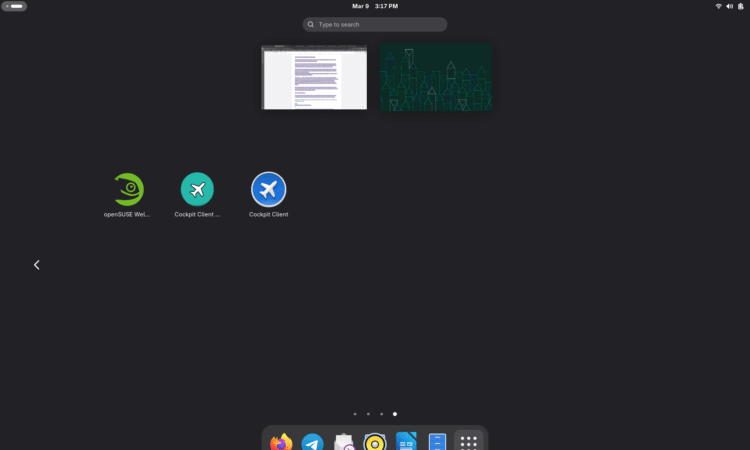
To ease the transition, developers adapted an existing utility into a new Cockpit client launcher. This tool provides openSUSE users with quick access to a web-based administration interface, making system management more approachable—especially for those moving away from YaST.
Previously, many users found it difficult to set up and access Cockpit, particularly when trying to connect through localhost:9090. Community discussions highlighted this as a major usability issue. The new launcher eliminates that complexity by offering a more direct and user-friendly workflow.
Designed with User Feedback
The launcher was created in response to feedback from the openSUSE community. One notable feature is its custom icon design, which incorporates familiar YaST color themes to make the transition feel more intuitive.
Additionally, since Cockpit can be installed via different methods (such as Flatpak and RPM), each launcher now has a distinct visual identity. This helps users easily differentiate between versions and avoid confusion when launching the tool.
Now Available for Tumbleweed and Leap
After testing and minor refinements, the Cockpit client launcher has been officially released and is now available for:
- openSUSE Tumbleweed
- openSUSE Leap (including Leap 16)
Testing across different system setups confirmed that the launcher integrates smoothly regardless of the distribution variant or installation method.
Installation Made Easy
The new launcher simplifies what used to be a multi-step setup process. Users can now install it with a single command:
sudo zypper install cockpit-client-launcher
To ensure full functionality, it’s recommended to install all Cockpit modules:
sudo zypper install -t pattern cockpit
Once installed, users can launch Cockpit directly from their desktop application menu.
Automated Setup and Security Prompts
The launcher also handles initial configuration tasks automatically. It enables required systemd services and adjusts firewall settings as needed.
During setup, users may be prompted to:
- Enable the
cockpit.socketservice - Configure firewall permissions via
firewalld
These steps ensure that the system remains secure while allowing access to the Cockpit interface.
What Cockpit Offers
Cockpit provides a modern, browser-based interface for managing Linux systems. It replaces many traditional command-line and YaST functions with an intuitive graphical experience.
With Cockpit, users can:
- Manage software packages
- Create and manage user accounts
- Monitor and control system services
- View system performance and logs
This makes it a powerful alternative for both beginners and experienced administrators.
Final Thoughts
The introduction of the Cockpit client launcher marks an important step in openSUSE’s evolution. By simplifying access to a web-based management interface, the project is making system administration more accessible while gradually moving beyond YaST.
For users looking for a cleaner and more modern management experience, this new approach offers a promising direction.
add a comment


Alacritty 0.17 Terminal Emulator Released with Wayland Resize Improvements
Alacritty—the cross-platform, GPU-accelerated terminal emulator written in Rust—has been updated to version 0.17, bringing a range of new features and...
The Linux Terminal for Advanced Users – The Command Line Made Easy
If you're ready to move beyond basic commands and truly master the Linux command line, The Linux Terminal for Advanced...

PeaZip 11.0 Released With Faster Archive Browsing
Two months after the 10.9 release, PeaZip, a powerful cross-platform open-source file archiver, has introduced version 11.0 with a major...

PacHub is a Sleek GTK4 Frontend for Arch’s Pacman and AUR
PacHub is a modern, open-source application for Arch Linux and Arch-based distributions that brings a clean graphical interface to managing...




