Physical Address
304 North Cardinal St.
Dorchester Center, MA 02124
Physical Address
304 North Cardinal St.
Dorchester Center, MA 02124


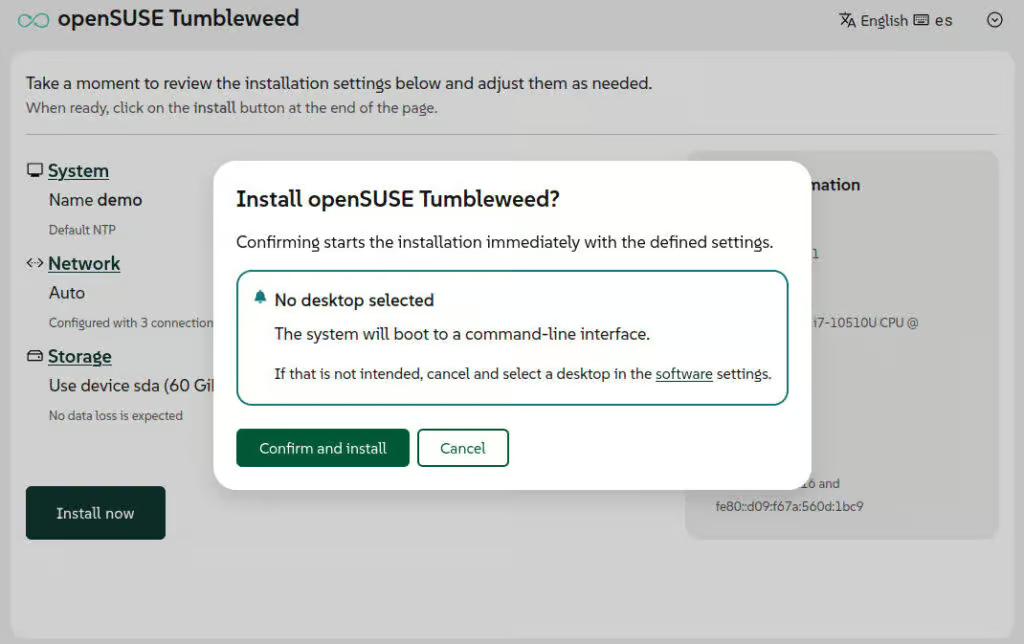
Agama, the modern Linux installer developed by the SUSE YaST team, has reached version 21, bringing several usability and configuration improvements. One of the main updates focuses on the desktop environment selection process. Because openSUSE distributions powered by Agama do not automatically choose a desktop interface, users are required to select one during setup.
To make this process clearer and more consistent, the pattern selection interface has been redesigned. In distributions like openSUSE Tumbleweed, Slowroll, and Leap 16.1, the installer now also warns users during confirmation if no desktop environment has been chosen.
Network management has also received major improvements in the web-based installer. Agama 21 introduces a revamped interface for creating and editing network connections, making it easier to configure additional connection types directly from the UI.
Previously, advanced configurations such as network bridges, bonding, and VLANs required manual editing of Agama’s JSON configuration files. With the latest release, users can now configure bonding and bridge connections directly through the web interface, while VLAN support is expected in a future update.
Storage management capabilities have expanded as well. Agama 21 now supports installations on existing LVM configurations. The updated JSON schema allows administrators to work with current volume groups and logical volumes, including resizing, formatting, mounting, or expanding them with additional physical storage devices.
The installer also supports creating thin volumes within existing thin pools. Through the web interface, users can reuse existing volume groups either as installation targets or as extra storage for creating additional logical volumes.
Another important change involves bootloader support. Earlier versions of Agama always installed GRUB2 regardless of the distribution. Agama 21 now offers multiple bootloader options on supported EFI systems, including GRUB2, systemd-boot, and openSUSE’s GRUB2-BLS implementation.
When users choose systemd-boot or GRUB2-BLS, the installer follows the UAPI Boot Loader Specification. Agama also automatically adapts disk partitioning and TPM-related settings according to the selected bootloader, including support for automatic unlocking of encrypted drives.
For distributions that still rely on GRUB2 by default, such as beta builds of openSUSE Leap 16.1 and SUSE Linux Enterprise Server 16.1, systemd-boot can still be tested by launching the installer with the inst.systemd_boot_preview=1 boot parameter.
The release also introduces improved NTP configuration support. Administrators can now define time synchronization sources — including servers, pools, and peers — directly through the JSON configuration system. Agama can additionally convert NTP settings from existing AutoYaST profiles automatically.
Within the web interface, a new “System” section has been added for managing hostname settings and NTP configuration. The installation media also now supports the rd.ntp boot parameter, allowing early time synchronization setup during the boot process.
Security enhancements are included as well. A new boot option, inst.remote=0, disables remote installer access. By default, Agama supports remote installation management from another machine over the network, but enabling this parameter restricts access to the local device only.
For additional details, see the announcement.
Users interested in trying the updated installer can download the latest openSUSE Agama ISO images, while the upcoming Agama 22 release is expected to arrive within the next month.

We have detected that you are using extensions to block ads. Please support us by disabling these ads blocker.





