Physical Address
304 North Cardinal St.
Dorchester Center, MA 02124
Physical Address
304 North Cardinal St.
Dorchester Center, MA 02124


Has Your vCenter Root User Password Expired? Here’s How to Fix It Has your vCenter root user password expired? Don’t worry—this is a common issue, and it’s easy to fix. VMware enforces password expiration policies as a security measure, but…
In VMware vSphere environments, ensuring seamless virtual machine (VM) migration and high availability often hinges on the proper configuration of Enhanced vMotion Compatibility (EVC) mode. Without EVC, adding new hosts with newer CPUs can lead to VM isolation, where VMs…

VMware Live Site Recovery is a fast, downtime recovery solution that helps organizations move to the Disaster Recovery Site live without interruption of service in the event of a crisis or major site issues. This solution is specifically designed to improve Recovery Time…
vSphere 7 is a product of VMware that is used for very large, high-level tasks that involve setting up a cloud and cloud system. vSphere is designed to support the widest range of virtual infrastructure needs, with a wide range of enterprises, small and medium-sized…

Upgrading to vCenter Server 8.0 U1b is a crucial step in boosting efficiency and security within your VMware environment. This update brings significant enhancements that streamline your operations while strengthening your system’s protection. In this post, I will show how…
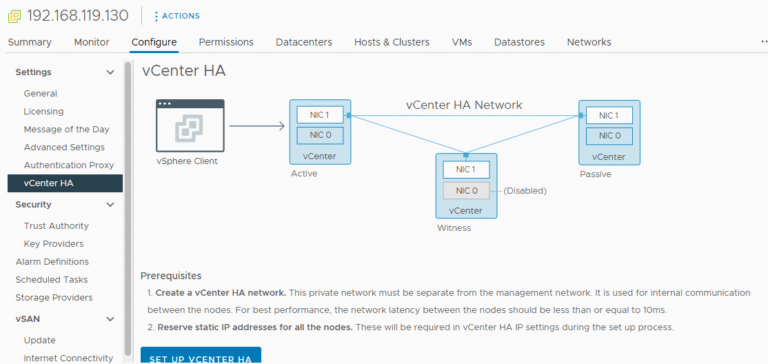
Introduction vCenter High Availability (vCenter HA) is a critical component for ensuring the continuous availability of your VMware environment. VMware’s vCenter High Availability (vCenter HA) is a powerful feature designed to eliminate downtime for the vCenter Server Appliance (VCSA) by…

Introduction to VMware vCenter Enhanced Linked Mode VMware vCenter Enhanced Linked Mode (ELM) is a powerful feature that enables seamless integration of multiple vCenter Servers. By using ELM, administrators can centralize management, view inventories, and perform tasks across multiple vCenters…

Introduction In VMware vSphere, a vApp is a logical container that allows administrators to group related virtual machines (VMs) into a single management unit. This is particularly valuable for multi-tier applications, where different components—such as web servers, application servers, and…
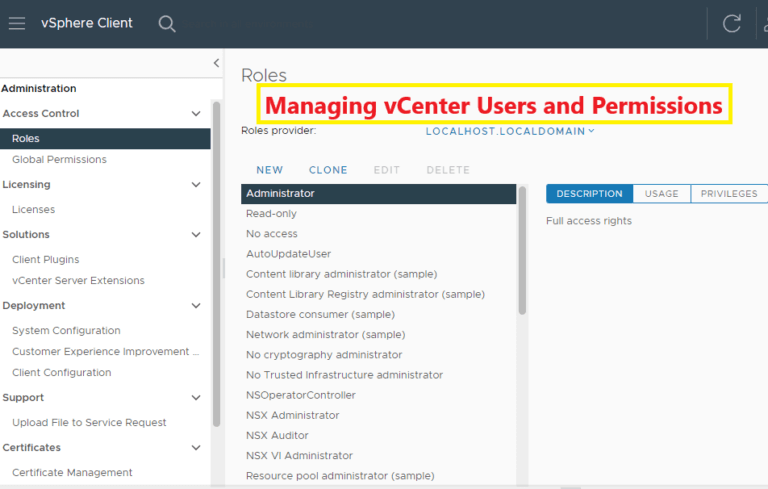
Managing users and permissions in VMware vCenter is a critical aspect of securing your virtual environment. With vCenter’s robust Role-Based Access Control (RBAC) model, you can define and enforce access controls, ensuring users have appropriate privileges without compromising security. This…
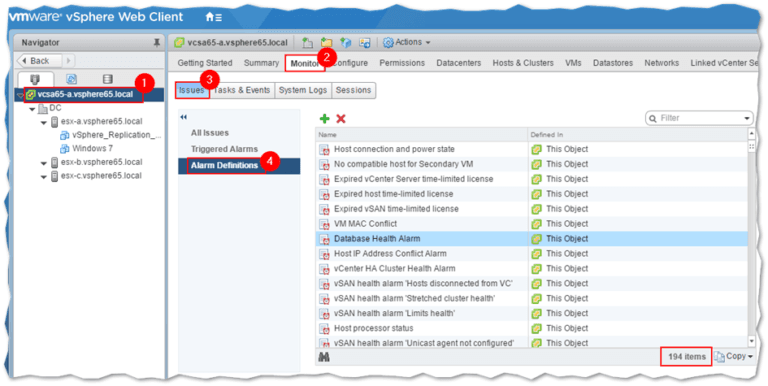
Introduction Monitoring and alerts in VMware vCenter are essential for maintaining a healthy virtual infrastructure. Proper monitoring ensures optimal performance, early problem detection, and efficient resource utilization. This guide is designed to provide users with a clear understanding of how…

We have detected that you are using extensions to block ads. Please support us by disabling these ads blocker.




