



239views
If you’re reading this, chances are you’ve felt the squeeze. Maybe it’s the unpredictable VMware licensing costs that hit your budget like a freight train, or perhaps you’re just tired of managing separate toolchains for VMs and containers. Whatever brought you here, you’re not alone—and you’re definitely not stuck.
I’ve spent over 15 years working with enterprise virtualization platforms, and I can tell you this: the shift from VMware to OpenShift Virtualization isn’t just about cutting costs. It’s about building a platform that actually grows with you, not against you.
Why Organizations Are Making the Move
Let’s be honest—the Broadcom acquisition of VMware has created considerable uncertainty about the commercial future of VMware’s virtualization products. But beyond the headlines, there are real operational challenges that keep IT teams up at night.
The Real Pain Points
Through my work with clients, I’ve seen three recurring issues that drive migration decisions:
Budget Unpredictability: One minute you’re planning your annual budget, and the next, you’re getting renewal quotes that make your CFO’s eye twitch. The per-CPU pricing models and surprise add-on SKUs make long-term planning feel like guesswork.
Tool Sprawl Overload: You’ve got one tool for hypervisors, another for backups, something else for disaster recovery, and yet another set for your containerized applications. Each one requires its own expertise, its own maintenance window, and its own share of your budget.
The Container Conundrum: Your developers are building cloud-native applications in containers, but your operations team is managing VMs with decades-old processes. This disconnect slows everything down and creates friction where you need collaboration.
What Makes OpenShift Virtualization Different
Red Hat OpenShift Virtualization offers a solution by enabling organizations to operate both virtual machines and containers on a unified platform. But what does that actually mean for you on Monday morning?
Think of it this way: instead of juggling two completely different platforms with different tools, different security policies, and different operational procedures, you get one control plane that manages everything. Your VMs and containers live side by side, using the same automation, the same security guardrails, and the same operational workflows.
Click here to download VMware vCenter 8
The Kubernetes Advantage Nobody Talks About
Here’s something most migration guides won’t tell you: OpenShift Virtualization uses KubeVirt technology, which essentially translates virtual machine disk images into persistent volume claims and running states into pods. That’s technical speak for “your VMs become first-class citizens in the Kubernetes ecosystem.”
What this really means is that suddenly, all those powerful Kubernetes features—GitOps automation, declarative configuration, built-in scaling—now work with your legacy VMs too. No more manual provisioning. No more snowflake configurations that only one person understands.
Planning Your Migration: The Framework That Works
After helping numerous organizations through this transition, I’ve learned that successful migrations aren’t determined by the technology chosen or architecture selected, but rather by organizational readiness. Let me break down what actually works in the real world.
Phase 1: Discovery and Honest Assessment
Before you migrate a single VM, you need to understand what you’re working with. And I mean really understand it—not just a spreadsheet of hostnames.
Inventory Everything:
- Which VMs are running what applications?
- What are the actual dependencies between systems?
- Which workloads are business-critical versus nice-to-have?
- What’s the current resource utilization? (You might be shocked by how many VMs are sitting idle)
A proven strategy involves identifying VMs that can be decommissioned or consolidated to avoid migrating unnecessary workloads. I once helped a client discover that 30% of their VMs hadn’t been accessed in over a year. That’s a lot of migration work you don’t need to do.
Categorize Your Workloads:
Not everything should migrate at once. Create three buckets:
- Keep (On VMware for Now): Your tier-0 mission-critical systems, anything with weird hypervisor dependencies, or systems under vendor support constraints that specifically require VMware.
- Move (Lift and Shift): Compatible operating systems with manageable performance requirements. These migrate as-is to OpenShift Virtualization, keeping the same IP addresses where possible.
- Modernize (Refactor to Containers): Stateless services, anything that follows cloud-native patterns, systems that would benefit from horizontal scaling. These get containerized properly.
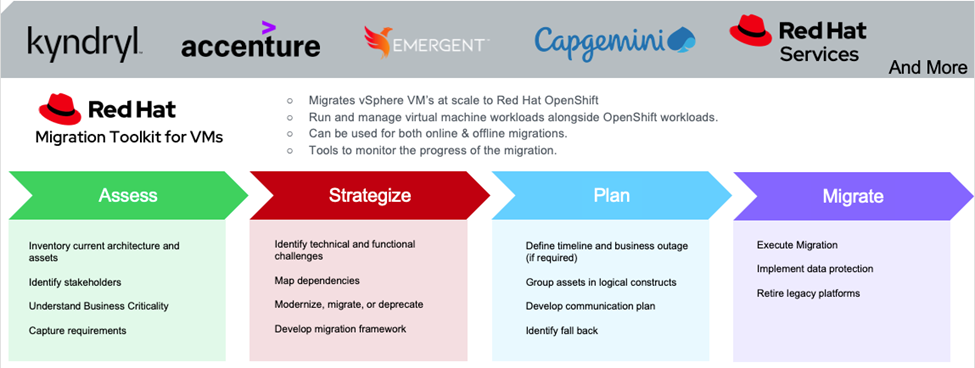
Phase 2: Building Your Pilot Environment
Starting with a non-production pilot validates performance, security, and compliance requirements before moving production workloads. Trust me—this step saves you from painful surprises later.
Define Success Metrics Upfront:
- VM performance should be within 10% of baseline
- Policy violations must be zero
- Mean time to recovery (MTTR) should improve
- Can you complete a successful disaster recovery drill?
In my experience, teams that skip this step end up doing it anyway—just with a lot more stress and under production pressure.
Phase 3: The Migration Toolkit in Action
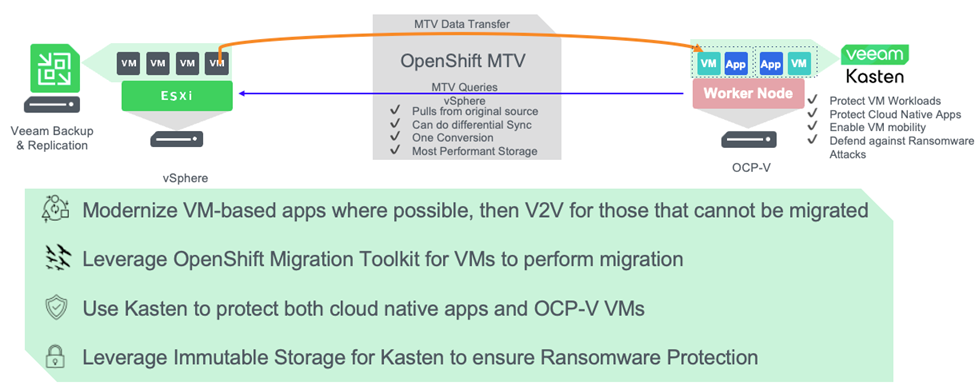
Red Hat provides the Migration Toolkit for Virtualization (MTV), and it’s included with your OpenShift subscription. MTV is available in OperatorHub as an installable operator at no additional cost.
Here’s how it works in practice:
Setting Up the Toolkit:
The MTV operator requires configuration of four key components: Providers for platform connections, Plans to define migration details, NetworkMaps for network translation, and StorageMaps to link ESXi datastores with cluster storage classes.
- Install the MTV Operator from OpenShift’s OperatorHub. It takes about five minutes.
- Connect Your Source Provider: You’ll need your vCenter details (or ESXi server directly in MTV 2.6+). For authentication, run an openssl command to get the SHA-1 fingerprint from your vCenter server.
- Map Your Networks and Storage: This is where you tell MTV which VMware networks correspond to which OpenShift networks, and which datastores map to which storage classes. Think of it as creating a translation guide.
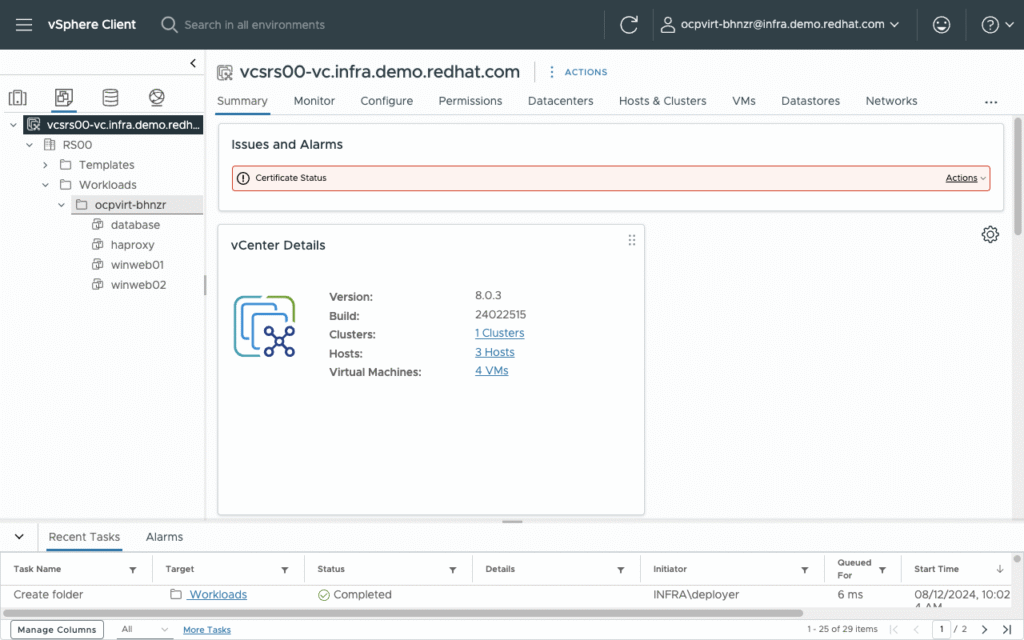
Migration Types: Cold vs. Warm
Cold migration involves shutting down source VMs during data transfer, while warm migration copies most data during a precopy stage with VMs running, then performs a final cutover.
For most situations, I recommend cold migration for non-critical workloads during maintenance windows. But for systems that absolutely cannot go down? Warm migration uses changed block tracking snapshots to copy data incrementally while VMs remain operational. The actual downtime is measured in minutes, not hours.
A Real-World Migration Workflow:
Let’s say you’re migrating a batch of application servers:
- Group your VMs by wave (similar applications, similar requirements)
- Create a migration plan that includes network and storage mappings
- Run a pre-migration validation to catch issues early
- Execute the migration (preferably starting with a test system)
- Verify the migrated VM boots correctly and applications function
- Update your IPAM and documentation
Testing has shown that migrations complete more quickly when migrating multiple VMs concurrently—think of it like filling a pipeline rather than moving one thing at a time.
Post-Migration: The Work Isn’t Over
Here’s what nobody tells you: the migration itself is the easy part. It’s what happens next that determines success.
Immediate Post-Migration Tasks
Network Adjustments: One common gotcha: Ubuntu VMs experience broken networking after migration because ethernet device naming changes from VMware’s virtual NIC format to OpenShift’s format. You’ll need to update network configuration files with the new device names.
Application Validation: Don’t just check that the VM boots. Actually test the applications. Log in. Run transactions. Verify database connections. I’ve seen too many “successful” migrations that broke subtle application dependencies.
Performance Benchmarking: Conducting performance benchmarking post-migration helps identify how workloads perform and enables resource allocation adjustments as needed. You might find some VMs were over-provisioned on VMware and can actually use fewer resources on OpenShift.
Data Protection and Backup
Once your VMs are running on OpenShift, you need to protect them. This is where solutions like Veeam come in. Veeam provides a future-proof, enterprise-grade data protection solution for OpenShift Virtualization environments.
The beauty of running on OpenShift is that you can use Kubernetes-native backup tools that understand both containers and VMs. No more separate backup infrastructure for each workload type.
Advanced Strategies for Complex Migrations
Zero-Downtime Migration with Service Interconnect
Red Hat Service Interconnect enables continuous service availability during migrations by managing traffic switchover from existing hypervisor platforms to OpenShift Virtualization without disruption.
This is particularly valuable for multi-tier applications where you can’t migrate everything at once. You might move the application tier to OpenShift while keeping the database on VMware temporarily, with Service Interconnect maintaining connectivity between them.
Automation at Scale
For organizations migrating hundreds of VMs, manual processes won’t cut it. Red Hat Ansible Automation Platform can automate VM migration processes using templates that include inventory lists and migration playbooks.
You can create Ansible surveys that let operators input VM names, choose migration settings, and kick off automated migration workflows. The migration plan gets created automatically, and the process starts without manual OpenShift console work.
Handling Special Cases
Windows VMs: MTV issues warning messages for Windows VMs with missing vNIC properties—these VMs need to run in vSphere to report their properties before migration.
LUKS-Encrypted Disks: You can configure disk decryption passphrases for Linux Unified Key Setup encrypted devices through MTV settings.
Custom Boot Devices: If a VM has a non-standard boot configuration, you’ll need to specify the boot device path explicitly in the migration plan.
Common Pitfalls (And How to Avoid Them)
1. Underestimating Network Complexity
Every organization thinks their network is straightforward until they start mapping it. Document everything. Test connectivity before migration. Create dedicated network attachment definitions for VMs that need to maintain their original IP addresses.
2. Ignoring Storage Requirements
Not all storage classes are created equal. If OpenShift Virtualization storage doesn’t support dynamic provisioning, MTV applies default settings of Filesystem volume mode and ReadWriteOnce access mode. That ReadWriteOnce limitation means no live VM migration—a feature you probably want to keep.
3. Forgetting to Train Your Team
Organizations should prepare teams with training and resources to learn how to design, build, migrate, and operate OpenShift solutions. Your VMware experts don’t automatically become OpenShift experts. Plan for knowledge transfer and hands-on training.
4. Missing the Decommissioning Phase
Common cleanup tasks include ensuring IPAM is current, removing entries for non-existent VMs, auditing security policies, and enforcing least-privilege principles. Don’t leave zombie VMs running on your old VMware environment consuming licenses and resources.
The Strategic Advantages Nobody Mentions
Beyond cost savings and operational efficiency, there are strategic benefits that emerge over time:
Unified DevOps Practices: When your VMs and containers share the same platform, your DevOps practices work across everything. CI/CD pipelines, GitOps workflows, infrastructure-as-code—they all just work, regardless of whether you’re deploying a container or updating a VM.
Future-Proof Modernization Path: You’re not locked into an all-or-nothing migration. Move VMs today, containerize them tomorrow, or next year, or never. The platform supports your timeline, not the other way around.
Hybrid Cloud Flexibility: MTV enables users to migrate VM workloads to anywhere they run OpenShift—on-premises, in the cloud, or at the edge. Your platform strategy becomes portable across environments.
Getting Started
The key to successful VMware to OpenShift migration isn’t having the perfect plan from day one. It’s starting with a solid foundation, learning from your pilot migrations, and iterating based on real results.
Red Hat Services and Global System Integrators are available to assist organizations that need professional help with their migration journey. Sometimes having an experienced guide who’s done this dozens of times can be the difference between a smooth transition and a painful one.
Start small. Migrate a handful of non-critical VMs first. Learn what works in your environment. Build confidence with your team. Then scale up based on that experience.
add a comment

Proxmox Finally Has a Real RVTools-Style Report (This is What Was Missing)
Introduction If you spent any meaningful time in VMware environments, RVTools was likely one of the first utilities you installed...
Download Virtuozzo 9 ISO
Virtuozzo 9 is a powerful enterprise-grade virtualization and cloud platform designed for service providers, hosting companies, and enterprises. It combines...
Check Point R81.20 T634 for VMware
If you're running Check Point environments in production, staying updated with the latest Jumbo Hotfix is critical for security, performance,...

VMware Cloud Director 10.3.3 OVA Download
The VMware Cloud Director-10.3.3 appliance is a ready-to-deploy OVA package that allows users to quickly set up VMware Cloud Director...




