Physical Address
304 North Cardinal St.
Dorchester Center, MA 02124
Physical Address
304 North Cardinal St.
Dorchester Center, MA 02124

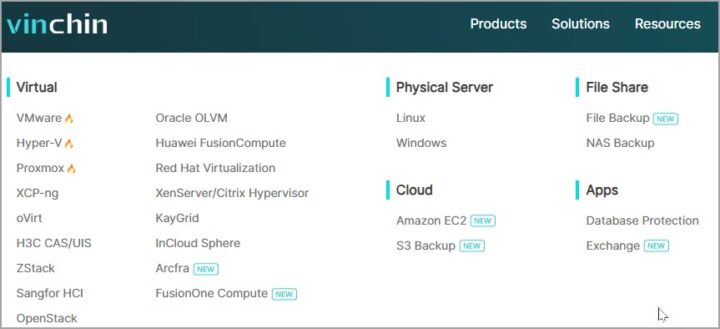
Vinchin Backup and recovery is currently supports 15 different hypervisors including VMware, Hyper-V, Proxmox or XCP-NG. The data protection solution is based China, however they are around since a while (established in 2015) and it seems that they are pretty dynamic supporting such a huge list of hypervisors. We have briefly mentioned the XCP-NG support in our article last week – Agentless Backup Solutions for XCP-ng Hypervisor: External Vendor Options – but Vinchin software seems to be appreciated by clients within the latest Gartner report – Vinchin Earns Acclaimed Recognition in Gartner Peer Insights 2025 Report.
Vinchin Backup & Recovery is an enterprise-grade, image-based backup solution designed to protect virtualized environments like VMware vSphere, Hyper-V, Proxmox, XenServer, XCP-ng, oVirt, and more. It also supports databases (Oracle, MySQL, SQL Server, etc.), physical Windows/Linux servers, and NAS devices. Whether you’re running a private, public, or hybrid cloud, Vinchin aims to deliver comprehensive data protection with a focus on simplicity and scalability.

The software is agentless, meaning no need to install agents on your VMs, which keeps performance overhead low and deployment straightforward. It’s built to handle everything from small setups to massive petabyte-scale environments, making it a fit for SMBs and large enterprises alike. They also have MSP edition, for service providers.
Vinchin packs a punch with features that make it a go-to for IT admins who want to sleep soundly knowing their data is safe.
Here are some of the main features:
The web-based console (B/S architecture) is a breeze to use, offering a centralized pane of glass for managing backups, restores, and migrations. Vinchin backup software not new as currently it is the v8.1 already, but we have not talked about them on our blog just yet. They have 24/7 support which is essential and their solution is easy to install and test. The trial lasts 60 days so plenty of time to do your proof of concept. You can also test this solution in conjunction with V2V migration when testing different hypervisors (hot topic recently, with many VMware users).
It scales quite nicely where you can run single Vinchin backup server for up to 200 VMs or 50TB of data. Then with larger environment simply add another node. Your web-based central management console stays with the main backup server.
Quote:
Users can consider deploying Vinchin backup node to accelerate the data protection process. Except backing up large-scale virtual environments, Vinchin node can be also deployed in ROBO (Remote Office/Branch Office) with a Vinchin server deployed in HQ to achieve unified data protection with a single web console. Vinchin node has built-in data protection functionalities but it does not have a web console, it will be centrally managed from the web console of a Vinchin server.
Vinchin supports different hypervisors, physical servers, cloud, file shares and apps.

Download: Trial Download of Vinchin Backup and Recovery.
Backup, Recovery, V2V,
One of the use cases nowadays is V2V where you backup your VM on let’s say VMware platform, then restore it to XCP-NG or Proxmox. Using your backup software for the job is imho the best option. Here are some of the reasons why I think it is better than third party converters:

Download: Trial Download of Vinchin Backup and Recovery.
Certainly, if you’re used to big names like Veeam or Nakivo, Vinchin might not have the same brand recognition, which can make it feel like a riskier bet, but they have.
But with a 60-day free trial and a free edition for up to 3 VMs, you can test it thoroughly before committing. Vinchin Backup & Recovery is a versatile, user-friendly solution that punches above its weight in the VM backup market.
Its agentless approach, instant recovery, and broad platform support make it a compelling choice for IT pros managing complex virtualized environments. While it’s not as flashy as some competitors, it gets the job done with minimal fuss and solid performance. If you’re curious, grab the 60-day trial or try the free edition for up to 3 VMs.
It’s a low-risk way to see if Vinchin fits your setup. Got thoughts on Vinchin or other backup tools? Drop a comment below. Test before you say it’s (not) good. I’d love to hear your take.

We have detected that you are using extensions to block ads. Please support us by disabling these ads blocker.





