




256views

The lightweight IceWM window manager has kicked off the new year with its 4.0 release, delivering significant improvements to window navigation, modern graphics support, and enhanced usability for high-resolution displays. Released on January 1, 2026 (IceWM) , this major update arrives five months after version 3.9 and represents a substantial leap forward for users seeking a fast, minimal desktop environment.
Revolutionary Alt+Tab Experience
The standout feature of IceWM 4.0 centers around a completely reimagined Alt+Tab quick switch system. The window switcher can now handle large numbers of open windows more efficiently, working smoothly in both horizontal and vertical layouts (Linuxiac) . This addresses a longstanding pain point for power users managing dozens of applications simultaneously.
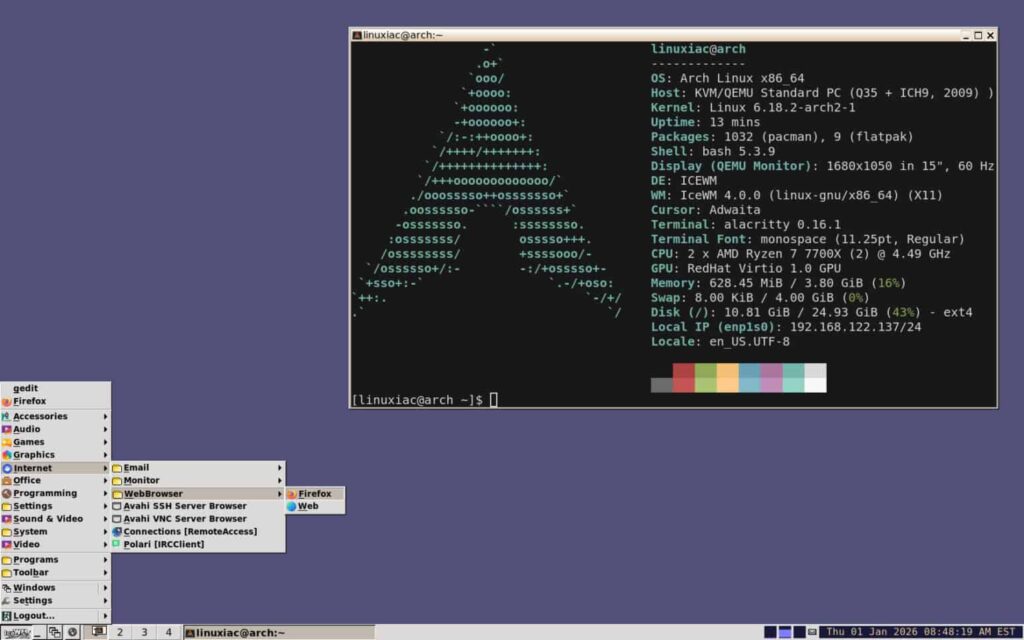
What makes this update genuinely useful is the keyboard-first approach. Users can now type the first letter of an application class name in the Alt+Tab quick switch to select the next instance window of that application class.
For example, hit Alt+Tab and press “F” to jump directly to Firefox windows, or “T” for terminal instances. Number keys also work for direct selection in horizontal mode, while mouse support provides flexibility for different workflows.
The navigation improvements extend beyond keyboard shortcuts. IceWM 4.0 introduces QuickSwitchPreview, a new mode that shows live previews of applications while the quick switch is active.
These previews update in real time, eliminating the guesswork when switching between similar-looking windows in busy workspaces. Users can even open the system menu directly from the Alt+Tab interface, streamlining common window management tasks.
Modern Graphics and HiDPI Support
IceWM 4.0 finally embraces modern compositing with meaningful visual upgrades. Alpha blending and 32-bit RGBA support is now the default, bringing smoother transparency effects without additional configuration hassles.For users with high-resolution displays, this release delivers targeted improvements. The update introduces support for high-resolution icons in WM_ICON_SIZE, support for HiDPI monitors to the submenu indicator, and faster icon drawing by caching the images server-side (9to5Linux) . Icon sizes have been standardized from 16 to 256 pixels, ensuring consistent appearance across different screen densities.
The performance benefits are tangible. Server-side icon caching reduces rendering overhead, particularly noticeable on systems displaying numerous application icons in taskbars and menus. This optimization means smoother scrolling through menus and faster workspace switching even on older hardware.
Finally, IceWM 4.0 updates translations across multiple languages, including Swedish, Catalan, German, Japanese, Dutch, Slovak, Indonesian, Portuguese, Brazilian Portuguese, and Slovenian.For more information, see the changelog.
add a comment


Incus 6.23 Container & Virtual Machine Manager Released
The Incus project has rolled out version 6.23, marking the final update in the 6.x series before the anticipated 7.0...

KaOS 2026.03 Released With Major Move Away From systemd Components
The KaOS project has rolled out its March 2026 ISO, introducing one of the most extensive internal transformations the distribution...


8 Ubuntu Terminal Tools You Must Master in 2026
Introduction1. micro — The Terminal Editor With Zero Learning Curve2. Neovim — IDE-Level Terminal Editing When You Are Ready3. tmux...


Canonical Plans Controversial GRUB Changes for Ubuntu 26.10 Secure Boot
Canonical is considering a significant overhaul to how Secure Boot works in Ubuntu 26.10, with a proposal aimed at reducing...
