Physical Address
304 North Cardinal St.
Dorchester Center, MA 02124
Physical Address
304 North Cardinal St.
Dorchester Center, MA 02124

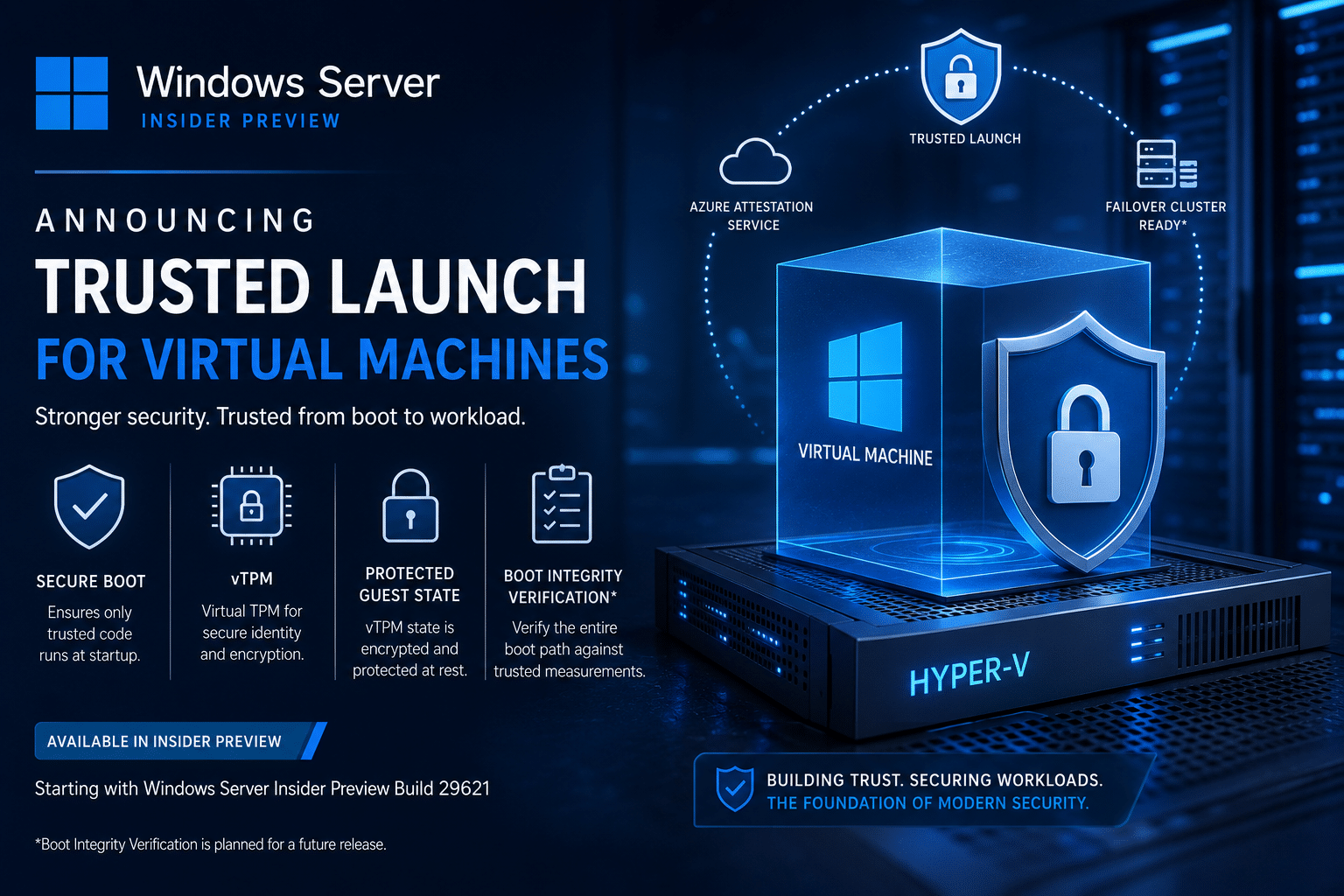
Microsoft has unveiled Trusted Launch for Virtual Machines (TVMs) in the latest Windows Server Insider Preview, marking a significant advancement in virtualization security. Designed for Hyper-V Generation 2 virtual machines, Trusted Launch introduces multiple hardware-backed security features that help protect workloads from sophisticated boot-level and firmware attacks.
Available beginning with Windows Server Insider Preview Build 29621, the feature brings enterprise-grade protections such as Secure Boot, virtual Trusted Platform Module (vTPM), and guest state protection, laying the foundation for a more secure virtualization platform in future Windows Server releases.

As cyber threats continue to evolve, attackers are increasingly targeting firmware and boot processes rather than traditional operating system vulnerabilities.
Unlike malware operating inside Windows, bootkits and firmware-based attacks execute before the operating system loads, making them significantly harder to detect using conventional antivirus or endpoint security solutions.
Trusted Launch addresses this challenge by establishing a hardware-rooted chain of trust that validates a virtual machine from the moment it powers on.
The result is a virtualization environment capable of detecting unauthorized modifications before the guest operating system even starts.
Trusted Launch combines several modern security technologies into a single security profile for Hyper-V Generation 2 virtual machines.
Secure Boot verifies that only digitally signed and trusted bootloaders, firmware components, and operating system files are allowed to execute during startup.
This prevents attackers from loading malicious code before Windows or Linux begins booting.
Trusted Launch automatically provisions a virtual Trusted Platform Module (vTPM) for every protected virtual machine.
The vTPM enables:
This provides virtual machines with security capabilities similar to those available on modern physical hardware.
One of the most important additions is Guest State Protection.
Every Trusted Launch VM stores its guest state—including TPM secrets—using a unique encryption key maintained by a Key Storage Provider (KSP) on the host server.
Without this key, the virtual machine simply cannot start.
This significantly reduces the risk of offline tampering or unauthorized copying of virtual machine state.
Microsoft is also introducing Boot Integrity Verification, one of the most anticipated Trusted Launch capabilities.
This feature measures every stage of the boot process and compares those measurements against trusted reference values stored within the Microsoft Azure Attestation Service.
If any boot component has been modified—including firmware, bootloaders, or critical drivers—the verification process detects the change before workloads begin running.
This enables organizations to identify attacks that traditional endpoint protection software may never see.
Potential remediation actions include:
Although Boot Integrity Verification is planned for Trusted Launch, it is not yet available in the current Insider Preview.
Traditional Hyper-V Generation 2 virtual machines already support Secure Boot and optional vTPM functionality.
However, administrators managing clustered environments often encounter operational challenges.
For example, when a VM containing a vTPM is moved between cluster nodes, administrators typically must manually transfer TPM protection keys before the VM can successfully start.
Trusted Launch eliminates this complexity.
In future releases, when Trusted Launch virtual machines run inside Windows Failover Clusters, the protected vTPM state will automatically migrate with the virtual machine during:
This ensures continuous availability without manual intervention.
The initial Insider Preview focuses on introducing the foundational Trusted Launch architecture.
Currently supported features include:
These capabilities allow administrators to begin testing Trusted Launch while Microsoft continues expanding functionality.
Since this is an Insider Preview, several capabilities remain under development.
The current preview does not support:
Microsoft has indicated these capabilities will arrive in future Insider builds.
Organizations interested in testing Trusted Launch should first prepare a compatible Windows Server Insider environment.
The deployment process involves several steps.
Trusted Launch requires:
Install the Hyper-V role if it is not already enabled.
A server restart is required after installation.
Administrators must configure the required Windows registry key to inform system components that Trusted Launch is enabled.
This registry configuration activates the Trusted Launch environment within Windows Server.
Trusted Launch relies on the IGVmAgent (Isolated Guest Virtual Machine Agent).
Administrators should verify that the service status is:
Running
If the service is not running, Microsoft recommends reviewing the following Event Viewer logs:
These logs help diagnose startup issues during testing.
Create an external Hyper-V virtual switch if one does not already exist.
This provides network connectivity for Trusted Launch virtual machines.
Administrators can create:
Windows and supported Linux operating systems can both be deployed.
Once the VM has been created, administrators can verify that the Guest State Isolation Type reports:
TrustedLaunch
This confirms the VM is using the new security profile.
Microsoft recommends stopping the IGVmAgent service and attempting to restart the VM.
If Guest State Protection is functioning correctly, the virtual machine will not start while the service is unavailable, demonstrating that protected guest state is actively enforced.
Trusted Launch delivers several security advantages for enterprise virtualization environments.
Firmware malware and bootkits become significantly harder to deploy successfully.
Security is rooted in cryptographic trust rather than relying solely on operating system protections.
Organizations adopting Zero Trust and regulated security frameworks gain stronger workload integrity.
Future Boot Integrity Verification provides measurable assurance that workloads started from a known-good state.
Automatic handling of protected vTPM state removes manual administrative tasks during migration and failover.
Trusted Launch represents Microsoft’s continued investment in securing Windows Server virtualization against increasingly sophisticated attacks.
While the current Insider Preview focuses on foundational technologies, future releases are expected to add:
Together, these capabilities will create one of the most secure Hyper-V environments Microsoft has ever delivered.
Trusted Launch for Virtual Machines is more than just another Hyper-V feature—it’s a major step toward securing virtual infrastructure at the firmware and boot levels.
By combining Secure Boot, vTPM, and Protected Guest State, Microsoft is helping organizations defend against attack techniques that traditional endpoint security often cannot detect.
Although still in preview, Trusted Launch demonstrates Microsoft’s long-term vision for trusted virtualization in Windows Server. Enterprises evaluating future Windows Server deployments should begin testing the feature now, providing feedback through the Windows Server Insider Program while preparing for broader adoption as the platform matures.
As cybersecurity threats continue shifting toward firmware and virtualization layers, Trusted Launch positions Windows Server to meet the next generation of enterprise security challenges.

We have detected that you are using extensions to block ads. Please support us by disabling these ads blocker.





