



245views
The Linux distribution landscape just witnessed an unconventional move. Nitrux 5.1, released on January 7, 2026, has officially ended support for virtual machine environments, pivoting exclusively toward physical hardware deployments. This strategic shift marks a significant departure from conventional Linux distribution development practices.
What Makes Nitrux Unique?
Before diving into the latest release, it’s important to understand what sets Nitrux apart. This Debian-based distribution operates as an immutable, systemd-free operating system that prioritizes AppImage-based software delivery. Since version 5.0, it has shipped with Hyprland as its default desktop environment, positioning itself as a modern, Wayland-focused system.
The Virtual Machine Exit Strategy
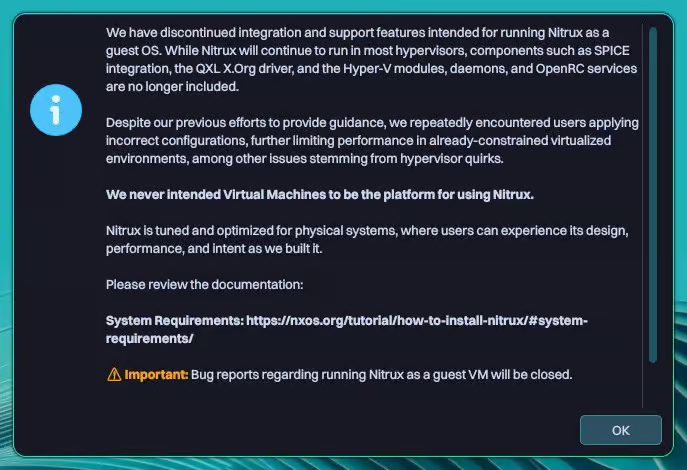
The most controversial change in Nitrux 5.1 is the complete removal of virtual machine support. The development team has stripped out all VM-specific components, including SPICE integration, QXL X.Org driver, and Hyper-V modules.
While the distribution may still boot under most hypervisors, users attempting to run Nitrux 5.1 in a virtual environment will encounter a warning message followed by an automatic system restart. The project maintainers have explicitly stated that any bug reports related to virtualized setups will be immediately closed.
Why This Decision?
The Nitrux team explains that the distribution is engineered and optimized exclusively for physical hardware. This focus allows them to fine-tune performance, ensure system stability, and maintain tighter control over the computing environment without accounting for the variables introduced by virtualization layers.
Kernel and Performance Enhancements
Nitrux 5.1 consolidates its kernel strategy by standardizing on Linux kernel 6.18 LTS across both ISO images. This kernel build incorporates CachyOS performance patches and replaces the long-standing Liquorix kernel option.
New Scheduling Architecture:
- SCX (Sched-ext) now serves as the default process scheduler
- ADIOS functions as the default I/O scheduler
- These changes target reduced latency and more predictable system behavior on contemporary storage devices and processors
Desktop Environment Updates
The desktop stack receives comprehensive updates throughout Nitrux 5.1:
Hyprland and Wayland Ecosystem
Hyprland and its companion utilities have been updated to version 0.52, bringing improved window management and compositor stability. The desktop environment now runs on KDE Frameworks 6.20 and Qt 6.9.2, ensuring modern application compatibility.
Visual Refinements:
- Waybar features a redesigned floating “island” layout for improved aesthetics
- Crystal Dock advances to version 2.16 with enhanced functionality
- Wofi interface adopts rounded geometry throughout for visual consistency
Functional Improvements:
- Hyprlock now displays battery status and media playback information
- Grimshot gains window-specific screenshot selection capabilities
- Long-standing launcher issues causing multiple overlapping instances have been resolved
Network Security Hardening
Nitrux 5.1 implements several security-focused networking changes:
DNS Privacy by Default
NetworkManager now routes all DNS queries through dnscrypt-proxy automatically, bypassing DHCP-provided DNS servers to prevent potential DNS leaks. This configuration protects user privacy by encrypting DNS queries and preventing ISP-level tracking.
Firewall Modernization
The distribution transitions from UFW to Firewalld as its default firewall solution. Accompanying this change is Cinderward, a new MauiKit-based graphical interface designed specifically for Wayland systems, making firewall management more accessible to users without command-line expertise.
Bluetooth Security
Bluetooth configuration receives security-focused updates:
- Secure pairing modes are now mandatory
- Low-quality headset profiles are disabled by default
- Passive device exposure is minimized to reduce attack surface
Application Management Evolution
NX AppHub reaches its 1.0 milestone with significant improvements across multiple areas:
- Enhanced sandboxing for improved security isolation
- Better desktop integration for seamless user experience
- Comprehensive safety checks before application execution
- Improved cleanup logic for system maintenance
The Nitrux Update Tool advances to version 2.2.7, introducing critical reliability features:
- File locking mechanisms to prevent update conflicts
- Safer reboot handling using Magic SysRq functionality
- Stricter validation during system rescue operations
Power Management Intelligence
Two new components address modern power management needs:
NX Dynamic PPD introduces adaptive power profile management that adjusts system behavior based on current workload and power conditions.
NX Battery Notify provides battery health monitoring and notifications, helping users maintain optimal battery longevity on portable systems.
WireGuard Integration
Wirecloak debuts as a native WireGuard VPN client featuring a graphical interface tailored to Nitrux’s immutable architecture. This addition simplifies secure network connectivity for users who need VPN functionality without configuration complexity.
Hardware Validation Layer
A new Hardware Compatibility Validation Layer performs early-stage checks to ensure system compatibility:
- CPU capability verification
- GPU and ISO alignment validation
- Detection of unsupported workflow configurations
This proactive approach aims to prevent compatibility issues before they manifest as system failures or unexpected behavior.
Component Removals
In keeping with its streamlined approach, Nitrux 5.1 removes several components deemed redundant or contrary to the project’s direction:
- SwayOSD
- nwg-displays
- Seatd
- Tini
- Plasma Firewall
- Legacy SysV scripts
These removals reflect the project’s commitment to a cleaner, Wayland-focused architecture that eliminates systemd dependencies.
Who Should Use Nitrux 5.1?
This release targets specific user profiles:
Ideal For:
- Users with dedicated hardware who want maximum performance
- Linux enthusiasts interested in systemd-free alternatives
- Developers seeking an immutable, AppImage-centric platform
- Privacy-conscious users who value built-in security measures
Not Recommended For:
- Users who need to test systems in virtual environments
- Those requiring compatibility with legacy desktop applications
- Anyone dependent on systemd-based service management
Getting Nitrux 5.1
Users interested in experiencing Nitrux 5.1 can download ISO images directly from the project’s official website. Installation requires physical hardware—remember, virtual machine deployments are no longer supported.
The project maintains comprehensive documentation covering installation procedures, system requirements, and post-installation configuration.
Final Thoughts
Nitrux 5.1 represents a bold experiment in Linux distribution development. By deliberately constraining its deployment scenarios, the project team signals confidence in their technical direction and willingness to prioritize depth over breadth.
For users willing to commit dedicated hardware to the platform, Nitrux 5.1 offers a unique combination of modern desktop technology, robust security defaults, and performance-oriented design decisions. The removal of virtual machine support will undoubtedly limit adoption, but for its target audience, this focused approach may deliver precisely the refined experience they seek.
1 Comment
Leave a Response


How to Automatically Block Suspicious IPs using iptables and Fail2Ban
Your Linux server is under attack right now you just might not know it yet. Every internet-facing machine faces a...
How to Setup Two-Factor Authentication For SSH In Linux
Password-only SSH authentication is one of the most common — and most dangerous — security gaps in Linux server management. Attackers armed with credential lists and automated scripts can hammer your SSH port indefinitely. If your password is the only thing standing between them and root access, your environment is one breach away from a serious incident. Two-factor authentication (2FA) via Google Authenticator eliminates that single point of failure. Even if an attacker gets your password, they still need the time-based one-time code from your phone — a six-digit number...

JetStream 3 Debuts as a Major Browser Benchmark Update
JetStream 3 has been introduced as a major upgrade to one of the most widely recognized browser benchmarking tools, representing...

How to Set Up Automated Incremental Backups with rsync and Cron on Linux
Data loss is one of the most disruptive events a system administrator or Linux user can experience. Hard drives fail....




[…] recommends performing a fresh installation with the new ISO, although systems currently running Nitrux 5.1 can upgrade using the built-in update […]