


16views
Microsoft Defender for Cloud Apps is a Cloud Access Security Broker (CASB) solution that delivers comprehensive security for Software as a Service (SaaS) applications across your organization. This security platform provides visibility into shadow IT, threat protection, data loss prevention capabilities, and security posture management for cloud-based applications. The tool integrates with Microsoft Defender XDR to offer extended detection and response across the full attack chain. Recent updates include March 2026 changes to Secure Score category calculations that reclassify some recommendations from the Cloud apps category to Identity, more accurately reflecting where controls apply without changing the overall Secure Score.
What are cloud apps?
Cloud apps, or SaaS applications, are software services hosted in the cloud and accessed over the internet rather than installed locally on your devices. These applications include Microsoft 365, Google Workspace, Salesforce, Slack, Dropbox, AWS, Zoom, and ServiceNow. While these services enable remote data access and collaboration, they also introduce security risks, including shadow IT—unsanctioned applications used without IT department approval, data exfiltration, and anomalous user behavior that could indicate compromised accounts.
What is Microsoft Defender for Cloud Apps?
Microsoft Defender for Cloud Apps was originally introduced as Microsoft Cloud App Security (MCAS), a CASB service later rebranded and integrated into the broader Microsoft Defender suite as Microsoft Defender for Cloud Apps.
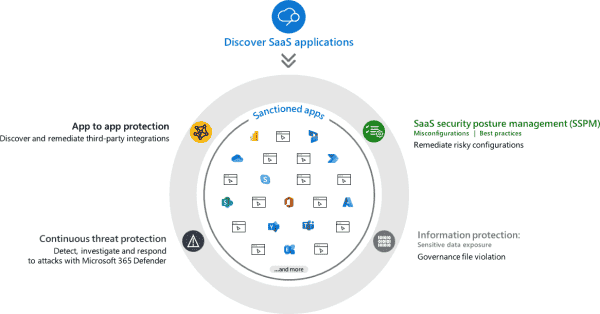
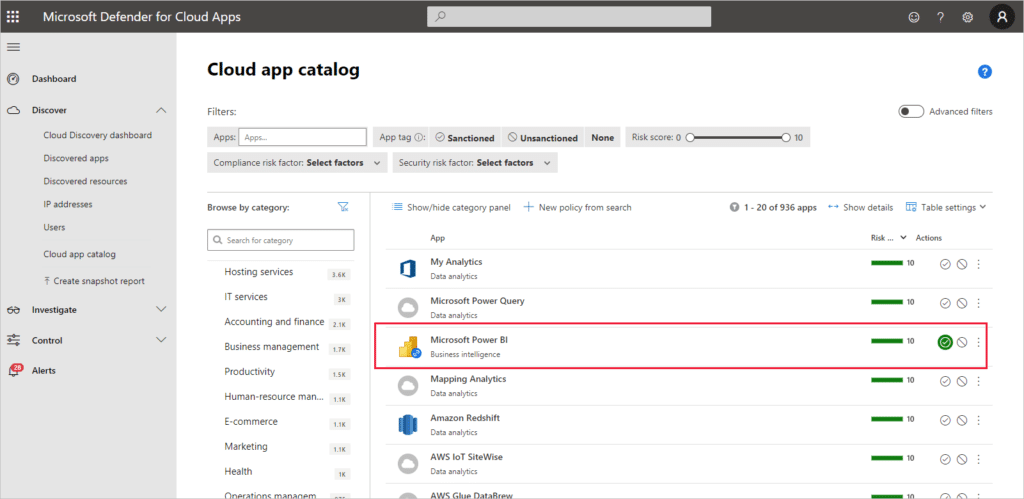
Defender for Cloud Apps supports an extensive catalog of SaaS applications through API connectors. The platform monitors Microsoft services, including Microsoft 365, Microsoft Entra ID (formerly Azure AD), SharePoint, and OneDrive, as well as third-party applications such as Google Workspace, AWS, Dropbox, Salesforce, Slack, ServiceNow, Zoom, and OAuth-enabled apps with permissions to critical resources. The solution discovers cloud services via network traffic analysis and assigns risk rankings based on over 90 risk indicators, including security configuration and compliance standards.
The tool integrates deeply into the Microsoft Defender XDR ecosystem to provide unified threat detection. With Microsoft Defender for Endpoint, it ingests endpoint data for Cloud Discovery and enables the blocking of unsanctioned apps. Integration with Microsoft Purview enhances data loss prevention through data classification and governance. The Microsoft 365 Defender Portal provides a centralized view for CASB alerts, policies, and XDR correlation, enabling security teams to investigate cross-domain attacks that span email, endpoints, identities, and cloud applications.
Protection mechanisms and security features
Defender for Cloud Apps employs three core protection mechanisms: Cloud Discovery analyzes firewall logs to identify application traffic, reverse proxy technology intercepts sessions for real-time inspection, and app connectors provide API integrations for deep application scanning. These mechanisms support configurable policies—activity, file, access, session, and discovery policies—that generate alerts or trigger automated responses for suspicious events.
The platform uses User and Entity Behavior Analytics (UEBA) to detect anomalies, such as unusual login patterns, data access behaviors, or file-sharing activities, using machine-learning algorithms. Adaptive Access Control dynamically adjusts access based on user risk scores, while the policy engine monitors for anomalous spikes, risky behavior, or policy violations. Conditional Access policies integrate with Microsoft Entra ID to enforce granular controls based on user, device, location, IP address, and behavior, with actions including multi-factor authentication requirements, session termination, or file quarantine.
Threat detection capabilities include activity policies that monitor audit logs for suspicious activities, such as logins from anonymous IP addresses, mass downloads, or administrative password changes. The platform automatically detects malware in files using Microsoft Threat Intelligence. It identifies ransomware using out-of-the-box policies that flag mass encryption across Microsoft 365, Google Workspace, Box, and Dropbox. OAuth app policies identify overprivileged applications, while Cloud Discovery alerts flag abnormal traffic patterns.
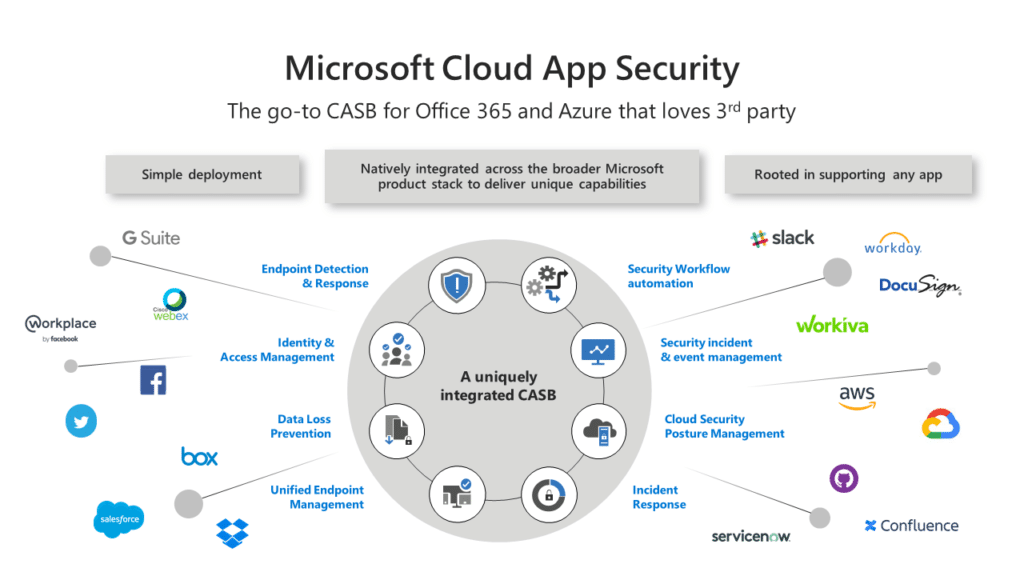
Information protection features scan and label sensitive data—such as credit card numbers or personally identifiable information—and block sharing to unauthorized domains. SaaS Security Posture Management (SSPM) assesses application security configurations and compliance, providing governance actions and security recommendations. App-to-app protection monitors OAuth permissions to prevent data exfiltration through least-privilege enforcement.
Installation and configuration for administrators
To set up Defender for Cloud Apps, you must at least be a Security Administrator in Microsoft Entra ID or Microsoft 365. Access the Microsoft Defender Portal and navigate to Settings to configure your environment. Add your managed domains to identify internal versus external users—domains not configured as internal are marked as external users. This configuration determines where files should and should not be shared.
Connect applications you want to protect through app connectors. In the Microsoft Defender Portal, navigate to Cloud Apps > Policies > Policy templates to configure protection policies. Enable Microsoft Purview Information Protection integration if you need to work with sensitivity labels and data classification. For Cloud Discovery, configure automatic log collection using Docker containers or Azure Kubernetes Service (AKS) for continuous reporting.
Administrators with different roles have specific access permissions. Default Microsoft 365 and Microsoft Entra ID admin roles automatically have access to Defender for Cloud Apps. The Global Discovery admin can view and edit Cloud Discovery settings with full permissions for Cloud Discovery activities. To enable real-time session protection, configure Microsoft Entra ID Conditional Access policies for the applications you want to control, then create access and session policies in Defender for Cloud Apps.
Recent features and updates
Microsoft released AI Agent Protection in November 2025 as a preview feature that automatically discovers AI agents created in Microsoft Copilot Studio and Azure AI Foundry. The solution collects audit logs, continuously monitors for suspicious activity, and integrates detections into the XDR Incidents and Alerts experience with a dedicated Agent entity. For Copilot Studio AI agents, Defender provides real-time protection by monitoring agent runtime and blocking harmful or suspicious actions during execution, such as prompt injection attacks.
A new Dynamic Threat Detection model introduced in June 2025 continuously adapts to the evolving SaaS threat landscape without requiring manual policy updates or reconfiguration. Several legacy anomaly detection policies have transitioned to this adaptive model to provide smarter, more responsive security coverage. The Behaviors data type, released in June 2025, enhances threat detection accuracy by reducing alerts on generic anomalies and surfacing alerts only when observed patterns align with real security scenarios. Security operations teams can now use Behaviors in Advanced Hunting to conduct investigations and build custom detections based on behavioral signals.
OAuth application information became available in attack paths in April 2025 as a preview feature, enabling security teams to visualize how attackers could exploit OAuth apps to move laterally within environments and access critical assets. The OAuthAppInfo table was added to Defender XDR advanced hunting in the same month, providing enhanced visibility into Microsoft 365-connected OAuth applications registered with Microsoft Entra ID.
The Workday connector was updated in January 2026 to require only View permissions, removing the previous requirement for Modify permissions to align with the principle of least privilege. Microsoft Defender for Cloud Apps permissions integrated with Microsoft Defender XDR Unified RBAC in December 2025, providing centralized role-based access control across the XDR platform.
In March 2026, Microsoft Defender for Cloud Apps updated how Secure Score categories are calculated so that some security recommendations previously counted under the Cloud apps category are now treated as identity-related and moved to the Identity category. This change does not affect the overall Secure Score but can cause the individual identity and app scores to shift, providing a more accurate reflection of where controls actually apply.
Pricing and licensing
Microsoft Defender for Cloud Apps is included in Microsoft 365 E5 licenses, which cost approximately $57 per user per month. For organizations with existing Microsoft 365 E3 licenses, the E5 Security add-on provides access to Defender for Cloud Apps at roughly $12 per user per month. Standalone Defender for Endpoint Plan 2 is licensed per user (covering up to five devices) and costs approximately $5.20 per user monthly.
Effective July 1, 2026, Microsoft will implement price increases for several Microsoft 365 components. The Microsoft Defender Suite will cost $12.00 per user per month for enterprise customers with Microsoft 365 E3 or equivalent licenses, with no seat restrictions. A separate offering, the Defender Suite for Business Premium, costs $10.00 per user per month and is designed for organizations with Microsoft 365 Business Premium, which supports up to 300 users.
Organizations using annual commitment, monthly billing plans will see a 5% price increase at renewal, while prepaid annual plans avoid this increase.
add a comment

What is Microsoft Agent 365?
What Is Microsoft Agent 365? Microsoft Agent 365 is a platform‑neutral control plane that treats AI agents as first‑class entities...
Microsoft 365 Backup: delegate administration, configure billing policies
Microsoft has launched departmental billing for Microsoft 365 Backup, effective March 2, 2026, enabling organizations to configure billing policies, delegate...

Why Active Directory Password Policy Fails Modern Attacks (and What Admins Need Instead)
According to Microsoft’s latest Digital Defense Report, 97% of identity-based attacks are password spray attacks. This highlights a key reality:...

How to Automatically Block Suspicious IPs using iptables and Fail2Ban
Your Linux server is under attack right now you just might not know it yet. Every internet-facing machine faces a...




