Physical Address
304 North Cardinal St.
Dorchester Center, MA 02124
Physical Address
304 North Cardinal St.
Dorchester Center, MA 02124

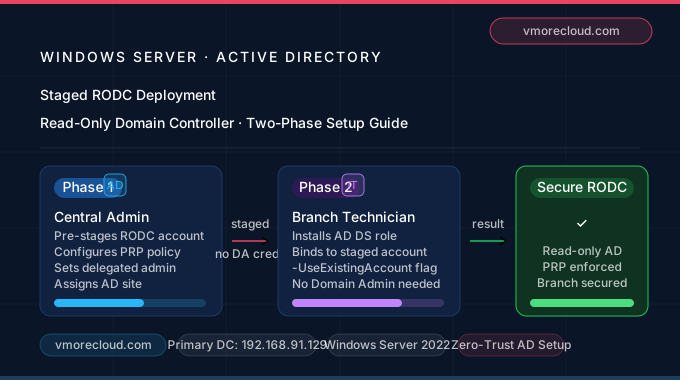
A Staged RODC deployment is a two-phase approach to installing a Read-Only Domain Controller where the AD account creation and the actual server promotion are performed separately — and critically, by different people with different privilege levels.
In a traditional RODC promotion, you need Domain Admin credentials on-site to complete the process. In many organizations, that’s a security non-starter. A branch office technician shouldn’t need Domain Admin rights just to join a server to the domain as an RODC. Staged deployment solves this cleanly.

Pre-creates the RODC computer account in AD with all settings configured (PRP, delegated admin, site assignment).
Attaches the physical server to the pre-staged AD account. No Domain Admin credentials required.
Fully functional, policy-compliant RODC at the branch — with zero privilege escalation risk.
Both methods result in the same read-only domain controller — but the path to get there is very different.
| Aspect | Standard RODC Deployment | Staged RODC Deployment |
|---|---|---|
| Who promotes the server? | Domain Admin on-site | Branch tech (non-privileged) |
| AD account pre-created? | No | Yes ✅ |
| PRP configured before promotion? | No | Yes ✅ |
| Delegated admin set upfront? | No | Yes ✅ |
| Risk of credential exposure at branch? | Higher | Minimized ✅ |
| Supports GUI & PowerShell? | Yes | Yes |
| Best for distributed enterprises? | Not ideal | Purpose-built ✅ |
Here’s what actually happens behind the scenes during a staged RODC deployment:
Using either Active Directory Users and Computers (ADUC) or PowerShell, a Domain Admin pre-creates a computer account for the future RODC in the Domain Controllers OU. During this step, they configure:
At this point, the RODC account exists in AD but no physical server is attached to it yet. Think of it as a reserved parking spot with security rules already painted on the floor.
The local administrator installs Windows Server, runs the AD DS role installation, and during the Domain Controller promotion wizard, selects “Use existing RODC account”. The server binds to the pre-staged account and inherits all configuration set in Phase 1 — without the technician ever needing Domain Admin credentials.
The RODC computer account is created in AD before any server hardware is involved — configuration-first, hardware-second.
Branch technicians complete server promotion without ever receiving Domain Admin or Enterprise Admin credentials.
Password Replication Policy is configured during Phase 1 — not as an afterthought — ensuring no unauthorized caching on day one.
Assign a specific user or group as the RODC’s local admin during account creation. Granular, auditable, and revocable.
AD site assignment, DNS, and GC roles are all locked in during Phase 1, ensuring the RODC integrates correctly from the moment it comes online.
Once deployed, a staged RODC behaves identically to a standard RODC — same replication model, same PRP enforcement, same security boundaries.
Let’s walk through the complete process. Our environment: primary writable DC at 192.168.91.129, domain vmorecloud.com, and a branch server that will become our staged RODC.
Open PowerShell as Administrator on your primary DC and run:
BranchRODC01 now exists in your Domain Controllers OU with PRP and delegation already configured. No physical server is involved yet.
BranchRODC01 and select the AD site (BranchSite).vmorecloud\BranchTechUser. This grants them permission to attach the physical server in Phase 2.The branch technician logs into the new Windows Server at the branch. They do not need Domain Admin credentials — only the delegated account configured in Phase 1.
-UseExistingAccount flag is what tells the wizard to bind to the pre-staged account rather than create a new one. If you omit this, the promotion will attempt a fresh standard RODC deployment and fail or create a duplicate account.
BranchRODC01 is now a fully operational Read-Only Domain Controller — deployed without ever handing Domain Admin credentials to the branch technician.
Get-ADDomainController shows IsReadOnly: Truerepadmin /replsummary shows 0 consecutive failuresTraditional RODC deployments require Domain Admin credentials to be used at the branch server. In locations without physical security controls or a trusted IT team, that’s an unacceptable risk. Staged deployment ensures those credentials never leave the central datacenter.
When you’re rolling out DCs to 20+ branch offices, you can’t send a Domain Admin to each site. Staged deployment lets your central AD team pre-configure everything, and local contractors or helpdesk staff complete the physical setup — no security shortcuts required.
Because all sensitive configurations — PRP, delegated admin, site assignment — are set centrally before the server is provisioned, your AD governance is clean and traceable from the very beginning. There’s no “we’ll fix the policy later” situation to audit around.
With the AD account pre-staged, branch provisioning becomes a repeatable, low-risk process. Your central team can pre-create accounts for 10 branches in an afternoon, and each branch can go live independently — on their own schedule.
The staged model enforces a core Zero-Trust concept: never grant more access than what is needed for the task. The branch technician gets exactly the permissions required to attach the server — nothing more, nothing less.
Staged RODC deployment is one of those Active Directory features that genuinely deserves more attention than it gets. It’s not just a convenience — it’s a principled security architecture that separates configuration authority from physical deployment access. In environments where branch offices, third-party technicians, or remote sites are part of the picture, it’s the right way to deploy every time.
In our Domain environment, deploying a staged RODC from the primary DC at 192.168.91.129 demonstrates just how practical and accessible this process is. The central AD team controls everything meaningful — the branch tech just runs the final wizard. That’s clean, auditable, and secure by design.
Whether you’re an enterprise architect standardizing DC rollouts or an IT admin hardening a growing network, staged RODC deployment should be part of your Active Directory playbook — not the exception, but the rule.
In the Next section we will learn What Read only DNS in Windows Server 2025

We have detected that you are using extensions to block ads. Please support us by disabling these ads blocker.






I am truly thankful to the owner of this web site who has shared this fantastic piece of writing at at this place.
[…] In the next section we will learn How to Deploy a Staged Read-Only Domain Controller (RODC) […]