Physical Address
304 North Cardinal St.
Dorchester Center, MA 02124
Physical Address
304 North Cardinal St.
Dorchester Center, MA 02124

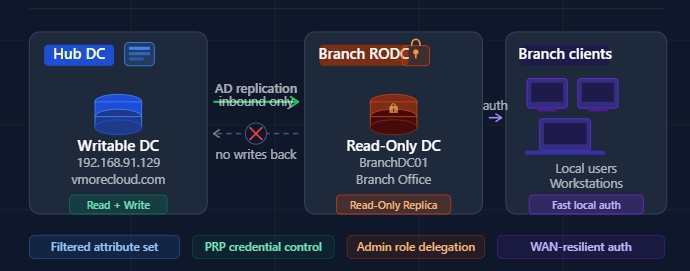
A practical, no-fluff guide to understanding, deploying, and securing your infrastructure with RODC on Windows Server.
A Read-Only Domain Controller (RODC) is a special type of domain controller introduced in Windows Server 2008 that holds a read-only partition of the Active Directory database. Unlike a standard writable domain controller (DC), an RODC cannot originate changes to Active Directory — it only receives updates, never sends them.

Think of it like a read-only snapshot of your AD environment. Users at a branch office can still log in, authenticate, and access resources — but if someone compromises that RODC, they can’t push malicious changes back into your core directory. It’s a brilliant containment strategy.
| Feature | Writable DC | Read-Only DC (RODC) |
|---|---|---|
| AD Database | Full read/write | Read-only copy |
| Replicates changes TO hub? | Yes | No |
| Stores all password hashes? | Yes | No (filtered by PRP) |
| Suitable for unsecured sites? | No | Yes |
| Admin role separation | Limited | Yes (local admin delegation) |
When you deploy an RODC at a branch, it pulls a filtered replica of Active Directory from a writable DC at your central hub — in our case, from the vmorecloud.com domain at 192.168.91.129. Here’s the flow in plain English:
RODC also supports a Filtered Attribute Set (FAS) — a list of AD attributes that are intentionally excluded from replication to the RODC. This means even if an attacker extracts the NTDS.dit from the RODC, those sensitive attributes simply won’t be there.
Only approved user password hashes are cached locally. No admin credentials are ever stored on the RODC.
AD changes only flow to the RODC — never originate from it. Compromising an RODC cannot corrupt your main AD forest.
Non-domain users (e.g., branch IT staff) can manage the RODC locally without being given Domain Admin privileges.
Branch users authenticate against the local RODC instead of over a slow WAN link to the central DC.
Fine-grained control over which accounts have their credentials cached — or explicitly denied — on the RODC.
Sensitive AD attributes can be excluded from the RODC’s replica, reducing data exposure in case of physical theft.
Let’s get our hands dirty. Below is a real-world deployment walkthrough for promoting a Windows Server to an RODC in the vmorecloud.com domain, with the primary DC sitting at 192.168.91.129.
Run this on your primary DC to ensure the schema is ready for RODC:
This is critical. Before promoting, decide which accounts can be cached. On your primary DC:
repadmin /replsummary output.
Branch offices, remote sites, and co-location facilities don’t always have the same physical security controls as your main data center. If a malicious actor walks out with an RODC server, the damage is contained — they can’t use it to inject changes into your live AD environment.
When the WAN link between a branch and the main datacenter goes down, users can still authenticate locally using cached credentials. Business operations don’t halt just because of a network hiccup — and you didn’t have to put a full writable DC at that location to achieve this.
With RODC’s admin role separation, you can delegate local management responsibilities to branch staff without ever making them Domain Admins. This follows the principle of least privilege and drastically shrinks your attack surface.
Even if an attacker extracts the NTDS.dit from a compromised RODC, they only get a limited set of cached password hashes — and none of your privileged admin credentials. Compare that to a writable DC compromise, where the entire domain is at risk.
Many compliance frameworks (ISO 27001, NIST, CIS Controls) require privileged account isolation and access control segmentation. RODC naturally enforces these controls and provides audit-friendly logging for all authentication events.
A Read-Only Domain Controller isn’t just a “nice to have” — for any organization running branch offices, remote sites, or cloud-adjacent infrastructure, it’s a foundational security decision. By placing an RODC at locations where you can’t guarantee physical security, you’re applying the single most important AD security principle: minimize what an attacker can do even if they get in.
In our vmorecloud.com lab environment, deploying an RODC alongside our primary DC at 192.168.91.129 demonstrates just how accessible and practical this setup is. With built-in PowerShell support and granular policy controls, there’s no reason to leave your branch offices exposed with a full writable domain controller when a hardened RODC will do the job — and do it safer.
Whether you’re a sysadmin hardening a corporate environment or a cloud architect designing a hybrid identity solution, RODC deserves a permanent spot in your Active Directory toolkit.
In the next section we will learn How to Deploy a Staged Read-Only Domain Controller (RODC)

We have detected that you are using extensions to block ads. Please support us by disabling these ads blocker.





