Physical Address
304 North Cardinal St.
Dorchester Center, MA 02124
Physical Address
304 North Cardinal St.
Dorchester Center, MA 02124

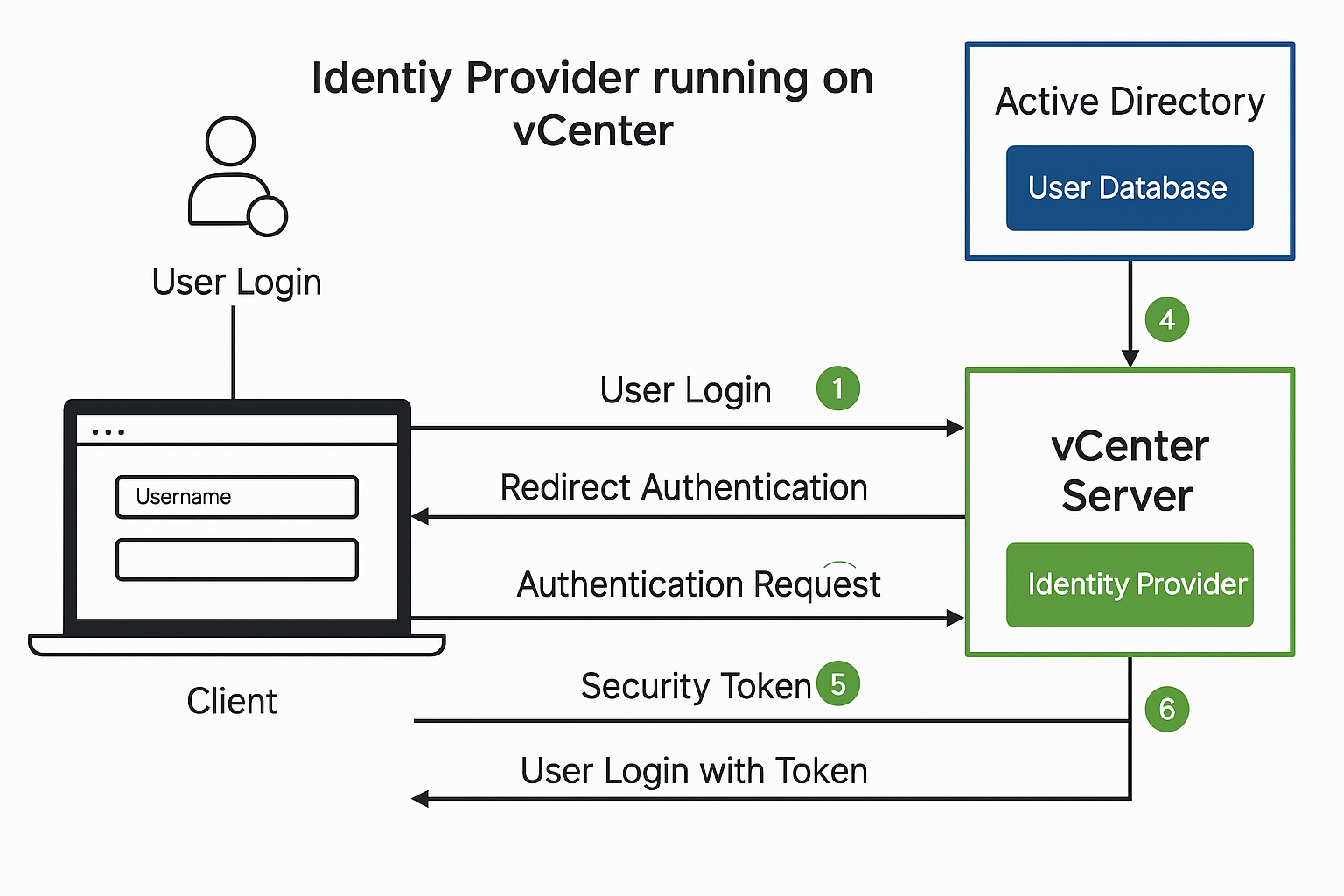
As enterprises move toward centralized identity and access management, integrating VMware vCenter with Windows Active Directory Federation Services (ADFS) offers a powerful solution. This integration enables Single Sign-On (SSO) capabilities using SAML 2.0, improving user experience, security, and operational efficiency in hybrid cloud environments.
In this guide, we’ll walk you through the process of integrating VMware vCenter Server with Windows ADFS, ensuring your infrastructure benefits from federated identity and seamless authentication.

SAML (Security Assertion Markup Language) is an XML-based open standard used for single sign-on (SSO) and secure federated identity management. It allows identity and access information to be securely transferred between an Identity Provider (IdP) and a Service Provider (SP) in this case, AD FS (as IdP) and VMware vCenter (as SP).
Here’s how it works in a real-world setup: When a user attempts to log into the vCenter UI, they’re automatically redirected to the AD FS login portal. This is where the magic of SAML begins. The user enters their corporate credentials, which AD FS then authenticates against Active Directory. Once verified, AD FS generates a SAML assertion a digitally signed XML document that contains the user’s identity information and, optionally, their group memberships.
The user navigates to https://<vcenter-FQDN>/ui and selects the External Identity Provider login option. vCenter redirects the user to the AD FS login page, where the user enters their Active Directory credentials. AD FS authenticates the user using Active Directory (via Kerberos or NTLM, depending on the configuration).
Upon successful authentication, AD FS generates a SAML assertion (a signed XML file) that includes:
NameID)The SAML token is returned to vCenter via the user’s browser (using POST or Redirect binding).
vCenter validates the signature, extracts the user identity and any group information, then:
Before starting, ensure:
Verify access by opening:
https://fs.vmorecloud.com/adfs/ls/IdpInitiatedSignOn.aspx
https://<vcenter-FQDN>/ui/saml/websso/sso/metadataVMware vCenter)SAM-Account-Name to Name IDToken-Groups - Unqualified Names to GroupsAdministration > Single Sign-On > Configuration > Identity Providerhttps://fs.vmorecloud.com/FederationMetadata/2007-06/FederationMetadata.xmlMenu > Administration > Access Control > Global Permissionsvmorecloud.com)vmorecloud.com\vmadmins)https://<vcenter-FQDN>/uiBy federating vCenter with your Windows Server 2022-based AD FS, you unlock modern, secure authentication without needing cloud platforms like Azure. It keeps access centralized, supports existing security policies, and reduces identity management complexity.

We have detected that you are using extensions to block ads. Please support us by disabling these ads blocker.





