


13views
If you’ve been reading my blog for a while, you’ll know I regularly explore backup and recovery tools that simplify life for virtualization administrators—especially those working with VMware vSphere, hybrid environments, or newer platforms like Proxmox VE. Over the years, NAKIVO Backup & Replication has proven to be a reliable and lightweight alternative to larger enterprise solutions, offering agentless backups, solid performance, and strong cost efficiency. One of its advantages is flexibility—it can be deployed on Linux, Windows, or even supported NAS devices, making it adaptable to a wide range of setups.
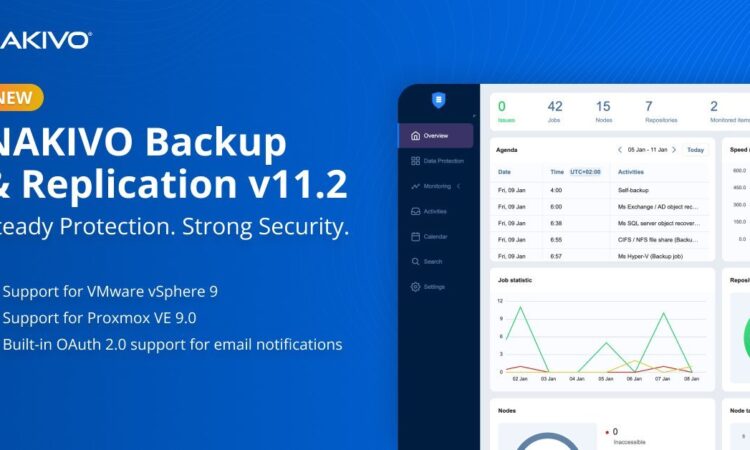
Released on March 10, 2026, NAKIVO Backup & Replication v11.2 introduces important compatibility updates along with a security-related enhancement that’s becoming increasingly relevant. While not a major overhaul, this type of incremental update plays a crucial role in ensuring backup jobs continue running smoothly during infrastructure upgrades. In this article, we’ll look at what’s new, why it matters in real-world scenarios, and how it integrates into common VMware and Proxmox environments.
Before wrapping up, it’s also worth noting that NAKIVO can assist with migrations—for example, moving workloads from VMware to Proxmox. By leveraging existing backups, you can restore directly onto a different hypervisor, simplifying the transition process.
Full Support for VMware vSphere 9
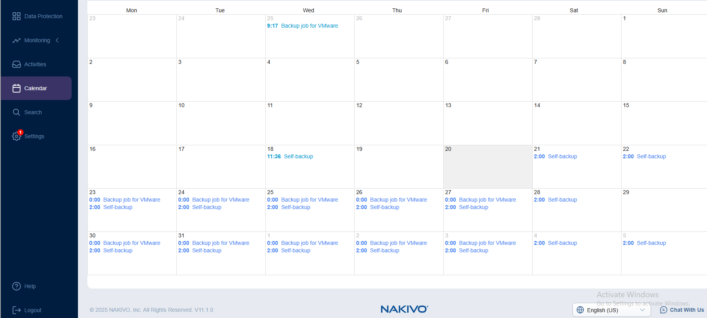
The headline for most readers here: NAKIVO v11.2 now fully supports VMware vSphere 9 (including vCenter Server 9.0.1.0, ESXi 9.0.1.0, and VDDK 9.0.1.0).If you’re planning (or already doing) a vSphere 9 upgrade — especially now that features are bundled under VMware vSphere Foundation (VVF) 9.0 rather than standalone Standard/Enterprise Plus editions this means no more waiting for backup compatibility or running in partial/limited mode.
Key capabilities that carry over unchanged:
- Agentless image-based backup and replication — leverages Changed Block Tracking (CBT) for efficient incrementals.
- Fast, deduplicated, compressed backups — great for reducing storage footprint on repositories.
- Instant VM recovery, granular file-level, and application-object recovery (e.g., Exchange, SQL items).
- Built-in DR with VM replication, failover/failback, and Site Recovery orchestration for non-disruptive testing.
- Ransomware resilience — immutability on supported targets (S3-compatible, cloud object storage like AWS S3, Wasabi, Azure Blob, Backblaze B2; dedup appliances like HPE StoreOnce, NEC HYDRAstor, Dell EMC Data Domain), AES-256 encryption (source, transit, rest), air-gapped options (tape, detached USB/NAS), and pre-recovery malware scanning.
In practice, if your environment is on vSphere 8.x and you’re eyeing 9 for the latest security patches, performance tweaks, or new hardware support, you can upgrade VMware first and then point NAKIVO to it without breaking jobs. (NAKIVO was quick to add initial vSphere 9 compatibility back in 11.04
Proxmox VE 9.0 Full Support + 9.1 Compatibility
NAKIVO continues to invest in Proxmox VE — now with full support for Proxmox VE 9.0 and compatibility for 9.1.For those running Proxmox (often in homelabs, edge sites, or cost-sensitive production — and increasingly as a VMware alternative):
- Agentless backup/replication at the host level — no guest agents needed.
- Block-level incrementals via native/propriety change tracking (similar to CBT).
- Instant recovery of VMs, templates, files, or app objects.
- Replication for quick DR, plus automated verification with screenshot reports.
- Same ransomware features: encryption, immutability, air-gapped copies.
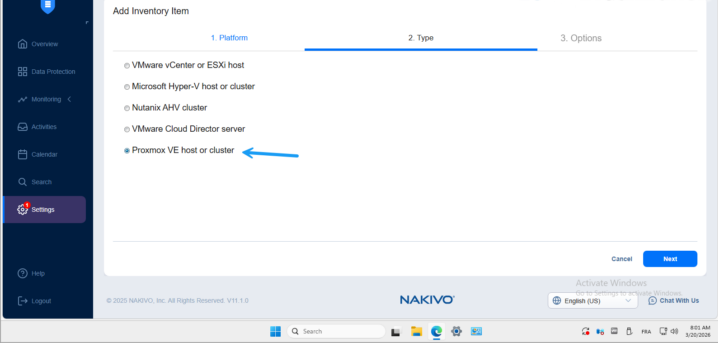
This keeps Proxmox users protected during upgrades without workflow changes. If you’re using Proxmox alongside VMware (hybrid setups are more common now), NAKIVO’s single pane of glass simplifies management — and their Proxmox support has been evolving steadily (e.g., replication and backup-copy jobs added in earlier releases like v11.1).
HPE StoreOnce Enhancements
Added full support for HPE StoreOnce VSA Gen 5 — better integration for deduplication appliances. If your repo is on StoreOnce, expect smoother performance and compatibility in v11.2.OAuth 2.0 for Secure Email NotificationsA smart security-focused addition: OAuth 2.0 support in email settings (replacing deprecated Basic Auth).
This is huge for compliance and modern email providers (Google Workspace, Microsoft 365). No more storing plain passwords for SMTP alerts — use token-based auth instead. It aligns well with broader ransomware resilience strategies, like the malware scanning and immutable backups
Performance & Core Tweaks Under the Hood
The release upgrades the platform to Java SE 24 and latest Spring Framework — expect better overall stability, security patches, and minor performance gains in backup/restore throughput.Combined with existing strengths (LAN-free transfers, network acceleration, global dedup, variable compression, log truncation for SQL/Exchange), backups should stay fast — especially on NAS-based deployments.
Final Thoughts
NAKIVO v11.2 is a “keep you current” release essential if you’re on/going to vSphere 9 or Proxmox 9.x, and the OAuth 2.0 shift is a welcome proactive security move. For admins juggling upgrades, tight budgets, or mixed hypervisors, it ensures continuity without drama. If you’re already on NAKIVO, update soon (check helpcenter.nakivo.com for full release notes). New? The 15-day trial lets you test vSphere 9/Proxmox support hands-on.
Links: Nakivo
add a comment

Microsoft 365 Backup: Delegate Administration & Configure Billing Policies
Introduction Data protection at enterprise scale is no longer a monolithic IT responsibility. As organizations grow — spanning multiple departments, regions, subsidiaries, and business units — the need to decentralize backup management while maintaining centralized governance has become one of the most pressing demands in Microsoft 365 administration. On March 2, 2026, Microsoft announced the general availability of departmental billing for Microsoft 365 Backup, a major enhancement that directly addresses this challenge. The new capability introduces three fundamental improvements to the backup management experience: granular billing scoping across Azure subscriptions,...
Thinware SimpleVM – A Free-Forever Hypervisor Alternative for VMware
Here’s a fully rephrased, original version with a smooth tech-blog tone 👇 When I first came across Thinware and their upcoming SimpleVM virtualization platform, it immediately caught my attention. At first glance, it seemed like exactly what many admins have been waiting for—a straightforward virtualization solution with centralized management similar to vCenter, but completely free, open-source, and easy to operate. That’s precisely the direction they’re taking. I reached out to their team right away to learn more about the project. With many organizations now looking for cost-effective alternatives to traditional...
Veeam Backup & Replication 12.3 on Windows Server 2025
Introduction Veeam Backup & Replication is a data protection and disaster recovery solution designed to back up, restore, and replicate...
Hasleo Backup Suite Free Download
If you’re looking for a reliable Windows backup solution, Hasleo Backup Suite is a powerful option designed for system imaging,...




