Physical Address
304 North Cardinal St.
Dorchester Center, MA 02124
Physical Address
304 North Cardinal St.
Dorchester Center, MA 02124

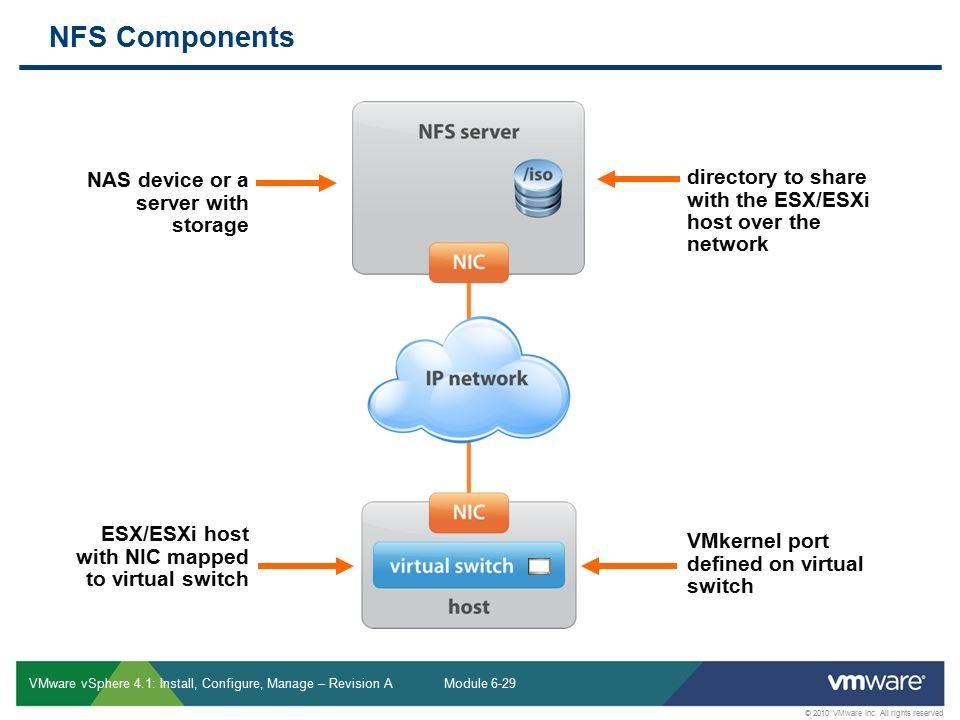
NFS datastore mount errors in VMware ESXi can prevent virtual machines from accessing shared storage and may be caused by network connectivity, NFS permissions, firewall rules, DNS, or protocol mismatches. Identifying the root cause requires checking both the ESXi host and NFS server.
This guide explains the most common NFS datastore mount problems and provides practical troubleshooting steps. You’ll learn how to verify VMkernel connectivity, NFS exports, permissions, NFS versions, firewall settings, DNS resolution, and ESXi logs to restore reliable datastore access.
This guide is built to be used two ways: read it top to bottom to understand the full failure landscape, or jump straight to the root cause matching your symptom and work that section in isolation. Each root cause includes diagnosis, fix, risk level, and verification together so you don’t have to cross-reference sections mid-incident.
Ranked by how often each actually shows up in the field, highest-impact first:
| Rank | Root Cause | Typical Signature |
|---|---|---|
| 1 | Network connectivity (routing, VLAN, MTU, cabling) | “Unable to connect to NFS server” |
| 2 | Configuration errors (/etc/hosts, VMkernel adapter, stale mount state) | Mount fails intermittently or after a host reboot |
| 3 | Storage permissions (export ACLs, root squash) | “The mount request was denied by the NFS server” |
| 4 | Firewall rules (host-side or physical) | Connects on some hosts, not others |
| 5 | NFS service / server-side issues (NFS daemon down, array degraded) | All hosts lose the datastore simultaneously |
| 6 | Protocol/version mismatches (NFS 3 vs 4.1, missing VIBs) | Works on some ESXi builds, not others; fails post-patch |
Work top-down when you don’t yet know the cause — connectivity issues are both the most common and the fastest to rule in or out.
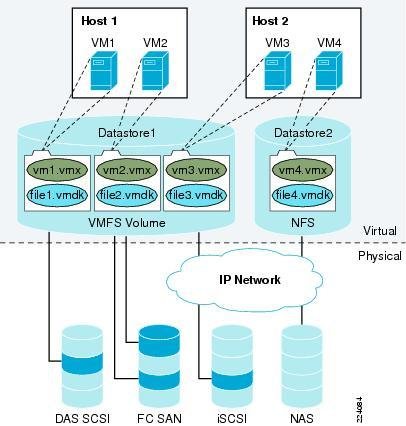
The single most common source of NFS mount failures. This covers IP subnet mismatches between the ESXi VMkernel adapter and the NFS server, VLAN tagging not permitted on the physical switch port, MTU/jumbo frame mismatches, and plain physical-layer failures (bad cable, downed switch port, NIC teaming misconfiguration).
CLI:
# List VMkernel adapters and their IPs/netmasks
esxcfg-vmknic -l

# Confirm the routing table matches the NFS server's subnet
esxcli network ip route ipv4 list

# Test basic reachability to the NFS server from the storage VMkernel interface
vmkping -I vmk1 <NFS_server_IP>

# Test with jumbo frame size if your environment uses MTU 9000
vmkping -I vmk1 -s 8972 -d <NFS_server_IP>
If vmkping fails outright, you have a network-layer problem, not an NFS problem — stop troubleshooting NFS and start troubleshooting the network path.
A very common real-world variant of this: <cite index=”31-1″>the target NFS server’s IP address and the ESXi host’s VMkernel adapter IP address are on different IP subnets, which prevents the host from establishing a connection to NFS storage</cite> — always compare the NFS server’s subnet against your VMkernel adapter’s configured netmask before looking anywhere else.
GUI:
Logs:
/var/log/vmkernel.log — look for NFS: 349: Command: (mount) entries and the Vmknic: field, which tells you exactly which VMkernel interface ESXi attempted the mount from.vmkping with -s 8972 -d isolates this precisely.esxcli network ip route ipv4 list output. If they don’t overlap and there’s no route, either re-IP the VMkernel adapter into the correct subnet or add a static route.vmkping succeeds at default MTU but fails with -s 8972 -d, jumbo frames aren’t consistently configured end-to-end (vSwitch MTU, VMkernel port MTU, and physical switch MTU must all match at 9000). Fix the weakest link, not just the ESXi side.Version notes: Behavior of vmkping, esxcfg-vmknic, and esxcli network ip route is consistent across 6.x/7.x/8.x. Nothing protocol-specific changes here between versions — this layer is standard IP networking.
vmkping, esxcli network ip route ipv4 list).vmkping -I vmk1 <NFS_server_IP>
esxcli storage nfs list # Accessible and Mounted columns should both read true
The NFS server itself (NAS, filer, or software-defined array) is unreachable, overloaded, degraded, or its NFS daemon has stopped. This is distinguishable from network connectivity issues because all hosts pointed at that server fail simultaneously, while other network traffic to/from the array (management, other protocols) may still work.
CLI:
esxcli storage nfs list
# Accessible: false / Mounted: true (or false) tells you ESXi still has
# the datastore registered but can't currently reach it — an APD-style state
Logs:
/var/log/vmkernel.log — repeated NFS: 3500: NFS mount failed... Status: Unable to connect to NFS server with NFS: 2861: Retrying mount request entries confirms ESXi is actively retrying against an unreachable server, matching the documented pattern where <cite index=”35-1″>inconsistent APD (All Paths Down) issues to NFS can also be caused by issues with the host hardware, network, and the NFS storage array itself</cite>, not just the ESXi side.nfsd/mountd) status.Array-side (vendor-agnostic) checks:
esxcli storage nfs add -H <NFS_IP_OR_HOSTNAME> ....Version notes: No meaningful difference across 6.x/7.x/8.x — this is entirely array/vendor-side behavior.
esxcli storage nfs list # Accessible: true, Mounted: true
Also confirm VM-level I/O has resumed normally (no continued APD/PDL alarms in vCenter under Host > Monitor > Issues and Alarms).
Stale or incorrect host-level configuration — most commonly a bad /etc/hosts entry, a corrupted VMkernel network config, or an inconsistent mount state left behind after a failed operation.
CLI:
esxcli storage nfs list
cat /etc/hosts
A textbook example: a host loses access to an NFS datastore because <cite index=”32-1″>the ESXi host contains incorrect NFS server information in its /etc/hosts file, and since the host uses that file for hostname resolution, a faulty IP mapping directly prevents the network connection required to reach the storage</cite>. This produces the same esxcli storage nfs list symptom — Accessible and Mounted both showing false — as a straight network-layer failure, so always check /etc/hosts before assuming a deeper network problem.
Logs:
/var/log/hostd.log — look for Hostsvc.FSVolumeProvider entries with VmkCtl mount or ProcessNas failed./var/log/vmkernel.log — cross-reference timestamps with hostd.log entries for the same mount attempt./etc/hosts directly — per official guidance, <cite index=”32-1″>do not modify this file directly; use esxcli instead</cite>. First back it up: cp /etc/hosts /etc/hosts.backupesxcli storage nfs list but is permanently inaccessible), unmount and re-add cleanly: esxcli storage nfs remove -v <datastore_name>esxcli storage nfs add -H <NFS_server_IP_or_FQDN> -s <share_path> -v <datastore_name>Version notes: Identical behavior across 6.x/7.x/8.x — /etc/hosts handling via esxcli has been consistent for years.
/etc/hosts.backup you took in step 1 until you’ve confirmed the fix works — this is a cheap safety net for a fast rollback.esxcli storage nfs list
cat /etc/hosts # confirm correct FQDN/IP mapping
Required ports blocked either on the ESXi host firewall or on the physical/external firewall between the host and the NFS server. NFS v3 requires the RPC portmapper (TCP/UDP 111) in addition to the NFS data port (TCP 2049); NFS v4.1 needs only TCP 2049, since <cite index=”47-1″>when accessing the NFS server using v4 of the protocol on both client and server, the firewall configuration only requires port 2049 to be open</cite>.
GUI:
CLI:
esxcli network firewall ruleset list | grep -i nfs
esxcli network firewall ruleset allowedip list -r nfsClient
External/array-side:
The NFS Client firewall ruleset behaves differently from every other ESXi firewall ruleset — it’s managed automatically by ESXi itself when you mount/unmount datastores, not by you directly in most cases:
This is a change worth flagging explicitly because it breaks a workflow some teams still assume works: starting in ESXi 8.0 Update 2 (and continuing in 9.0), <cite index=”45-1″>the NFS Client, vSAN encryption, and Trusted Infrastructure key management services can no longer be restricted to specific IP addresses via the ESXi firewall — attempting to uncheck “Allow connections from any IP” for these services fails with the error “Cannot change allowed IP list for this ruleset, it is owned by system service”</cite>. If you’re running 8.0 U2 or later and previously relied on host-level IP restriction for the NFS Client ruleset, that control point is gone. <cite index=”45-1”>If you need to restrict NFS traffic, you must implement those controls at the network layer instead — physical switch ACLs or an external hardware firewall — rather than on the host itself</cite>.
nfsClient ruleset via GUI or esxcli network firewall ruleset allowedip add -r nfsClient -i <IP> if needed.Version notes:
nfsClient ruleset automatically via mount/unmount operations rather than hand-editing it, especially on pre-8.0 U2 hosts.esxcli network firewall ruleset list | grep -i nfs
esxcli storage nfs list
Confirm both the ruleset is enabled/active and the datastore shows Accessible: true.
The NFS export’s access control (which client IPs/subnets are permitted, and whether root is squashed to an unprivileged user) doesn’t allow the ESXi host to mount as required.
Logs:
/var/log/vmkernel.log — the telltale signature is <cite index=”33-1″>”NFS: 194: NFS mount <NFS_Server_IP>:<share_path> failed: The mount request was denied by the NFS server. Check that the export exists and that the client is permitted”</cite>.Array-side:
no_root_squash (terminology and exact setting name vary by NFS server/vendor, but the concept is universal — root on the ESXi host must not be mapped to an unprivileged/anonymous user for VM file operations to succeed).esxcli storage nfs add --host=<NFS_Server> --share=<NFS_Share_Path> --volume-name=<Datastore_Name>Version notes: Consistent across 6.x/7.x/8.x — this is entirely array/export-side configuration, not an ESXi version dependency.
no_root_squash) has real security implications if the export’s client ACL isn’t also tightly scoped — don’t open root access broadly as a troubleshooting shortcut. Scope the ACL to the specific VMkernel IPs/subnet that need it.esxcli storage nfs list
Confirm Accessible: true and Mounted: true, then power on a test VM (or verify existing VMs) to confirm actual read/write I/O succeeds, not just that the mount handshake completed.
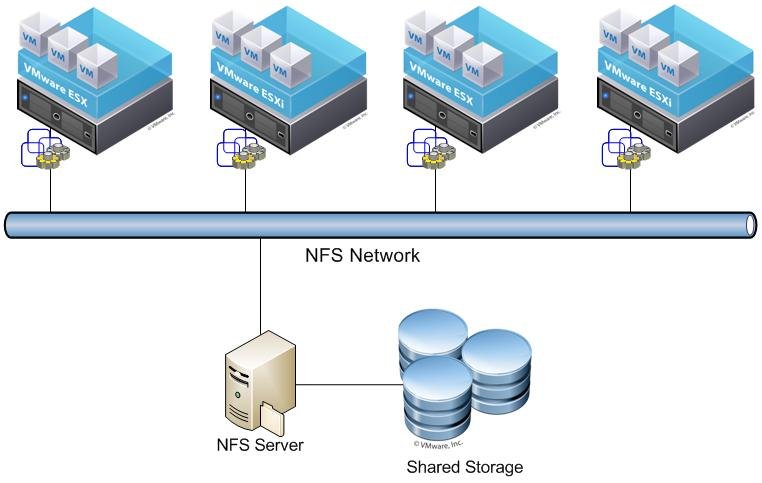
Mixing NFS versions across hosts sharing the same datastore, mounting over the wrong transport, or missing storage-vendor VIBs after an ESXi patch — all of which produce mount failures that look identical to network issues at first glance but have a completely different fix.
Logs:
/var/log/vmkernel.log — this points at a transport-protocol mismatch, not connectivity.CLI:
esxcli storage nfs list       # confirm which NFS version each mounted datastore is using
esxcli software vib list | grep -i <storage_vendor>   # confirm vendor VIBs survived the patch
Version notes:
esxcli storage nfs list
esxcli software vib list | grep -i <storage_vendor>
Confirm all hosts in the cluster report the same NFS version for the shared datastore, and confirm Accessible/Mounted are both true on every host, not just the one you were actively troubleshooting.
When multiple issues are present simultaneously (common after a network change or a patch cycle), work in this order to avoid chasing symptoms:
/etc/hosts being the classic example).General rule for any fix in this guide: anything that touches a datastore actively backing powered-on VMs should be treated as requiring a maintenance window unless you’ve explicitly confirmed otherwise in that section’s risk assessment. When in doubt, Storage vMotion running VMs off the affected datastore before making changes.
Before mounting any new NFS datastore in production:
vmkping (including jumbo-frame-sized pings) from every host in the cluster to the NFS server IP — not just one host.no_root_squash (or vendor equivalent) is set correctly on the export.esxcli storage nfs list output (or the equivalent vCenter datastore accessibility state) across all hosts on a schedule, not just when something looks wrong — silent single-host accessibility loss is easy to miss if only one host in a cluster loses a path./var/log/vmkernel.log for recurring NFS: 2861: Retrying mount request patterns — this indicates an intermittent connectivity issue that hasn’t yet escalated to a full outage, and catching it here is far better than waiting for a hard failure.esxcli software vib list | grep -i <vendor>) before considering the patch cycle complete — don’t assume patching is “done” just because the host booted successfully.| Log Signature | Location | Points To |
|---|---|---|
Unable to connect to NFS server | hostd.log / vmkernel.log | Network connectivity, firewall, or server down (Sections 1, 2, 4) |
NFS: 349: Command: (mount)... Vmknic: | vmkernel.log | Confirms which VMkernel interface attempted the mount — cross-check subnet (Section 1) |
The mount request was denied by the NFS server | vmkernel.log | Export permissions / client ACL (Section 5) |
does not support Mount Program (100005) Version (3) Protocol (TCP) | vmkernel.log | Transport protocol mismatch (Section 6) |
NFS: 2861: Retrying mount request | vmkernel.log | Intermittent/APD-style connectivity issue (Sections 1, 2) |
Incorrect /etc/hosts mapping | n/a — check file directly | Hostname resolution misconfiguration (Section 3) |
Cannot change allowed IP list for this ruleset, it is owned by system service | vSphere Client error dialog | ESXi 8.0 U2+ firewall behavior change (Section 4) — not a bug |
| Mount fails only post-patch | hostd.log / vmkernel.log | Missing vendor VIBs (Section 6) |
This guide draws on current Broadcom Knowledge Base articles and TechDocs for vSphere 6.x through 8.x (several KB articles carry 2025–2026 timestamps, reflecting recent Broadcom KB maintenance rather than newly-discovered issues), plus independent practitioner documentation for esxcli storage nfs command usage. The ESXi 8.0 U2 firewall IP-restriction change for system-owned services (NFS Client, vSAN encryption, Trusted Infrastructure key management) is confirmed current as of this guide’s verification date — if you’re planning an upgrade to 8.0 U2 or later and currently rely on host-level NFS Client IP restriction, treat that as a required pre-upgrade planning item, not something to discover after the fact.

We have detected that you are using extensions to block ads. Please support us by disabling these ads blocker.





