Physical Address
304 North Cardinal St.
Dorchester Center, MA 02124
Physical Address
304 North Cardinal St.
Dorchester Center, MA 02124


Upgrading to vCenter Server 8.0 U1b is a crucial step in boosting efficiency and security within your VMware environment. This update brings significant enhancements that streamline your operations while strengthening your system’s protection. In this post, I will show how…
Runecast Analyzer is a powerful tool designed for proactive monitoring and management of VMware environments. It helps organizations ensure the health and compliance of their VMware vSphere infrastructure by scanning for configuration issues, security vulnerabilities, best practice violations, and hardware…
VMware and Proxmox are both major players in the world of virtualization, providing robust solutions for the management and operation of virtual machines. However, there are significant differences in licensing, features, performance, and target users. Vmware: VMware is a virtualization…

SANnav’s Brocade Management Portal and SANnav Global View allow IT to be more productive through streamlined processes and providing the right information at the right time. These tools simplify management by eliminating time-consuming command-line (CLI) tasks to manage, monitor, and alert…

Introduction VMware Aria Operations is a unified, AI-powered self-driving IT operations management platform for private, hybrid and multi-cloud environments. It supports VMware Cloud on AWS, Amazon Web Services (AWS), Google Cloud Platform, Microsoft Azure, and vSphere-based on-premises private clouds. VMware…
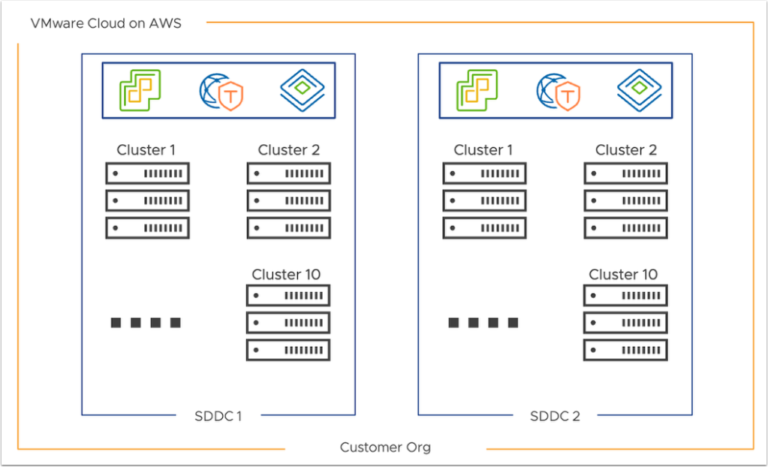
Introduction VMware Cloud on AWS is a hybrid cloud solution that seamlessly integrates VMware’s enterprise-class Software-Defined Data Center (SDDC) with Amazon Web Services (AWS). It enables businesses to extend their on-premises VMware environments to the cloud, offering scalability, reliability, and…
With all the uncertainty across the industry with the tectonic shakeup with VMware by Broadcom, many organizations may be looking at alternative solutions. Vates XCP-ng (free and open source Xenserver for virtualization) is certainly on the list of solutions that…

I have been working the last few days on my Windows Server 2025 packer build for VMware vSphere now that Windows Server 2025 has now been released as GA. It did require quite a few tweaks from the previous way…

Introduction Are you looking to install ESXi on your VMware Workstation? ESXi, a hypervisor used in virtualization, allows you to run multiple virtual machines on a single physical server. This can be a great solution for testing and learning purposes,…
VMware is the leader in virtualization in the enterprise. It has released VMware vSAN Max as the latest addition to their vSAN product lineup. vSAN Max is a hyperconverged infrastructure (HCI) solution providing maximum performance, scalability, and flexibility for modern…

We have detected that you are using extensions to block ads. Please support us by disabling these ads blocker.




