Read Only DNS

Read-Only DNS on Windows Server 2025

Windows Server 2025 DNS Security Branch Office Infrastructure

Read-Only DNS on Windows Server 2025: How It Works and Why Every Branch Office Needs It

The definitive guide to deploying, configuring, and securing Read-Only DNS on a Windows Server 2025 RODC — with real commands.

DNS is the backbone of every Active Directory environment — but most branch office DNS setups are either fully writable (a security risk) or entirely absent (a resilience risk). Windows Server 2025 solves this dilemma elegantly with Read-Only DNS, a DNS service that runs directly on your RODC, serves local resolution requests at full speed, but accepts no dynamic updates that could corrupt your zone data. In this guide, we’ll unpack exactly how it works, what’s new in Windows Server 2025, and how to implement it properly in the domain running on 192.168.91.129.

What is Read-Only DNS?

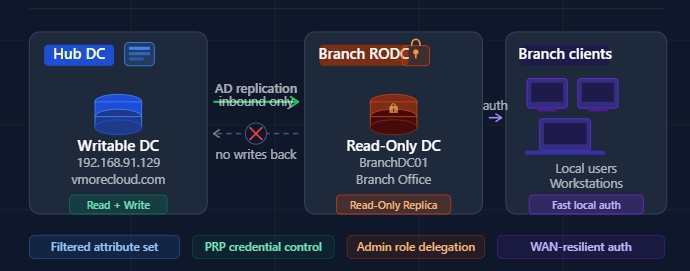
Read-Only DNS is the DNS Server role running on a Read-Only Domain Controller (RODC). It hosts a copy of your Active Directory-integrated DNS zones — but that copy is read-only. It answers queries, forwards requests it can’t resolve, and participates in the DNS infrastructure of your domain — but it cannot accept dynamic updates, cannot be used to modify zone data, and cannot propagate changes back into your AD forest.

Think of it as a DNS mirror with a one-way valve. Clients at the branch get fast, local DNS resolution. Zone data stays clean and controlled. And if the RODC is ever compromised, your DNS infrastructure remains intact because there was never anything writable to corrupt.

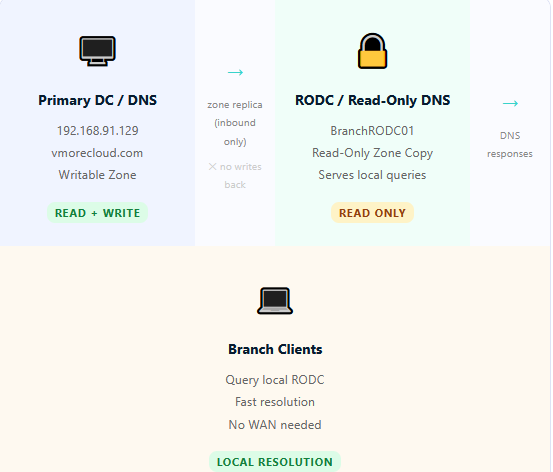
🖥️
Primary DC / DNS
192.168.91.129
vmorecloud.com
Writable Zone
Read + Write
zone replica
(inbound only)
✕ no writes back
🔒
RODC / Read-Only DNS
BranchRODC01
Read-Only Zone Copy
Serves local queries
Read Only
DNS responses
💻
Branch Clients
Query local RODC
Fast resolution
No WAN needed
Local Resolution
📌 Why not just use a standard DNS server at the branch? A standard DNS server with a writable AD-integrated zone can receive dynamic updates from clients — including potentially malicious ones. An RODC running Read-Only DNS silently rejects all dynamic update attempts, forwarding them to the primary DC at 192.168.91.129 instead. Your zone data is never modified at the branch.

How Read-Only DNS Works on an RODC

When you install the DNS Server role on an RODC, it behaves differently from DNS on a writable DC in three important ways:

1. Zone Data Is a Read-Only Replica

The RODC receives a replicated, read-only copy of your AD-integrated DNS zones. This replica is pulled from the writable DC during standard AD replication. The RODC’s DNS service reads from this zone database to answer queries — but the DNS service itself has no write permission to the zone objects stored in AD.

2. Dynamic Updates Are Silently Redirected

When a client (like a workstation registering its A record) sends a dynamic DNS update to the RODC’s DNS server, the RODC doesn’t reject it outright with an error. Instead, it responds with a referral — pointing the client to the primary writable DNS server (192.168.91.129) to complete the update. The client retries against the correct server, and the update succeeds. From the end user’s perspective, DNS registration just works.

3. DNS Cache Is Local and Independent

The Read-Only DNS server maintains its own local DNS resolver cache for external (internet) queries. This cache is populated through normal recursive resolution and serves future identical queries instantly without WAN traffic. This cache is local only — it does not replicate to other DCs.

✅ The elegant part: The dynamic update referral mechanism means you don’t need to manually configure clients to use a different DNS server for registrations. The RODC handles the redirect automatically — so your branch machines always end up registering with the writable DC, keeping your zone data clean and authoritative.

🔄 DNS Query Flow: Step by Step

Here’s what actually happens during a typical DNS lookup at a branch office with Read-Only DNS:

Client Query
Branch workstation queries BranchRODC01 for a hostname (e.g. fileserver.vmorecloud.com).
Local Cache Check
RODC DNS checks its local cache first. If found — answer returned instantly. No WAN traffic.
Zone Lookup
If not cached, RODC checks its read-only zone replica. If record exists — response sent to client.
Recursive / Forward
If record not in zone, RODC forwards to primary DC or configured forwarder and caches the result.

What Happens During a Dynamic Update Attempt?

  1. Branch client sends a DNS dynamic update request to BranchRODC01.
  2. The RODC’s DNS service detects the write request and refuses it locally.
  3. The RODC responds to the client with a referral pointing to the primary DNS server at 192.168.91.129.
  4. The client automatically retries the update against the primary DC.
  5. The primary DC processes and accepts the dynamic update normally.
  6. On the next AD replication cycle, the new record is replicated back to the RODC’s read-only zone copy.

🆕 What’s New in Windows Server 2025 for Read-Only DNS

Windows Server 2025 brings meaningful refinements to how Read-Only DNS behaves compared to earlier server versions. Here’s what’s worth knowing:

🔐
Enhanced DNS over TLS (DoT)
Read-Only DNS on WS2025 supports DNS over TLS for encrypted resolver communications — even on RODC deployments.
Faster Replication Convergence
Improved AD replication scheduling in WS2025 means zone replica updates reach RODCs faster after changes are made on the primary DC.
🛡️
DNSSEC on Read-Only Zones
WS2025 supports DNSSEC validation on RODC-hosted read-only zones — allowing branch clients to benefit from signed DNS responses.
📊
Improved DNS Analytics
Windows Server 2025 expands DNS diagnostic logging for RODC deployments, making it easier to identify referral events and resolution failures.
🔧
PowerShell 7 DNS Modules
Full DNS management via updated PowerShell 7 cmdlets — including richer RODC-specific diagnostics and zone inspection commands.
🌐
Hybrid DNS for Azure Integration
WS2025 RODCs integrate more cleanly with Azure Private DNS Resolver, enabling hybrid DNS scenarios where the RODC is a branch link in a cloud-connected zone hierarchy.
🆕 Windows Server 2025 DNSSEC + RODC — Worth Noting: Previous server versions had limited DNSSEC support on RODC-hosted zones. Windows Server 2025 expands this significantly — read-only zones can now serve DNSSEC-validated responses directly, without needing to forward every signed query to the primary DC. This dramatically reduces WAN dependency for security-conscious DNS environments.

⚖️ Read-Only DNS vs Standard DNS: Key Differences

Feature / Behaviour Standard DNS (Writable DC) Read-Only DNS (RODC)
Zone data typeRead/Write AD-integratedRead-only AD-integrated replica
Accepts dynamic updates?Yes — directlyRedirects to primary DC
Can modify zone records?YesNo
Answers DNS queries?YesYes — from local cache + zone
Operates during WAN outage?YesYes — for cached + zone records
DNSSEC support (WS2025)?Full signing + validationValidation only (no signing)
DNS over TLS (DoT)?YesYes (WS2025)
Replication directionBidirectionalInbound only
Risk if physically compromisedHigh — zone data exposedLow — read-only, no write access
Suitable for unsecured sites?NoYes

🌟 Key Highlights

🔒
Zone Data Can Never Be Modified at the Branch

The DNS zone replica on an RODC is structurally read-only. No admin error, no rogue tool, and no attacker can modify it directly — changes only arrive through inbound AD replication from the primary DC.

↩️
Automatic Dynamic Update Referral

When clients attempt dynamic DNS registration, the RODC transparently redirects them to the primary DC. No manual client configuration needed — the process is invisible to end users.

🌐
Full Local Query Resolution

Branch clients get fast, local DNS responses from the RODC’s zone replica and resolver cache — no round trip to the hub DC required for known records. WAN independence for day-to-day operations.

🆕
DNSSEC Validation in Windows Server 2025

The RODC can now validate DNSSEC signatures locally and serve signed responses to branch clients — a major security improvement over earlier server versions that required forwarding for this.

📡
Survives WAN Outages Gracefully

With a local zone replica and resolver cache, the RODC’s DNS service continues resolving internal and recently-queried external names even when the WAN link to the primary DC is down.

📊
Detailed Audit Trail

All dynamic update referral events and resolution failures are logged with expanded telemetry in Windows Server 2025 — giving you full visibility into branch DNS activity without touching the primary DC.

🚀 Deploy & Configure Read-Only DNS

Here’s the complete walkthrough for enabling and configuring Read-Only DNS on your RODC in the vmorecloud.com domain, with the primary DC at 192.168.91.129.

⚠️ Prerequisites: RODC already promoted in the domain · Windows Server 2025 (or 2019/2022) · DNS Server role not yet installed on the RODC · Primary DNS zone hosted on writable DC at 192.168.91.129 · AD-integrated DNS zones only (not file-backed zones)

Step 1 — Install the DNS Server Role on the RODC

# Run on BranchRODC01 — install DNS Server role Install-WindowsFeature -Name DNS -IncludeManagementTools # Verify installation Get-WindowsFeature DNS
📌 Note: If you enabled DNS during RODC promotion using the -InstallDns flag, the role is already installed. You can skip this step and proceed directly to verification.

Step 2 — Verify the Zone Replica Replicated Correctly

# On BranchRODC01 — list DNS zones and confirm read-only status Get-DnsServerZone # Expected output for vmorecloud.com zone: # ZoneName : vmorecloud.com # ZoneType : Primary # IsReadOnly : True # IsDsIntegrated : True # ReplicationScope : Domain

Step 3 — Configure DNS Forwarders on the RODC

# Set primary DC as the forwarder for unresolved queries Add-DnsServerForwarder -IPAddress “192.168.91.129” -PassThru # Add a public DNS fallback forwarder Add-DnsServerForwarder -IPAddress “8.8.8.8” -PassThru # Verify configured forwarders Get-DnsServerForwarder

Step 4 — Enable DNS Diagnostic Logging (Windows Server 2025)

# Enable enhanced DNS logging on the RODC for full query audit trail Set-DnsServerDiagnostics ` -Queries $true ` -Answers $true ` -Update $true ` -QuestionTransactions $true ` -SendPackets $true ` -ReceivePackets $true ` -ComputerName “BranchRODC01”

Step 5 — Configure DNS over TLS (Windows Server 2025 Only)

# Enable DNS over TLS on RODC (WS2025 feature) Set-DnsServerSetting ` -EnableDoT $true ` -DoTPort 853 ` -ComputerName “BranchRODC01” # Verify DoT status Get-DnsServerSetting -ComputerName “BranchRODC01” | Select EnableDoT, DoTPort

Step 6 — Enable DNSSEC Validation on the RODC (Windows Server 2025)

# Enable DNSSEC validation on the read-only zone Set-DnsServerZone “vmorecloud.com” ` -ComputerName “BranchRODC01” ` -DnssecEnabled $true # Trust anchor must be configured on primary DC first # Then verify DNSSEC trust anchors replicated to RODC Get-DnsServerTrustAnchor -ZoneName “vmorecloud.com” -ComputerName “BranchRODC01”

Step 7 — Force DNS Zone Replication from Primary DC

# Force AD replication to sync DNS zone records to RODC repadmin /syncall BranchRODC01 /AdeP # Alternatively, use dnscmd to reload zone on RODC dnscmd BranchRODC01 /ZoneRefresh vmorecloud.com # Verify zone record count matches primary DC Measure-Object -InputObject (Get-DnsServerResourceRecord -ZoneName “vmorecloud.com” -ComputerName “BranchRODC01”)

🔧 Monitor, Verify & Troubleshoot Read-Only DNS

Verify DNS Resolution from a Branch Client

# On a branch client — confirm it’s using RODC for DNS Get-DnsClientServerAddress # Test resolution via the RODC specifically Resolve-DnsName “fileserver.vmorecloud.com” -Server “BranchRODC01” # Test that update referral works (dynamic update test) ipconfig /registerdns # Watch DNS debug log on RODC — should show referral event to 192.168.91.129

Check DNS Replication Health

# Check DNS zone replication from primary to RODC repadmin /showrepl BranchRODC01 # Query DNS zone SOA on both DCs — serial numbers should be identical Resolve-DnsName “vmorecloud.com” -Type SOA -Server “192.168.91.129” Resolve-DnsName “vmorecloud.com” -Type SOA -Server “BranchRODC01” # Compare serial numbers — must match for zone to be in sync

Key DNS Event IDs to Monitor (Windows Server 2025)

Event IDLogWhat It Means
2501DNS ServerDynamic update forwarded (referral sent to primary DC)
4013DNS ServerDNS Server waiting for AD replication — zone not yet loaded
4015DNS ServerCritical DNS error — AD zone failed to load from RODC replica
4523DNS ServerZone loaded successfully from AD replica on RODC
6702DNS ServerDNS server forwarder list updated
6703DNS ServerForwarder query failed — fallback used

Common Issue: Zone Shows as “Not Loaded” After RODC Reboot

If the RODC boots before completing AD replication, the DNS zone may temporarily fail to load (Event ID 4013). This is normal and self-resolves once replication completes. If it persists beyond 15 minutes:

# Force reload of the zone from the AD replica dnscmd BranchRODC01 /ZoneRefresh vmorecloud.com # If still failing, force full AD replication first repadmin /syncall BranchRODC01 /AdeP dnscmd BranchRODC01 /ZoneRefresh vmorecloud.com
✅ Best Practice: Configure the RODC’s DNS service to depend on the Active Directory Domain Services service at startup (sc config DNS depend= NTDS). This prevents the DNS service from attempting to load zone data before AD replication has initialized — eliminating the Event ID 4013 startup race condition entirely.

💡 Why Read-Only DNS Matters

🛡️
DNS Poisoning Attacks Are Neutralized at the Branch

A writable DNS server at a branch site is a prime target — inject a malicious record and you can redirect users to attacker-controlled resources. With Read-Only DNS, there’s no write path to exploit. Even an admin with local access to the RODC cannot inject records into the zone.

Branch Performance Without Compromise

Without a local DNS server, every single query from branch clients crosses the WAN — adding latency to every application connection, login, and file access. Read-Only DNS eliminates that latency for internal names while keeping the zone data firmly under centralized control.

🔄
WAN Resilience Without Writable Risk

When the WAN link goes down, branch clients can still resolve all internal names present in the RODC’s zone replica and local cache. The branch keeps running. And because the zone is read-only, there’s no risk of split-brain DNS developing during the outage.

📋
Centralized Zone Control — Always

All DNS changes — new records, modified entries, deleted hosts — originate exclusively from the writable DC at the hub. Branch staff cannot accidentally (or maliciously) modify DNS records. Your zone data has a single, authoritative, auditable source of truth.

🔐
Reduces the Value of an RODC Compromise

If an attacker gains physical access to the RODC, they inherit a read-only DNS replica they can query but not modify, AD credentials only for PRP-approved accounts, and no ability to push changes into the forest. For a DNS-focused attacker, this is a dead end.

📜
Compliance and Audit-Readiness

Regulatory frameworks like PCI-DSS, ISO 27001, and NIST SP 800-53 require demonstrable controls over DNS infrastructure. Read-Only DNS on an RODC provides a clean, documentable answer: zone data at remote sites is read-only, changes are centralized, and all referral events are logged.

✅ Conclusion

Read-Only DNS on Windows Server 2025 is one of those infrastructure decisions that quietly eliminates an entire category of risk. You get the performance benefits of local DNS resolution at the branch, the resilience of a locally-cached zone during WAN outages, and the security guarantees of a system that structurally cannot be used to corrupt your zone data — no matter what.

For the vmorecloud.com domain, running Read-Only DNS on BranchRODC01 with the primary DC at 192.168.91.129 as the zone source means your branch DNS infrastructure is fast, resilient, and hardened by default. Add Windows Server 2025’s new DNSSEC validation and DNS over TLS support, and you have a branch DNS stack that most enterprises would struggle to match even with much more complex setups.

Whether you’re hardening an existing RODC deployment or designing a new branch office architecture from scratch, Read-Only DNS should be a non-negotiable component of your Windows Server 2025 infrastructure strategy.

Leave a Reply

Your email address will not be published. Required fields are marked *