
ZSvirt Download: Explore an Open-Source Enterprise Virtualization Platform
Discover ZSvirt, an open-source virtualization platform for centrally managing virtual machines, compute hosts, storage, networking, and VMware workload migration.
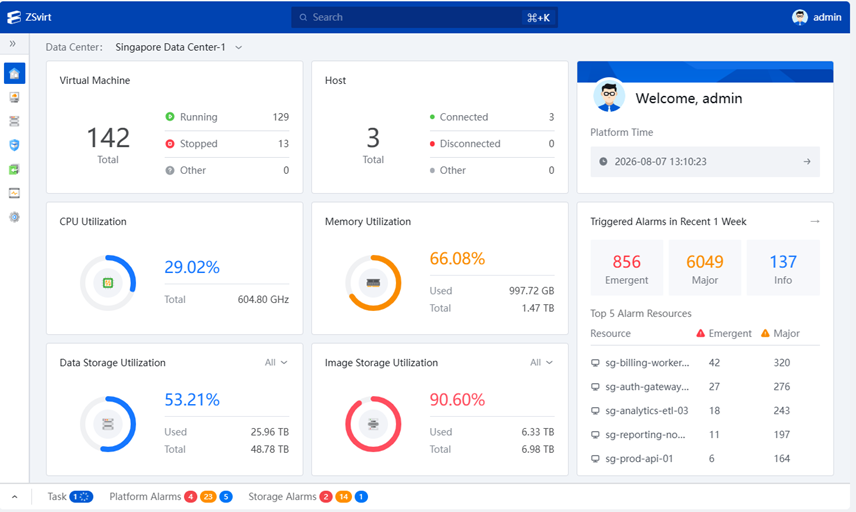
Organizations evaluating alternatives to traditional virtualization platforms are increasingly looking at open-source infrastructure solutions. ZSvirt is an open-source virtualization platform built around ZStack’s ZSphere virtualization engine. It is designed to provide centralized management of virtual machines, compute hosts, clusters, storage, and virtual networks through a web interface and automation-friendly APIs.
ZSvirt is intended for environments ranging from home labs and proof-of-concept deployments to larger infrastructure installations. Its project documentation describes KVM-based compute hosts, a centralized management plane, and migration tools intended to help organizations evaluate a move from VMware environments.
In this guide, we look at the platform’s main capabilities, deployment options, architecture, lab requirements, and where to obtain the software.
Download ZSvirt
Visit the official ZSvirt website to find the current installation media and virtual appliance images. Select the package that matches your deployment and verify its published checksum.
Download ZSvirt OVA Download ZVirt ISO Available package types described by the project include ISO, OVA, QCOW2, and ZMigrate. Confirm current versions and file availability on the official download page before installation.What Is ZSvirt?
ZSvirt is an open-source infrastructure virtualization platform that brings ZStack’s ZSphere virtualization engine into an open-source project. It provides a centralized control plane for managing virtual infrastructure resources, including compute, storage, networking, and virtual machines.
Administrators can manage the environment through a browser-based interface or interact with the platform through RESTful APIs, command-line tools, SDKs, and infrastructure-as-code integrations. The project is designed to support both manual infrastructure administration and automated workflows.
ZSvirt’s architecture is based on a management node and KVM-based compute hosts. The management plane coordinates resources such as datacenters, clusters, hosts, datastores, networks, images, and virtual machines.
Main Features of ZSvirt
Centralized Virtual Machine Management
Manage virtual machines and their lifecycle alongside hosts, clusters, images, and related infrastructure resources through a central management interface.
Compute and Cluster Management
Organize compute hosts into clusters and datacenters, providing a structured model for managing infrastructure resources.
Storage Management
Work with primary storage, backup storage, volumes, snapshots, datastores, and system images as part of the virtual infrastructure.
Virtual Networking
Configure virtual networks, distributed switches, port groups, network services, and security groups for VM connectivity and isolation.
Automation and APIs
Integrate with infrastructure workflows through REST/OpenAPI endpoints, Terraform, and SDKs for Go, Python, and Java.
Security Features
The project describes capabilities such as VM Secure Boot, vTPM 2.0, VM encryption, security groups, multi-factor authentication, and audit logging. Verify feature availability in the release you deploy.
ZSvirt Architecture and Core Components
ZSvirt uses a modular architecture built around virtualization resource management, a management plane, extension services, and operational tooling. Its documentation groups core capabilities into several infrastructure areas.
Compute Virtualization
Hosts, clusters, virtual machines, images, and VM lifecycle management.
Network Virtualization
Virtual networks, network services, security groups, distributed switches, and related network resources.
Storage Virtualization
Primary storage, backup storage, volumes, snapshots, datastores, and storage resource management.
Management Plane
API framework, permissions, events, alarms, auditing, and infrastructure operations.
This design provides a unified management model for the virtual infrastructure rather than requiring administrators to manage every resource independently.
VMware Migration Capabilities
One of the project’s notable use cases is helping organizations evaluate migration from VMware environments. ZSvirt documents several migration paths, including its ZMigrate toolset, OVF import, and VMDK upload.
ZMigrate
ZMigrate is the project’s migration toolset for moving virtual machine workloads. The project describes agentless migration and continuous synchronization workflows intended to reduce disruption during migration. Supported workflows and limitations depend on the current release and source environment.
OVF Import and VMDK Upload
For supported workloads, administrators can also use OVF import or upload VMDK disks as part of a migration or VM provisioning workflow. Consult the current migration documentation for supported formats, compatibility requirements, and operational steps.
Read the official ZSvirt resources for the current migration guide and supported workflows.
ZSvirt Deployment Options
The project documents multiple ways to evaluate and deploy ZSvirt. Choose the method based on whether you are testing the platform or preparing a dedicated environment.
ISO Installation
Use the installation ISO to prepare a management node on a physical server. The quick-start workflow covers operating system installation, network configuration, management service setup, and initial infrastructure configuration.
OVA Virtual Appliance
Import the OVA image into a compatible hypervisor to run a ZSvirt management node inside a virtual machine for lab evaluation or a proof of concept.
QCOW2 Image
Use the QCOW2 image in a compatible KVM-based environment. The project also documents nested virtualization approaches for running the management node as a VM.
Source Code
Review the project’s source repository, license, issue tracker, and contribution information on GitHub.
ZSvirt Lab Requirements
For a minimal all-in-one management-node installation, the official quick-start documentation lists the following baseline requirements. These figures are for the documented minimal setup, not a sizing recommendation for a production cluster.
| Resource | Minimum | Recommended |
|---|---|---|
| CPU | Intel VT or AMD-V, at least 8 cores | 24 cores or more |
| Memory | 8 GB | 24 GB or more |
| System Disk | 100 GB | 200 GB or more |
| Network | One management NIC | Separate management, storage, and service networks |
| IP Configuration | Static IP | Static IP with DNS and NTP configured |
The documentation also provides a virtual-machine evaluation path. For that method, it specifies at least 8 vCPUs, 8 GiB of memory, one virtual NIC connected to the management network, and an IP address, netmask, and gateway for the management node.
Always check the latest official documentation before allocating hardware. Production deployments should be sized according to workload, storage, network, availability, and performance requirements.
Getting Started with ZSvirt
The official quick-start guide describes a workflow that takes you from installation media to a working virtual machine. At a high level, the process includes:
- Prepare the ZSvirt installation ISO or supported virtual appliance image.
- Install or deploy the management node.
- Configure management networking and time synchronization.
- Verify the management node services and open the web interface.
- Initialize a datacenter and cluster.
- Add a compute host and configure a datastore.
- Configure image storage and virtual networking.
- Add a system image, create a virtual machine, and verify console and network access.
For a guided installation, follow the vendor’s current ZSvirt documentation and Quick Start resources. The exact screens and commands can vary by release.
License, Source Code, and Download Notes
The ZSvirt project repository identifies the platform as licensed under the GNU General Public License version 3.0 (GPLv3). Some included or related components may have separate third-party licenses, so review the applicable LICENSE and NOTICE files.
Download packages and installation images should be obtained from the official project download resources. Check the release version, supported architecture, package notes, and SHA-256 checksum before installation. Do not use an image from an untrusted mirror for production deployment.
ZSvirt is an open-source project. Its open-source license does not remove the need to review third-party component licenses, hardware compatibility, or operational support arrangements for your environment.
Important Software and Trademark Notice
ZSvirt is an independent open-source virtualization project. ZSvirt and ZStack names and logos belong to their respective owners. VMoreCloud is an independent technology website and is not affiliated with, sponsored by, or endorsed by the ZSvirt project or ZStack unless explicitly stated.
This article is provided for educational and informational purposes. Always download software from trusted official sources, review the license terms, and test new virtualization platforms in a non-production environment before deploying business-critical workloads.
Ready to Evaluate ZSvirt?
Explore the official project, review the documentation, and choose the installation image that fits your lab or evaluation environment.
Visit ZSvirt Download Resources Explore GitHub Repository